

編輯:關於 Android 程式設計
想在自己的 App 裡做一個「CPU 實時監控」面板,看到每個進程、每個線程佔了多少 CPU?Android 沒有直接開放這類 API,但幸好它把 Linux 的 /proc 虛擬文件系統完整保留了下來,我們完全可以循著「讀文件 → 算差值 → 存庫 → 展示」這條路徑自己實現。
CPU 使用率不是一個絕對量,而是「一段時間內佔了多少時間片」。因此監控的核心手段是採樣兩次做差:先記錄一次各進程的累計 CPU 時間,隔一小段時間再記錄一次,兩次差值除以總 CPU 時間的差值,就是這段時間內的佔用率。
List<IsRunningAppInfo> appList。/proc/stat。/proc/[pid]/stat。/proc/[pid]/task/[tid]/stat。這裡有兩個實踐要點。第一,不要在讀文件的同一輪循環裡順手寫數據庫——密集 IO 交錯會讓耗時急劇上升,兩次採樣的時間間隔被拉長,算出的佔用率誤差會非常明顯。正確做法是先把內容收集到內存集合,讀完再批量落庫。第二,不要用 Activity 直接承接讀取與計算,否則容易觸發 ANR 甚至 AndroidRunTime 相關崩潰;合適的做法是把耗時工作放進 AsyncTask,用 Handler 承載回調,並在 Handler 中判斷數據是否已存儲完畢,避免計算佔用比例時出現「除數為 0」。
通過 ActivityManager.getRunningAppProcesses() 拿到進程列表,再用 PackageManager 補上應用名稱與圖標。
/** 獲取正在運行的進程 */
public List<IsRunningAppInfo> queryRunningApp() {
    List<IsRunningAppInfo> listRunApp = new ArrayList<IsRunningAppInfo>();
    am = (ActivityManager) context.getSystemService(Context.ACTIVITY_SERVICE);
    List<RunningAppProcessInfo> list = am.getRunningAppProcesses();
    RunningAppProcessInfo runningPro = null;
    IsRunningAppInfo appInfo = null;
    for (int i = 0; i < list.size(); i++) {
        runningPro = list.get(i);
        appInfo = new IsRunningAppInfo();
        appInfo.setPid(runningPro.pid);
        appInfo.setProcessName(runningPro.processName);
        appInfo.setUid(runningPro.uid);
        pkgManager(appInfo);
        listRunApp.add(appInfo);
    }
    return listRunApp;
}

/** 獲取應用的程序名與圖標 */
public void pkgManager(IsRunningAppInfo appInfo) {
    try {
        PackageManager pm = context.getPackageManager();
        PackageInfo pkInfo = pm.getPackageInfo(appInfo.getProcessName(), 0);
        appInfo.setIcon(pkInfo.applicationInfo.loadIcon(pm));
        appInfo.setAppName(pkInfo.applicationInfo.loadLabel(pm).toString());
    } catch (NameNotFoundException e) {
        e.printStackTrace();
    }
}
用計數變量 i 控制採樣輪次:i == 0 為第一次(基準),i == 1 為第二次(對比)。每輪依次讀取總 CPU、進程 CPU、線程 CPU,並在讀文件前清空舊表與緩衝文件。
public void cpuMain() {
    sqliteHelp.clearAllTableData(new String[] {
        Config.TBL_CPUMONITOR_PROCESSCPU,
        Config.TBL_CPUMONITOR_TheadCPU,
        Config.TBL_CPUMONITOR_TOTALCPU });   // 讀取前清空所有表
    R_W_File rw = new R_W_File();
    rw.clearFileData(new File(rw.getSdcardPath(), "result.txt"));
    i = 0;
    while (i < 2) {
        queryRunningApp();          // 獲取正在運行的應用
        if (i == 0) {
            readTotalCPU(i);        // 第一次採樣:總 CPU
        }
        readProcessCPU(i);          // 進程 CPU
        readThreadCPU(i);           // 線程 CPU
        i++;
    }
}

protected void queryRunningApp() {
    IsRunningAppProgress pro = new IsRunningAppProgress(context);
    appList = pro.queryRunningApp();
}

protected void readTotalCPU(int i) {
    AsyncTask_TotalCPU taskTotalCPU = new AsyncTask_TotalCPU(context);
    taskTotalCPU.execute(i, null, null);
}

protected void readProcessCPU(int i) {
    AsyncTask_ProgressCPU taskProcessCPU =
            new AsyncTask_ProgressCPU(new ProcessCallback(), appList);
    taskProcessCPU.execute(i, null, null);
}

protected void readThreadCPU(int i) {
    AsyncTask_TheadCPU taskThreadCPU =
            new AsyncTask_TheadCPU(new ThreadCallback(), appList);
    taskThreadCPU.execute(i, null, null);
}
線程採樣完成後再補采一次總 CPU,這樣總量與明細的時間窗口盡可能對齊;進程與線程的結果則各自寫入對應的表,並用 numTimes 字段標記採樣輪次。
class ThreadCallback implements ICallbacks {
    @Override
    public <T> void call(T t1, T t2) {
        if ((Integer) t2 == 1) {
            readTotalCPU(1);        // 第二次採樣:總 CPU
        }
        @SuppressWarnings("unchecked")
        Map<String[], IsRunningAppInfo> saveThreadCPUMap =
                (Map<String[], IsRunningAppInfo>) t1;
        saveThreadData(saveThreadCPUMap, (Integer) t2);
    }
}

class ProcessCallback implements ICallbacks {
    @Override
    public <T> void call(T t1, T t2) {
        @SuppressWarnings("unchecked")
        Map<String[], IsRunningAppInfo> saveProCPUMap =
                (Map<String[], IsRunningAppInfo>) t1;
        saveProData(saveProCPUMap, (Integer) t2);
    }
}

public void saveThreadData(Map<String[], IsRunningAppInfo> saveThreadCPUMap, int j) {
    Set<String[]> key = saveThreadCPUMap.keySet();
    Iterator<String[]> it = key.iterator();
    String[] str = null;
    IsRunningAppInfo appInfo = null;
    ContentValues cv = null;
    while (it.hasNext()) {
        str = it.next();
        appInfo = saveThreadCPUMap.get(str);
        cv = new ContentValues();
        cv.put("processName", appInfo.getProcessName());
        cv.put("pid", appInfo.getPid());
        cv.put("tid", Long.valueOf(str[0]));
        cv.put("utime", Long.valueOf(str[13]));
        cv.put("stime", Long.valueOf(str[14]));
        cv.put("numTimes", j);
        sqliteHelp.append(Config.TBL_CPUMONITOR_TheadCPU, cv);
    }
    if (j == 1) {
        writeData();
    }
}

private void saveProData(Map<String[], IsRunningAppInfo> saveProCPUMap, int j) {
    Set<String[]> key = saveProCPUMap.keySet();
    Iterator<String[]> it = key.iterator();
    String[] str = null;
    IsRunningAppInfo runApp = null;
    ContentValues cv = null;
    while (it.hasNext()) {
        str = it.next();
        runApp = saveProCPUMap.get(str);
        cv = new ContentValues();
        if (runApp.getIcon() == null) {
            cv.put("icon", FormatImage.getInstace().getDrawableToByte(
                    context.getResources().getDrawable(R.drawable.ic_launcher_default)));
        } else {
            cv.put("icon", FormatImage.getInstace().getDrawableToByte(runApp.getIcon()));
        }
        if (runApp.getAppName() == null || runApp.getAppName().equals("")) {
            cv.put("appName", runApp.getProcessName());
        } else {
            cv.put("appName", runApp.getAppName());
        }
        cv.put("processName", runApp.getProcessName());
        cv.put("pid", runApp.getPid());
        cv.put("utime", str[13]);
        cv.put("stime", str[14]);
        cv.put("cutime", str[15]);
        cv.put("cstime", str[16]);
        cv.put("numTimes", j);
        sqliteHelp.append(Config.TBL_CPUMONITOR_PROCESSCPU, cv);
    }
    if (j == 1) {
        writeData();
    }
}

public void writeData() {
    try {
        R_W_File files = new R_W_File();
        File mFile = new File(files.getSdcardPath(), "result.txt");
        files.writeFileDataAtTail(mFile, "1");
    } catch (IOException e) {
        e.printStackTrace();
    }
}
進程與線程的 stat 文件按空格切分後,下標 13、14 分別是 utime 與 stime(用戶態與內核態佔用的時間片);總 CPU 的 /proc/stat 首行則依次給出 user、nice、system、idle、iowait、irq、softirq 等字段。
/** 讀取進程 CPU */
public void readFile() {
    String[] str = null;
    for (int i = 0; i < list.size(); i++) {
        runApp = list.get(i);
        file = new File(getPath(runApp.getPid()));
        try {
            fis = new FileInputStream(file);
            br = new BufferedReader(new InputStreamReader(fis));
            String readLine;
            while ((readLine = br.readLine()) != null) {
                str = readLine.split(" ");
            }
            br.close();
            fis.close();
        } catch (FileNotFoundException e) {
            e.printStackTrace();
        } catch (IOException e) {
            e.printStackTrace();
        }
        saveProCPUMap.put(str, runApp);
    }
}

public String getPath(long pid) {
    return "/proc/" + pid + "/stat";
}

/** 遍歷所有進程的線程 */
public void queryThreadCPU(List<IsRunningAppInfo> list) throws IOException {
    for (int i = 0; i < list.size(); i++) {
        queryThreadCPU(list.get(i));
    }
}

public void queryThreadCPU(IsRunningAppInfo appInfo) throws IOException {
    path = "/proc/" + appInfo.getPid() + "/task";
    file = new File(path);
    if (file.exists() && file != null) {
        files = file.listFiles();
        if (files != null) {
            queryThreadCPU(files, appInfo);
        }
    }
}

private void queryThreadCPU(File[] files, IsRunningAppInfo appInfo) throws IOException {
    String readLine;
    String[] tStr = null;
    for (int i = 0; i < files.length; i++) {
        File f = files[i];
        path = f.getPath() + "/stat";
        file = new File(path);
        fis = new FileInputStream(file);
        br = new BufferedReader(new InputStreamReader(fis));
        while ((readLine = br.readLine()) != null) {
            tStr = readLine.split(" ");
        }
    }
    saveThreadCPUMap.put(tStr, appInfo);
}

/** 讀取總 CPU 並落庫 */
public Long readFile() {
    String[] str = null;
    file = new File(path);
    try {
        fis = new FileInputStream(file);
        br = new BufferedReader(new InputStreamReader(fis));
        String readLine;
        if ((readLine = br.readLine()) != null) {
            str = readLine.split(" ");
        }
        br.close();
        fis.close();
    } catch (FileNotFoundException e) {
        e.printStackTrace();
    } catch (IOException e) {
        e.printStackTrace();
    }
    return changeArray(str);
}

private Long changeArray(String[] str) {
    ContentValues cv = new ContentValues();
    cv.put("user", Long.valueOf(str[2]));
    cv.put("nice", Long.valueOf(str[3]));
    cv.put("system", Long.valueOf(str[4]));
    cv.put("idle", Long.valueOf(str[5]));
    cv.put("iowait", Long.valueOf(str[6]));
    cv.put("irq", Long.valueOf(str[7]));
    cv.put("softirq", Long.valueOf(str[8]));
    cv.put("stealstolen", Long.valueOf(str[9]));
    cv.put("guest", Long.valueOf(str[10]));
    cv.put("numTimes", i);
    return sqliteHelp.append(Config.TBL_CPUMONITOR_TOTALCPU, cv);
}
讀取階段全部結束後,再由 Handler 觸發查詢與刷新。總 CPU 時間用兩次採樣的差值求得;由於進程自身的 utime 已經把它下屬線程的時間統計在內,直接相加會重複計算,所以要在總量中扣掉進程自身與線程部分,剩下的才是「其他」進程的佔用。
@Override
public void handleMessage(Message msg) {
    super.handleMessage(msg);
    dialog = (Dialog) msg.obj;
    queryTotalCPU();
    queryProcessList();
    if (adapterCpuChart == null) {
        adapterCpuChart = new Adapter_cpu_chart(context, R.layout.adapter_cpu_chart, list, totalCPU);
    }
    lvChart.setAdapter(adapterCpuChart);
    adapterCpuChart.notifyDataSetChanged();
    pbBar.closeDialogProgressBar(dialog);
}

/** 計算總共的 CPU 時間片 */
public void queryTotalCPU() {
    sql = "select (max(num1)-min(num1)) as total from "
        + "(select (t.user+t.nice+t.system+t.iowait+t.irq+t.softirq"
        + "+t.stealstolen+t.guest) as num1 from TotalCPU t)";
    cursor = sqliteHelp.query(sql);
    int index = -1;
    long allValue = -1, ownValue = -1, ownThreadCPU = -1;
    if (cursor.moveToFirst()) {
        index = cursor.getColumnIndex("total");
        allValue = cursor.getLong(index);
    }
    sqliteHelp.closeDb();

    sql = "select (max(num2)-min(num2)) as ownCPU from (select "
        + "(p.utime+p.stime+p.cstime+p.cutime) as num2 from ProcessCPU p "
        + "where p.processName='" + pkgName + "')";
    cursor = sqliteHelp.query(sql);
    if (cursor.moveToFirst()) {
        ownValue = cursor.getLong(cursor.getColumnIndex("ownCPU"));
    }
    sqliteHelp.closeDb();

    sql = "select max(num3)-min(num3) as ownThreadCPU from (select "
        + "(t.utime+t.stime) as num3 from ThreadCPU t "
        + "where t.processName='" + pkgName + "')";
    cursor = sqliteHelp.query(sql);
    if (cursor.moveToFirst()) {
        ownThreadCPU = cursor.getLong(cursor.getColumnIndex("ownThreadCPU"));
    }
    sqliteHelp.closeDb();

    totalCPU = (allValue - ownValue - ownThreadCPU);
}

/** 查詢佔用最高的十個進程 */
public void queryProcessList() {
    sql = "select p.processName,p.appName,p.icon,sum(temp.utime) as utime from ("
        + "select processName,(max(utime)-min(utime)) as utime from ("
        + "select processName,appName,icon,(utime+stime+cutime+cstime) as utime "
        + "from ProcessCPU where processName <> '" + pkgName + "' and numTimes=0 "
        + "union all "
        + "select processName,appName,icon,(utime+stime+cutime+cstime) as utime "
        + "from ProcessCPU where processName <> '" + pkgName + "' and numTimes=1) "
        + "group by processName "
        + "union all "
        + "select processName,(max(utime)-min(utime)) as utime from ("
        + "select processName,sum(utime+stime) as utime from ThreadCPU "
        + "where processName <> '" + pkgName + "' and numTimes=0 group by processName "
        + "union all "
        + "select processName,sum(utime+stime) as utime from ThreadCPU "
        + "where processName <> '" + pkgName + "' and numTimes=1 group by processName) "
        + "group by processName) as temp,ProcessCPU p "
        + "where p.processName=temp.processName group by p.processName "
        + "order by utime desc limit 10";
    list = new ArrayList<ProcessCPU>();
    cursor = sqliteHelp.query(sql);
    ProcessCPU proCPU = null;
    if (cursor.moveToFirst()) {
        do {
            proCPU = new ProcessCPU();
            proCPU.setAppName(cursor.getString(cursor.getColumnIndex("appName")));
            proCPU.setProcessName(cursor.getString(cursor.getColumnIndex("processName")));
            proCPU.setIcon(FormatImage.getInstace().getByteToDrawable(
                    cursor.getBlob(cursor.getColumnIndex("icon"))));
            proCPU.setUtime(cursor.getLong(cursor.getColumnIndex("utime")));
            list.add(proCPU);
        } while (cursor.moveToNext());
    }
    sqliteHelp.closeDb();
}
Adapter 中把佔用率換算成百分比並驅動進度條即可:
public View getView(int position, View convertView, ViewGroup parent) {
    ProcessCPU pro = list.get(position);
    if (convertView == null) {
        convertView = inflater.inflate(layoutId, null);
        appView = new AppView(convertView);
        convertView.setTag(appView);
    } else {
        appView = (AppView) convertView.getTag();
    }
    appView.pkgName.setText(pro.getProcessName());
    appView.appIcon.setBackgroundDrawable(pro.getIcon());
    appView.appName.setText(pro.getAppName());
    appView.pb.setMax(100);
    double schedule = Double.valueOf(String.format("%.2f",
            pro.getUtime() * 100.00 / totalCPU));
    appView.pb.setProgress((int) schedule);
    appView.tvPb.setText("" + schedule + "%");
    return convertView;
}
需要提醒的是,這套方案依賴 /proc 的可讀性,在高版本 Android 上出於安全與功耗考慮,普通應用的讀取權限已被大幅收緊,getRunningAppProcesses() 也只能返回自己的進程。因此上述代碼更適合用於早期系統版本、內部工具或具備系統權限的定製 ROM 場景;新項目建議改用 UsageStatsManager、JobScheduler 或第三方性能採集方案。
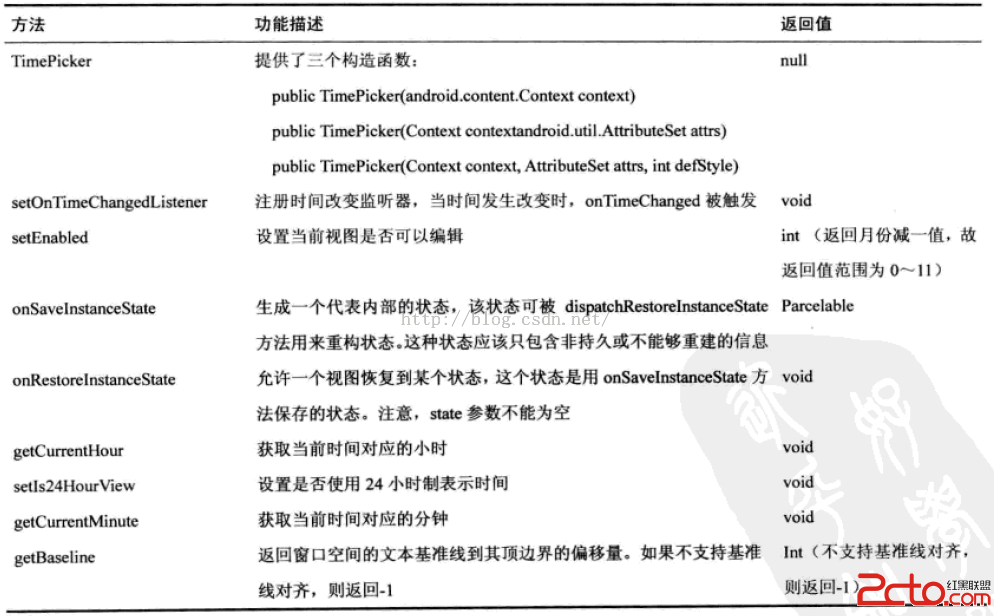 《Android 從入門到精通》(14)——時間選擇器 TimePicker 實戰
時間選擇器(TimePicker) 其繼承鏈為:java.lang.Object → android.view.View → android.view.ViewGroup
 從零開始的 Android 新專案 10:React Native 與 Redux 入門實解
這一篇我們來聊 React Native 與 Redux。不同於那些一上來就整段整段貼翻譯的教學,本文選擇從最小的例子切入:先讓你明白 React Native 到底是什
 Android 手機無法連接無線網路的解決辦法大全
Android 手機連不上 Wi-Fi,是許多使用者都碰過的困擾。問題可能出在手機端、路由器端,或是 IP 設定上。以下依三種常見情境,整理了完整的排查思路。 一、手機
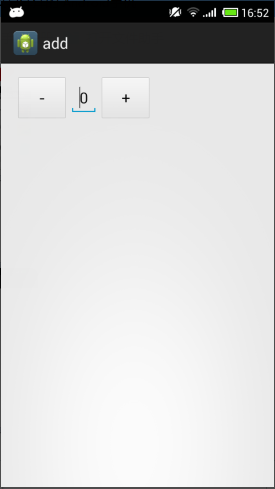 Android 仿淘寶購物車:商品數量增減功能實作
本文延續前一篇《Android 實現的仿淘寶購物車 demo》,示範如何為購物車加入商品數量的增加與減少功能。先前那篇只用 listview 完成了列表的基本呈現,但實際