

編輯:關於 Android 程式設計
這個動畫頗有新意,複雜度也不算太高,於是花了些時間整理出來。先一起看看原始的 GIF 效果:

從效果來看,需要著眼解決以下幾個問題:
整體看來,較需注意與繁瑣的地方主要就是上述幾點,當然還有一些細節,例如最左側是圓弧等等。接下來我們把效果拆解,逐一擊破。
整個效果所需的圖片主要是飛動的小葉子與右側旋轉的風扇,其餘部分都能用色值繪製;為了方便,連底部外框也一併切圖。先從 GIF 裡把飛動的小葉子、右側風扇與底部框摳出來,小葉子如下:

主要需要處理兩部分:
先處理第一部分——隨進度往前繪製的進度條。進度條的位置依據外層傳入的 progress 計算,可分為圖中 1、2、3 三個階段:
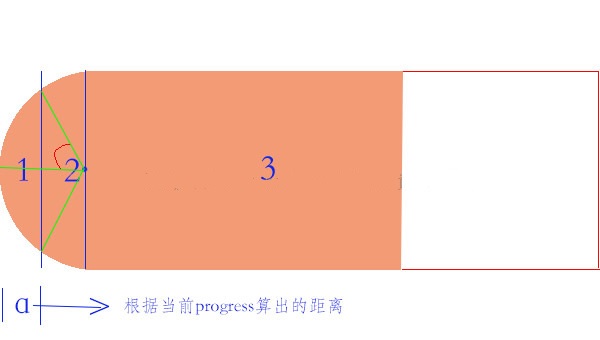
首先依據進度條寬度、當前進度與總進度算出當前位置:
//mProgressWidth為進度條的寬度,根據當前進度算出進度條的位置 mCurrentProgressPosition = mProgressWidth * mProgress / TOTAL_PROGRESS;
然後按照上述邏輯繪製,其中需要計算圖中紅色弧角的角度,方法如下:
// 單邊角度 int angle = (int) Math.toDegrees(Math.acos((mArcRadius - mCurrentProgressPosition)/ (float) mArcRadius));
Math.acos() 為反餘弦函數;Math.toDegrees() 將弧度轉為角度,Math.toRadians 則是角度轉弧度。因此圓弧的起始點為:
int startAngle = 180 - angle;
圓弧劃過的角度為 2 * angle。這一塊的程式碼如下:
// mProgressWidth為進度條的寬度,根據當前進度算出進度條的位置 mCurrentProgressPosition = mProgressWidth * mProgress / TOTAL_PROGRESS; // 即當前位置在圖中所示1范圍內 if (mCurrentProgressPosition < mArcRadius) { Log.i(TAG, "mProgress = " + mProgress + "---mCurrentProgressPosition = " + mCurrentProgressPosition + "--mArcProgressWidth" + mArcRadius); // 1.繪制白色ARC,繪制orange ARC // 2.繪制白色矩形 // 1.繪制白色ARC canvas.drawArc(mArcRectF, 90, 180, false, mWhitePaint); // 2.繪制白色矩形 mWhiteRectF.left = mArcRightLocation; canvas.drawRect(mWhiteRectF, mWhitePaint); // 3.繪制棕色 ARC // 單邊角度 int angle = (int) Math.toDegrees(Math.acos((mArcRadius - mCurrentProgressPosition) / (float) mArcRadius)); // 起始的位置 int startAngle = 180 - angle; // 掃過的角度 int sweepAngle = 2 * angle; Log.i(TAG, "startAngle = " + startAngle); canvas.drawArc(mArcRectF, startAngle, sweepAngle, false, mOrangePaint); } else { Log.i(TAG, "mProgress = " + mProgress + "---transfer-----mCurrentProgressPosition = " + mCurrentProgressPosition + "--mArcProgressWidth" + mArcRadius); // 1.繪制white RECT // 2.繪制Orange ARC // 3.繪制orange RECT // 1.繪制white RECT mWhiteRectF.left = mCurrentProgressPosition; canvas.drawRect(mWhiteRectF, mWhitePaint); // 2.繪制Orange ARC canvas.drawArc(mArcRectF, 90, 180, false, mOrangePaint); // 3.繪制orange RECT mOrangeRectF.left = mArcRightLocation; mOrangeRectF.right = mCurrentProgressPosition; canvas.drawRect(mOrangeRectF, mOrangePaint); }
接著看葉子部分。先依據效果大致確定曲線函數,標準方程式為 y = A(wx+Q)+h,其中 w 影響週期、A 影響振幅,週期 T = 2 * Math.PI / w。從效果判斷,週期大致等於總進度長度,因此確定 w = (float)((float) 2 * Math.PI / mProgressWidth)。
仔細觀察可以發現,葉子飄動過程中的振幅並非完全一致,而是帶有錯落感。既然如此,我們為葉子定義一個 Type,依 Type 採用不同的振幅。先建立一個葉子物件:
private class Leaf { // 在繪制部分的位置 float x, y; // 控制葉子飄動的幅度 StartType type; // 旋轉角度 int rotateAngle; // 旋轉方向--0代表順時針,1代表逆時針 int rotateDirection; // 起始時間(ms) long startTime; }
類型以列舉定義,實際上就是用來區分不同的振幅:
private enum StartType { LITTLE, MIDDLE, BIG }
建立一個 LeafFactory 類,用來產生一個或多個葉子資訊:
private class LeafFactory { private static final int MAX_LEAFS = 6; Random random = new Random(); // 生成一個葉子信息 public Leaf generateLeaf() { Leaf leaf = new Leaf(); int randomType = random.nextInt(3); // 隨時類型- 隨機振幅 StartType type = StartType.MIDDLE; switch (randomType) { case 0: break; case 1: type = StartType.LITTLE; break; case 2: type = StartType.BIG; break; default: break; } leaf.type = type; // 隨機起始的旋轉角度 leaf.rotateAngle = random.nextInt(360); // 隨機旋轉方向(順時針或逆時針) leaf.rotateDirection = random.nextInt(2); // 為了產生交錯的感覺,讓開始的時間有一定的隨機性 mAddTime += random.nextInt((int) (LEAF_FLOAT_TIME * 1.5)); leaf.startTime = System.currentTimeMillis() + mAddTime; return leaf; } // 根據最大葉子數產生葉子信息 public List<Leaf> generateLeafs() { return generateLeafs(MAX_LEAFS); } // 根據傳入的葉子數量產生葉子信息 public List<Leaf> generateLeafs(int leafSize) { List<Leaf> leafs = new LinkedList<Leaf>(); for (int i = 0; i < leafSize; i++) { leafs.add(generateLeaf()); } return leafs; } }
定義兩個常數分別記錄中等振幅與振幅差:
// 中等振幅大小 private static final int MIDDLE_AMPLITUDE = 13; // 不同類型之間的振幅差距 private static final int AMPLITUDE_DISPARITY = 5; [html] view plain copy 在CODE上查看代碼片派生到我的代碼片 // 中等振幅大小 private int mMiddleAmplitude = MIDDLE_AMPLITUDE; // 振幅差 private int mAmplitudeDisparity = AMPLITUDE_DISPARITY;
有了以上資訊,就能取得葉子的 Y 值:
// 通過葉子信息獲取當前葉子的Y值 private int getLocationY(Leaf leaf) { // y = A(wx+Q)+h float w = (float) ((float) 2 * Math.PI / mProgressWidth); float a = mMiddleAmplitude; switch (leaf.type) { case LITTLE: // 小振幅 = 中等振幅 - 振幅差 a = mMiddleAmplitude - mAmplitudeDisparity; break; case MIDDLE: a = mMiddleAmplitude; break; case BIG: // 小振幅 = 中等振幅 + 振幅差 a = mMiddleAmplitude + mAmplitudeDisparity; break; default: break; } Log.i(TAG, "---a = " + a + "---w = " + w + "--leaf.x = " + leaf.x); return (int) (a * Math.sin(w * leaf.x)) + mArcRadius * 2 / 3; }
接著開始繪製葉子:
/** * 繪制葉子 * * @param canvas */ private void drawLeafs(Canvas canvas) { long currentTime = System.currentTimeMillis(); for (int i = 0; i < mLeafInfos.size(); i++) { Leaf leaf = mLeafInfos.get(i); if (currentTime > leaf.startTime && leaf.startTime != 0) { // 繪制葉子--根據葉子的類型和當前時間得出葉子的(x,y) getLeafLocation(leaf, currentTime); // 根據時間計算旋轉角度 canvas.save(); // 通過Matrix控制葉子旋轉 Matrix matrix = new Matrix(); float transX = mLeftMargin + leaf.x; float transY = mLeftMargin + leaf.y; Log.i(TAG, "left.x = " + leaf.x + "--leaf.y=" + leaf.y); matrix.postTranslate(transX, transY); // 通過時間關聯旋轉角度,則可以直接通過修改LEAF_ROTATE_TIME調節葉子旋轉快慢 float rotateFraction = ((currentTime - leaf.startTime) % LEAF_ROTATE_TIME) / (float) LEAF_ROTATE_TIME; int angle = (int) (rotateFraction * 360); // 根據葉子旋轉方向確定葉子旋轉角度 int rotate = leaf.rotateDirection == 0 ? angle + leaf.rotateAngle : -angle + leaf.rotateAngle; matrix.postRotate(rotate, transX + mLeafWidth / 2, transY + mLeafHeight / 2); canvas.drawBitmap(mLeafBitmap, matrix, mBitmapPaint); canvas.restore(); } else { continue; } }
最後向外層暴露幾個介面:
/** * 設置中等振幅 * * @param amplitude */ public void setMiddleAmplitude(int amplitude) { this.mMiddleAmplitude = amplitude; } /** * 設置振幅差 * * @param disparity */ public void setMplitudeDisparity(int disparity) { this.mAmplitudeDisparity = disparity; } /** * 獲取中等振幅 * * @param amplitude */ public int getMiddleAmplitude() { return mMiddleAmplitude; } /** * 獲取振幅差 * * @param disparity */ public int getMplitudeDisparity() { return mAmplitudeDisparity; } /** * 設置進度 * * @param progress */ public void setProgress(int progress) { this.mProgress = progress; postInvalidate(); } /** * 設置葉子飄完一個周期所花的時間 * * @param time */ public void setLeafFloatTime(long time) { this.mLeafFloatTime = time; } /** * 設置葉子旋轉一周所花的時間 * * @param time */ public void setLeafRotateTime(long time) { this.mLeafRotateTime = time;
這些介面用來幹嘛呢?就是把動效做成完全可手動調節的。這樣做的好處是:一方面更方便產品與設計師即時查看效果、避免憑空想像,自己動手調參,不必來回改參數、安裝、查看、再改、再看……折騰 N 次之後才說「這好像不是我想要的」;另一方面,也能讓人感覺你是一個考慮周全、思維縝密、既會寫程式又懂設計的創作者(當然這純屬玩笑,主要還是方便大家)。
如此一來,設計師們只需不斷調節滑桿,就能即時看到呈現的效果,最後把確定的參數反饋過來即可,一了百了。
言歸正傳,完成收尾工作,讓所有參數都能調節起來。把剩下的 layout 與 activity 貼出來。
activity:
public class LeafLoadingActivity extends Activity implements OnSeekBarChangeListener, OnClickListener { Handler mHandler = new Handler() { public void handleMessage(Message msg) { switch (msg.what) { case REFRESH_PROGRESS: if (mProgress < 40) { mProgress += 1; // 隨機800ms以內刷新一次 mHandler.sendEmptyMessageDelayed(REFRESH_PROGRESS, new Random().nextInt(800)); mLeafLoadingView.setProgress(mProgress); } else { mProgress += 1; // 隨機1200ms以內刷新一次 mHandler.sendEmptyMessageDelayed(REFRESH_PROGRESS, new Random().nextInt(1200)); mLeafLoadingView.setProgress(mProgress); } break; default: break; } }; }; private static final int REFRESH_PROGRESS = 0x10; private LeafLoadingView mLeafLoadingView; private SeekBar mAmpireSeekBar; private SeekBar mDistanceSeekBar; private TextView mMplitudeText; private TextView mDisparityText; private View mFanView; private Button mClearButton; private int mProgress = 0; private TextView mProgressText; private View mAddProgress; private SeekBar mFloatTimeSeekBar; private SeekBar mRotateTimeSeekBar; private TextView mFloatTimeText; private TextView mRotateTimeText; @Override protected void onCreate(Bundle savedInstanceState) { super.onCreate(savedInstanceState); setContentView(R.layout.leaf_loading_layout); initViews(); mHandler.sendEmptyMessageDelayed(REFRESH_PROGRESS, 3000); } private void initViews() { mFanView = findViewById(R.id.fan_pic); RotateAnimation rotateAnimation = DXAnimationUtils.initRotateAnimation(false, 1500, true, Animation.INFINITE); mFanView.startAnimation(rotateAnimation); mClearButton = (Button) findViewById(R.id.clear_progress); mClearButton.setOnClickListener(this); mLeafLoadingView = (LeafLoadingView) findViewById(R.id.leaf_loading); mMplitudeText = (TextView) findViewById(R.id.text_ampair); mMplitudeText.setText(getString(R.string.current_mplitude, mLeafLoadingView.getMiddleAmplitude())); mDisparityText = (TextView) findViewById(R.id.text_disparity); mDisparityText.setText(getString(R.string.current_Disparity, mLeafLoadingView.getMplitudeDisparity())); mAmpireSeekBar = (SeekBar) findViewById(R.id.seekBar_ampair); mAmpireSeekBar.setOnSeekBarChangeListener(this); mAmpireSeekBar.setProgress(mLeafLoadingView.getMiddleAmplitude()); mAmpireSeekBar.setMax(50); mDistanceSeekBar = (SeekBar) findViewById(R.id.seekBar_distance); mDistanceSeekBar.setOnSeekBarChangeListener(this); mDistanceSeekBar.setProgress(mLeafLoadingView.getMplitudeDisparity()); mDistanceSeekBar.setMax(20); mAddProgress = findViewById(R.id.add_progress); mAddProgress.setOnClickListener(this); mProgressText = (TextView) findViewById(R.id.text_progress); mFloatTimeText = (TextView) findViewById(R.id.text_float_time); mFloatTimeSeekBar = (SeekBar) findViewById(R.id.seekBar_float_time); mFloatTimeSeekBar.setOnSeekBarChangeListener(this); mFloatTimeSeekBar.setMax(5000); mFloatTimeSeekBar.setProgress((int) mLeafLoadingView.getLeafFloatTime()); mFloatTimeText.setText(getResources().getString(R.string.current_float_time, mLeafLoadingView.getLeafFloatTime())); mRotateTimeText = (TextView) findViewById(R.id.text_rotate_time); mRotateTimeSeekBar = (SeekBar) findViewById(R.id.seekBar_rotate_time); mRotateTimeSeekBar.setOnSeekBarChangeListener(this); mRotateTimeSeekBar.setMax(5000); mRotateTimeSeekBar.setProgress((int) mLeafLoadingView.getLeafRotateTime()); mRotateTimeText.setText(getResources().getString(R.string.current_float_time, mLeafLoadingView.getLeafRotateTime())); } @Override public void onProgressChanged(SeekBar seekBar, int progress, boolean fromUser) { if (seekBar == mAmpireSeekBar) { mLeafLoadingView.setMiddleAmplitude(progress); mMplitudeText.setText(getString(R.string.current_mplitude, progress)); } else if (seekBar == mDistanceSeekBar) { mLeafLoadingView.setMplitudeDisparity(progress); mDisparityText.setText(getString(R.string.current_Disparity, progress)); } else if (seekBar == mFloatTimeSeekBar) { mLeafLoadingView.setLeafFloatTime(progress); mFloatTimeText.setText(getResources().getString(R.string.current_float_time, progress)); } else if (seekBar == mRotateTimeSeekBar) { mLeafLoadingView.setLeafRotateTime(progress); mRotateTimeText.setText(getResources().getString(R.string.current_rotate_time, progress)); } } @Override public void onStartTrackingTouch(SeekBar seekBar) { } @Override public void onStopTrackingTouch(SeekBar seekBar) { } @Override public void onClick(View v) { if (v == mClearButton) { mLeafLoadingView.setProgress(0); mHandler.removeCallbacksAndMessages(null); mProgress = 0; } else if (v == mAddProgress) { mProgress++; mLeafLoadingView.setProgress(mProgress); mProgressText.setText(String.valueOf(mProgress)); } } }
layout:
<?xml version="1.0" encoding="utf-8"?> <LinearLayout xmlns:android="https://schemas.android.com/apk/res/android" android:layout_width="match_parent" android:layout_height="match_parent" android:background="#fed255" android:orientation="vertical" > <TextView android:layout_width="wrap_content" android:layout_height="wrap_content" android:layout_gravity="center_horizontal" android:layout_marginTop="100dp" android:text="loading ..." android:textColor="#FFA800" android:textSize=" 30dp" /> <RelativeLayout android:id="@+id/leaf_content" android:layout_width="match_parent" android:layout_height="wrap_content" android:layout_marginTop="50dp" > <com.baidu.batterysaverDemo.ui.LeafLoadingView android:id="@+id/leaf_loading" android:layout_width="302dp" android:layout_height="61dp" android:layout_centerHorizontal="true" /> <ImageView android:id="@+id/fan_pic" android:layout_width="wrap_content" android:layout_height="wrap_content" android:layout_alignParentRight="true" android:layout_centerVertical="true" android:layout_marginRight="35dp" android:src="@drawable/fengshan" /> </RelativeLayout> <ScrollView android:layout_width="match_parent" android:layout_height="match_parent" > <LinearLayout android:layout_width="match_parent" android:layout_height="match_parent" android:orientation="vertical" > <LinearLayout android:id="@+id/seek_content_one" android:layout_width="match_parent" android:layout_height="wrap_content" android:layout_marginLeft="15dp" android:layout_marginRight="15dp" android:layout_marginTop="15dp" > <TextView android:id="@+id/text_ampair" android:layout_width="wrap_content" android:layout_height="wrap_content" android:layout_gravity="center_vertical" android:textColor="#ffffa800" android:textSize="15dp" /> <SeekBar android:id="@+id/seekBar_ampair" android:layout_width="0dp" android:layout_height="wrap_content" android:layout_marginLeft="5dp" android:layout_weight="1" /> </LinearLayout> <LinearLayout android:layout_width="match_parent" android:layout_height="wrap_content" android:layout_marginLeft="15dp" android:layout_marginRight="15dp" android:layout_marginTop="15dp" android:orientation="horizontal" > <TextView android:id="@+id/text_disparity" android:layout_width="wrap_content" android:layout_height="wrap_content" android:layout_gravity="center_vertical" android:textColor="#ffffa800" android:textSize="15dp" /> <SeekBar android:id="@+id/seekBar_distance" android:layout_width="0dp" android:layout_height="wrap_content" android:layout_marginLeft="5dp" android:layout_weight="1" /> </LinearLayout> <LinearLayout android:layout_width="match_parent" android:layout_height="wrap_content" android:layout_marginLeft="15dp" android:layout_marginRight="15dp" android:layout_marginTop="15dp" android:orientation="horizontal" > <TextView android:id="@+id/text_float_time" android:layout_width="wrap_content" android:layout_height="wrap_content" android:layout_gravity="center_vertical" android:textColor="#ffffa800" android:textSize="15dp" /> <SeekBar android:id="@+id/seekBar_float_time" android:layout_width="0dp" android:layout_height="wrap_content" android:layout_marginLeft="5dp" android:layout_weight="1" /> </LinearLayout> <LinearLayout android:layout_width="match_parent" android:layout_height="wrap_content" android:layout_marginLeft="15dp" android:layout_right="15dp" android:layout_marginTop="15dp" android:orientation="horizontal" > <TextView android:id="@+id/text_rotate_time" android:layout_width="wrap_content" android:layout_height="wrap_content" android:layout_gravity="center_vertical" android:textColor="#ffffa800" android:textSize="15dp" /> <SeekBar android:id="@+id/seekBar_rotate_time" android:layout_width="0dp" android:layout_height="wrap_content" android:layout_marginLeft="5dp" android:layout_weight="1" /> </LinearLayout> <Button android:id="@+id/clear_progress" android:layout_width="match_parent" android:layout_height="wrap_content" android:layout_marginTop="15dp" android:text="去除進度條,玩轉弧線" android:textSize="18dp" /> <LinearLayout android:layout_width="match_parent" android:layout_height="wrap_content" android:layout_marginLeft="15dp" android:layout_right="15dp" android:layout_marginTop="15dp" android:orientation="horizontal" > <Button android:id="@+id/add_progress" android:layout_width="wrap_content" android:layout_height="wrap_content" android:text="增加進度: " android:textSize="18dp" /> <TextView android:id="@+id/text_progress" android:layout_width="wrap_content" android:layout_height="wrap_content" android:layout_gravity="center_vertical" android:textColor="#ffffa800" android:textSize="15dp" /> </LinearLayout> </LinearLayout> </ScrollView> </LinearLayout>
最終效果如下(原本錄了 20 多秒,但 PS 只能轉 5 秒,有興趣的朋友請自行運行體驗):
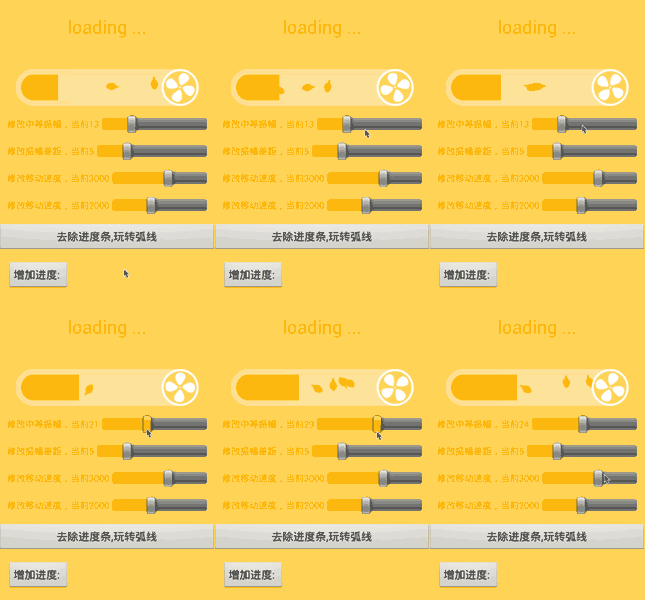
以上就是本文的全部內容,希望對大家的學習有所幫助。
 Android 文件管理器開發(三):文件過濾與排序
前面聊完了文件操作和主界面,這篇來說說文件列表的過濾與排序。 無論是 PC 還是手機,設備裡總有一些我們平時看不到的文件夾,也就是所謂的隱藏文件。這類文件大多數我們沒有權
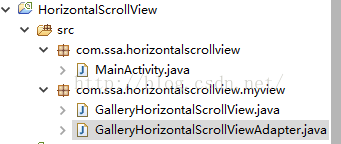 用 HorizontalScrollView 仿 ViewPager 打造輕量相冊
從 ViewPager 借鏡快取思路 這個相冊範例使用 HorizontalScrollView 模擬 ViewPager 的效果,重點在於借鏡 ViewPager 的快
 Android:Pull 方式解析 XML
上一篇寫了 SAX 解析 XML,寫下來才發現 Pull 方式和 SAX 方式非常相似,兩者最大的差別在於:SAX 需要一個輔助的類,解析時觸發事件後在回調方法裡寫程式碼
 用 PopupWindow 打造自訂的 Android Spinner 下拉選單
本篇要示範如何以 PopupWindow 為基礎,實作一個外觀與行為都能自由掌控的 Spinner 下拉選單,先來看看最終呈現的效果: 自訂控制項:LocationSp