

編輯:關於 Android 程式設計
ProGuard 是 Android 打包流程中內建的程式碼壓縮與混淆工具。它能同時達到「縮小 APK 體積」與「保護原始碼」的效果,而控制它行為的核心,就是 proguard.cfg 這支腳本。
-optimizationpasses 5
-dontusemixedcaseclassnames
-dontskipnonpubliclibraryclasses
-dontpreverify
-verbose
-optimizations !code/simplification/arithmetic,!field/*,!class/merging/*

-keep public class * extends android.app.Activity
-keep public class * extends android.app.Application
-keep public class * extends android.app.Service
-keep public class * extends android.content.BroadcastReceiver
-keep public class * extends android.content.ContentProvider
-keep public class com.android.vending.licensing.ILicensingService

-keepclasseswithmembernames class * {
    native <methods>;
}
-keepclasseswithmembernames class * {
    public <init>(android.content.Context, android.util.AttributeSet);
}
-keepclasseswithmembernames class * {
    public <init>(android.content.Context, android.util.AttributeSet, int);
}
-keepclassmembers enum * {
    public static **[] values();
    public static ** valueOf(java.lang.String);
}
-keep class * implements android.os.Parcelable {
    public static final android.os.Parcelable$Creator *;
}
從腳本可以看出,混淆過程刻意保留了繼承自 Activity、Service、Application、BroadcastReceiver、ContentProvider 等四大基本元件的類別,同時保留所有 Native 變數與類名、特定參數格式的建構子,以及列舉型別。這些例外都是為了避免混淆破壞執行期反射或系統呼叫。更細節的寫法可參考 ProGuard 安裝目錄下 examples 內的範例與註解。
設定非常簡單,只要在專案的 default.properties 中加入一行:
proguard.config=proguard.cfg
之後打包並簽名,輸出的 APK 就是已經混淆過的版本了。
打包時可能會遇到類似以下的警告:
Warning: there were 294 unresolved references to classes or interfaces.
You may need to specify additional library jars (using '-libraryjars').
Warning: there were 3 unresolved references to program class members.
Your input classes appear to be inconsistent.
java.io.IOException: Please correct the above warnings first.
這類錯誤通常源自於缺少函式庫或類別不一致。最簡單的解法,是在 proguard.cfg 中加入一行:
-ignorewarnings
這樣就能跳過這些警告,讓打包流程順利完成。
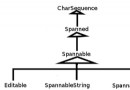 TextView 使用 SpannableString 實作可點擊文本
TextView 不只是用來顯示純文字,也能承載樣式與互動。透過 SpannableString,可以讓部分文字變色、加上底線,甚至變成可點擊的連結。 常見 Span
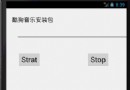 Android 斷點續傳原理與實作重點
斷點續傳看似只是暫停與繼續,但實作時需要處理下載位置、資料庫記錄、HTTP 範圍請求與本機寫入。核心概念是持續保存已下載的位元組位置,重新開始時再向伺服器要求從該位置續傳
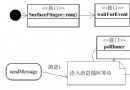 Android 4.4 SurfaceFlinger 深入淺出:渲染一個 Surface 的完整旅程(二)
SurfaceFlinger(以下簡稱 SF)自啟動後,主要有三類執行緒參與運作:Binder 執行緒:負責監控 binder 設備,完成與客戶端的交接。控制台事件監控執
 Retrofit 仿微信多張圖片拍照上傳
此範例延續仿微信發說說的場景,重點是拍照、相冊多選與 Retrofit 多圖上傳。客戶端選擇圖片後取得本地路徑,使用 Retrofit 的 multipart 介面將檔案