

編輯:關於 Android 程式設計
在 PopupWindow 的原始碼中,preparePopup 方法有一個關鍵判斷:
private void preparePopup(WindowManager.LayoutParams p) { if (mContentView == null || mContext == null || mWindowManager == null) { throw new IllegalStateException("You must specify a valid content view by calling setContentView() before attempting to show the popup."); } if (mBackground != null) { final ViewGroup.LayoutParams layoutParams = mContentView.getLayoutParams(); int height = ViewGroup.LayoutParams.MATCH_PARENT; if (layoutParams != null && layoutParams.height == ViewGroup.LayoutParams.WRAP_CONTENT) { height = ViewGroup.LayoutParams.WRAP_CONTENT; } // 當有背景可用時,將 content view 嵌入另一個擁有背景 drawable 的 view PopupViewContainer popupViewContainer = new PopupViewContainer(mContext); PopupViewContainer.LayoutParams listParams = new PopupViewContainer.LayoutParams(ViewGroup.LayoutParams.MATCH_PARENT, height); popupViewContainer.setBackgroundDrawable(mBackground); popupViewContainer.addView(mContentView, listParams); mPopupView = popupViewContainer; } else { mPopupView = mContentView; } mPopupWidth = p.width; mPopupHeight = p.height; }從原始碼可以看到:只有在背景(mBackground)不為空時,才會建立 PopupViewContainer。而 PopupWindow 正是透過 PopupViewContainer 這個內部類別來回應按鍵的。
PanelsViewContainer 的 dispatchKeyEvent 方法處理了 Back 鍵的邏輯:
private class PopupViewContainer extends FrameLayout { @Override public boolean dispatchKeyEvent(KeyEvent event) { if (event.getKeyCode() == KeyEvent.KEYCODE_BACK) { if (getKeyDispatcherState() == null) { return super.dispatchKeyEvent(event); } if (event.getAction() == KeyEvent.ACTION_DOWN && event.getRepeatCount() == 0) { KeyEvent.DispatcherState state = getKeyDispatcherState(); if (state != null) { state.startTracking(event, this); } return true; } else if (event.getAction() == KeyEvent.ACTION_UP) { KeyEvent.DispatcherState state = getKeyDispatcherState(); if (state != null && state.isTracking(event) && !event.isCanceled()) { dismiss(); return true; } } return super.dispatchKeyEvent(event); } else { return super.dispatchKeyEvent(event); } } }當按下 Back 鍵並在放開時,若條件都滿足,便會呼叫 dismiss() 關閉 PopupWindow。然而,這個回應 Back 鍵的能力完全依賴於 PopupViewContainer 的存在,而它只有在背景不為空時才會被建立。
結論:若想讓 PopupWindow 不響應 Back 鍵,只需將它的 background 設定為 null 即可。此時 mPopupView 會直接等於 mContentView,不會建立 PopupViewContainer,Back 鍵自然也就不會觸發 dismiss()。
 Android 記憶體分析工具全面總結
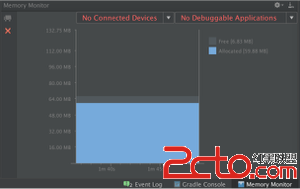
Android 的一些記憶體知識 垃圾回收(GC) 垃圾回收包含兩個過程:判定階段(判斷哪些物件可以被回收)與收集階段(具體的回收策略)。 判定階段主要有兩種方式: 引用
 Android 4.0 USB Camera 實戰(六):用 FFmpeg 實現 MPEG 編碼
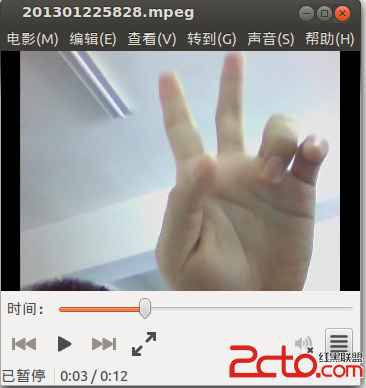
前面本來打算做 H.264 編碼,研究了兩天發現 FFmpeg 裡的 H.264 編碼似乎要依賴第三方庫 x264,於是就找了個更簡單的方案——做 MPEG 編碼。關於
 詳解第二組 UI 元件:TextView 及其子類
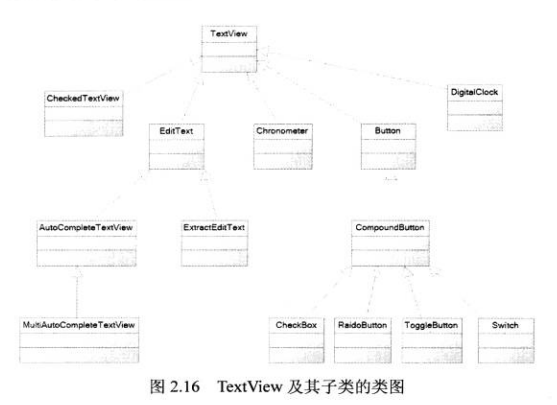
TextView 基本用法 TextView 是最基礎的文字顯示元件,除了文字內容,還可以設定字體大小、顏色、陰影、單行省略、自動連結與密碼顯示等屬性。若需要邊框或圓角
 Android-ObservableScrollView 源碼解析(一):從接口設計到動畫實戰
開源地址:https://github.com/ksoichiro/Android-ObservableScrollView 依賴引入:compile com.githu