

編輯:關於 Android 程式設計
很多時候我們需要一個輕巧的、自動淡出的提示框來給用戶反饋信息,而不是彈出系統那種阻塞式的對話框。下面這段代碼演示如何自定義一個帶圓角、可淡入淡出的浮動提示視圖,直接上關鍵代碼。
- (void)viewDidLoad { [super viewDidLoad]; // Do any additional setup after loading the view. [self showAlertView:@"11111"]; } //自定義彈出框 -(void)showAlertView:(NSString *)strTipText { UIView *showView=[[UIView alloc]init]; [showView setFrame:CGRectMake(100, 100, 120, 35)]; [showView setAlpha:0.0f]; [showView setBackgroundColor:[UIColor blackColor]]; [showView setClipsToBounds:YES]; [[showView layer]setMasksToBounds:YES]; [[showView layer]setCornerRadius:5.0f]; UILabel *lblTips=[[UILabel alloc]init]; [lblTips setFrame:CGRectMake(0, 0, 120, 35)]; [lblTips setText:strTipText]; [lblTips setTextAlignment:NSTextAlignmentCenter]; [lblTips setTextColor:[UIColor whiteColor]]; [lblTips setBackgroundColor:[UIColor clearColor]]; [lblTips setFont:[UIFont boldSystemFontOfSize:16]]; [showView addSubview:lblTips]; [self.view addSubview:showView]; [UIView animateWithDuration:0.5f delay:0.0f options:UIViewAnimationOptionCurveLinear animations:^{ showView.alpha=1.0f; }completion:^(BOOL finished){ [UIView animateWithDuration:1.0f delay:1.0f options:UIViewAnimationOptionCurveLinear animations:^{ showView.alpha=0.0f; }completion:^(BOOL finished){ ; }]; }]; }
這段代碼的核心思路是:先創建一個帶黑色背景與圓角的浮動視圖,初始透明度設為 0,再通過兩段動畫——先淡入顯示、停留後再淡出隱藏,實現一個優雅的臨時提示效果。需要提醒的是,此示例採用的是 iOS 的 Objective-C 寫法,Android 開發者可參考同樣的思路,用自定義 View 配合屬性動畫(如 ObjectAnimator)來實現類似的淡入淡出效果。
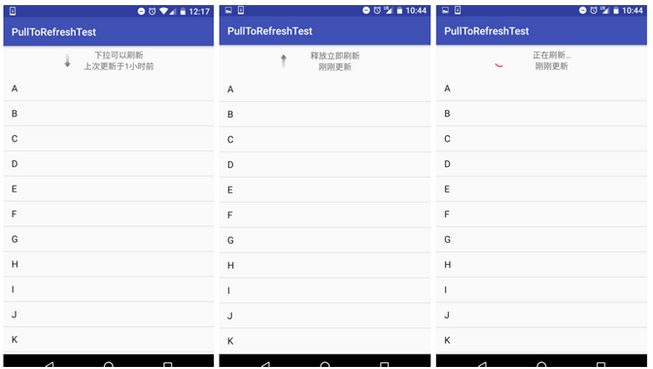 Android 自定義下拉刷新控件:從頭部布局到事件處理的完整實現
下拉刷新幾乎是移動端列表頁的標配交互。本文以一個可反覆複用的 RefreshView 為例,把實現過程拆成四個步驟,讀完就能直接搬進自己的項目。 一、先看效果與素材 用
 深入剖析 Android 手機字體庫:從系統默認字體到全角半角
問題一、Android 系統到底支持哪些字體庫?1、Android 系統默認支持三大字體家族,分別是 serif、sans-serif 和 monospace。這話怎麼證
 熱修補框架完結篇:自動產生帶簽章的補丁包並重構整個專案
關於前面四篇 整個系列的前兩篇談原理與方案:從 Dex 分包機制一路講到 CLASS_ISPREVERIFIED 問題;後兩篇則是實作,包含用 Javassist 注入位
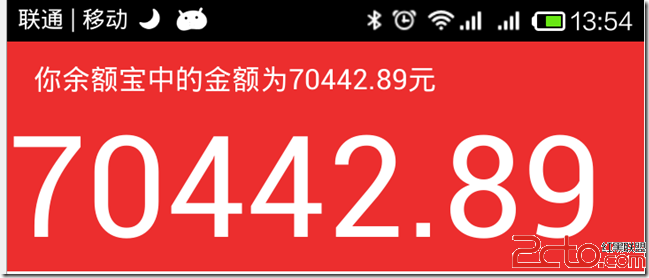 Android 實現類似支付寶餘額快速跳動的數字動畫效果
此圖為靜態截圖,實際執行時數字會快速跳動。 之前看到支付寶的這個效果覺得非常帥:進入頁面時餘額會呼嚕嚕地從小數字一路竄升到最終金額,很有質感。但一直不知道怎麼實作,最近