

編輯:關於 Android 程式設計
AndroidAnnotations 用註解簡化 Activity、View、Intent 等樣板程式碼,寫起來乾淨不少。要用它,第一步是把環境配置好。
Android Studio 的配置相當輕鬆,只要動兩個 build.gradle。
在 buildscript > dependencies 中加入:
classpath 'com.neenbedankt.gradle.plugins:android-apt:1.4'(1)在 apply plugin: 'com.android.application' 之後補一行:
apply plugin: 'com.android.application'
apply plugin: 'com.neenbedankt.android-apt'
(2)定義版本常數(寫作時最新版為 3.3.2):
def AAVersion = '3.3.2'(3)加上依賴,apt 與 api 兩件都要:
dependencies {
    apt "org.androidannotations:androidannotations:$AAVersion"
    compile "org.androidannotations:androidannotations-api:$AAVersion"
}
(4)設定 apt 參數,把產生的 AndroidManifest 交給它:
apt {
    arguments {
        androidManifestFile variant.outputs[0].processResources.manifestFile
    }
}
Build 一次專案,就完成了。
先下載 jar 包(同樣是 3.3.2),解壓後會拿到兩個檔案:androidannotations-api-*.jar 與 androidannotations-*.jar。
放置方式:把 androidannotations-api-*.jar 放進工程的 libs 目錄;在專案根目錄新建一個 compile-libs 目錄,把 androidannotations-*.jar 放進去。
步驟一:Properties > Java Compiler,勾選 Enable project specific settings,將 Compiler compliance level 設為 1.6。
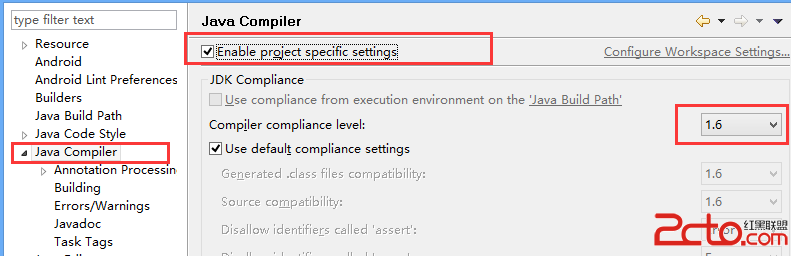
步驟二:Properties > Java Compiler > Annotation Processing,同樣勾選 Enable project specific settings。
步驟三:Properties > Java Compiler > Annotation Processing > Factory Path,勾選 Enable project specific settings,點 Add JARs,瀏覽到剛才的 compile-libs 目錄,選中 androidannotations-*.jar,按下確定。
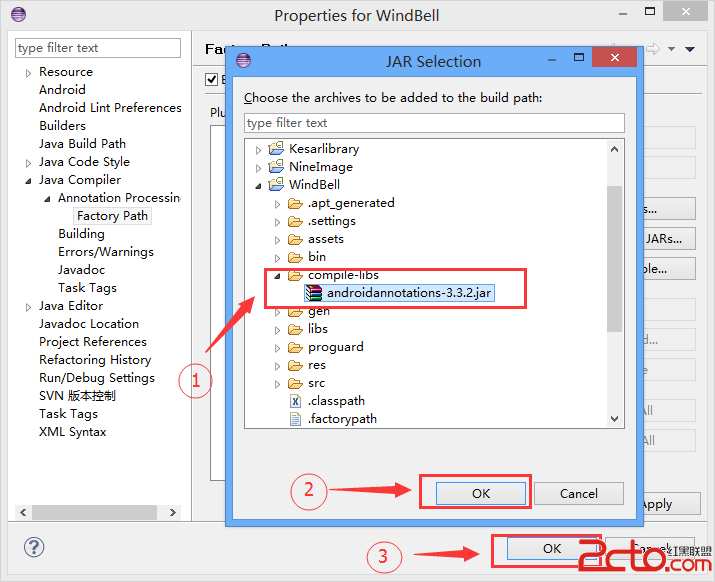
設定完成後就能開始使用這個框架了。
 Android 網絡編程(七):OkHttp 源碼解析前篇——請求是怎麼發出去的
前言 學會 OkHttp3 的用法之後,自然該來看看它的源碼。網上相關文章很多,我仍希望這一系列能寫得最簡潔易懂。 一、從請求處理開始 發請求時我們呼叫 OkHttpC
 Android WiFi 連接功能實作全解析(附完整源碼)
做專案的時候,常常會冒出這麼一個需求:讓使用者直接在 App 裡挑一個 Wi-Fi 熱點,輸入密碼完成連接,還要即時反映目前的連線狀態。看似簡單,實際動手會發現牽涉到掃描
 Android 動畫學習筆記(二):Property Animation 屬性動畫用法全攻略
要理解 Property Animation,首先必須認識 View 在 3.0 之後引入的幾個新屬性,並搭配其 getter 與 setter 方法: transla
 Android Activity 基礎全解:從生命周期到狀態保存
一、Activity 簡介Activity 是一種應用組件,用戶可以與它所提供的屏幕進行交互,從而完成撥打電話、拍攝照片、發送郵件或查看地圖等操作。每個 Activity