

編輯:關於 Android 程式設計
「點開編輯既有資料」是很常見的互動。使用者通常希望三件事同時發生:游標在欄位裡、內容全被選取(可以直接打字覆蓋)、鍵盤立刻出現。這三件事各自不難,順序才是關鍵。
final EditText input = new EditText(this);
input.setText("XXX");

new AlertDialog.Builder(this)
        .setView(input)
        .setTitle("編輯")
        .setPositiveButton("確定", null)
        .show();

input.selectAll();
為什麼順序重要?因為 selectAll() 依賴 EditText 已經具備有效的 Selection 狀態。在 Dialog 尚未 show() 之前呼叫,元件還沒完成版面配置,選取範圍可能無法正確套用。放在 show() 之後,就穩定了。
把 selectAll() 與焦點監聽結合起來:
final AlertDialog dialog = new AlertDialog.Builder(this)
        .setView(editText)
        .setPositiveButton("確定", null)
        .create();

editText.setOnFocusChangeListener(new View.OnFocusChangeListener() {
    @Override
    public void onFocusChange(View v, boolean hasFocus) {
        if (hasFocus) {
            dialog.getWindow().setSoftInputMode(
                    WindowManager.LayoutParams.SOFT_INPUT_STATE_ALWAYS_VISIBLE);
        }
    }
});

dialog.show();
editText.selectAll();
透過 OnFocusChangeListener 設定軟鍵盤模式,能確保鍵盤在欄位取得焦點的那一刻被叫出來,而不是等使用者再點一次。
其實不必繞這麼一圈。Window 的軟鍵盤模式可以直接在建立 Dialog 時設定:
final EditText editText = new EditText(this);
editText.setText("XXX");
editText.setSelectAllOnFocus(true);   // 取得焦點時自動全選

AlertDialog dialog = new AlertDialog.Builder(this)
        .setView(editText)
        .setPositiveButton("確定", null)
        .create();

dialog.setOnShowListener(new DialogInterface.OnShowListener() {
    @Override
    public void onShow(DialogInterface d) {
        // Dialog 顯示後才設定鍵盤模式,確保生效
        dialog.getWindow().setSoftInputMode(
                WindowManager.LayoutParams.SOFT_INPUT_STATE_VISIBLE
                | WindowManager.LayoutParams.SOFT_INPUT_STATE_ALWAYS_VISIBLE);
        editText.requestFocus();
    }
});

dialog.show();
這裡有兩個更省事的地方:setSelectAllOnFocus(true) 是 EditText 內建的屬性,等價於 XML 裡的 android:selectAllOnFocus="true",不需要手動呼叫 selectAll();而 setOnShowListener 比 OnFocusChangeListener 更直接,因為我們真正想 hook 的時機是「Dialog 顯示的那一刻」。
Dialog 顯示後,焦點預設在「確定」按鈕上。若不呼叫 editText.requestFocus(),即使設了鍵盤模式也可能不會彈出,因為焦點不在 EditText 上。
SOFT_INPUT_STATE_VISIBLE:只要有可能就顯示鍵盤。SOFT_INPUT_STATE_ALWAYS_VISIBLE:無論使用者之前是否手動收起鍵盤,都強制顯示。適合明確要求輸入的場景。SOFT_INPUT_ADJUST_RESIZE:鍵盤出現時縮放版面,避免輸入框被遮住。兩者可用位元或運算組合。
若 Dialog 內有多個欄位,鍵盤彈出可能遮住下方內容。在 Activity 的 manifest 中設定 android:windowSoftInputMode="adjustResize",或為 Dialog 的版面加上ScrollView,都能改善。
若需要把游標移到特定位置而非全選,用 editText.setSelection(index),同樣建議放在 show() 之後或 onShowListener 裡。
 Android Camera HAL3 Capture 模式:模塊交互與幀資料回調解析
本文以 Android 5.1 的 Camera3 HAL 為基礎,整理拍照 Capture 模式下,Camera2Client、CaptureSequencer、Jpe
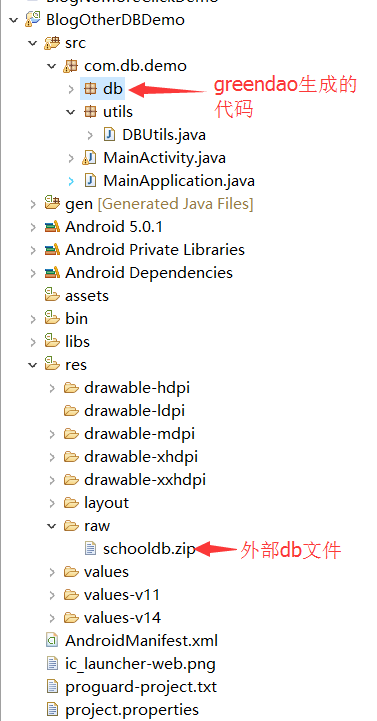 【Android】用 GreenDao 操作外部 DB 數據庫文件的完整實踐
一、背景說明 這裡所說的「外部數據庫文件」,指的是一個在專案之外單獨建立好的 db 文件。想像這樣一個場景:專案中存在一些本地靜態數據,它們不需要透過網絡接口獲取,而是直
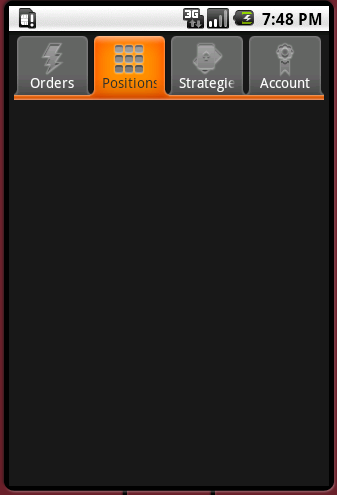 Android ViewPager 實現滑動分頁與禁用滑動的實作要點
過去若想做 Tab 分頁,往往得採用一個相當難用的 TabActivity,做出來的效果既不理想,彈性也很有限。 不知從何時開始,Google 推出了 ViewPage
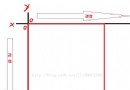 Android 界面座標系統與 Rect 矩形類簡介
Android 界面的座標系統以左上角為原點:水平向右為 X 軸正方向,垂直向下為 Y 軸正方向,數值一路遞增。下圖可以很直觀地理解這套規則: 而 Android 的