

編輯:關於 Android 程式設計
做 App 自動更新時,把下載的 APK 存在 SD 卡可以正常安裝,改存到內部儲存卻出現「解析套件時發生問題」(parse error)。這個錯誤訊息一點線索都沒給,很容易往簽章或 APK 本身的方向查錯。
搜尋之後大致歸納為兩種思路:
我一開始沒把邏輯理清楚就開始試,兩種都試過卻都沒解決,後來請教了前輩才慢慢拆解出來。
File apkfile = new File(mSavePath, appName);

String chmodCmd = "chmod 666 " + apkfile.getAbsolutePath();
try {
    Runtime.getRuntime().exec(chmodCmd);
} catch (Exception e) {
    // 忽略
}

Intent i = new Intent(Intent.ACTION_VIEW);
i.setDataAndType(Uri.fromFile(apkfile),
        "application/vnd.android.package-archive");
mContext.startActivity(i);
把檔案權限改成 666(所有使用者可讀寫),再叫起系統的安裝介面。這招確實有效,問題解決了。
用普通的檔案寫入:
File apkFile = new File(mSavePath, appName);
FileOutputStream fos = new FileOutputStream(apkFile);
然後檢查檔案時我嚇了一跳:檔案確實存在,名字也對,但大小是 0。內容根本沒寫進去。
原因出在這段:
FileOutputStream fos = mContext.openFileOutput(appName,
        Context.MODE_WORLD_READABLE | Context.MODE_WORLD_WRITEABLE);
openFileOutput() 每次呼叫都會清空檔案內容。我在「存檔時」和「呼叫安裝前」各用了一次,第二次呼叫把第一次寫入的 APK 內容整個清掉了,於是系統拿到一個 0 位元組的檔案,當然解析失敗。
正確做法是只在寫入時設定權限,不要重複呼叫:
String fileName = "tmp.apk";

FileOutputStream fos = openFileOutput(fileName,
        MODE_WORLD_READABLE | MODE_WORLD_WRITEABLE);

// 在這裡寫入 APK 內容,之後 flush() 與 close()

// 直接叫起安裝介面,不要再呼叫一次 openFileOutput
File fileLocation = new File(context.getFilesDir(), fileName);
Intent intent = new Intent(Intent.ACTION_VIEW);
intent.setDataAndType(Uri.fromFile(fileLocation),
        "application/vnd.android.package-archive");
context.startActivity(intent);
預設模式(MODE_PRIVATE)會清空既有內容。若要附加,必須明確使用 Context.MODE_APPEND。這點與某些語言的檔案 API 行為相反,容易誤判。
APK 安裝由系統的 PackageInstaller 執行,它以不同於你 App 的身分讀取檔案。若檔案只有你的 App 可讀,系統就讀不到——這才是 parse error 的真正源頭,而非 APK 損毀。
MODE_WORLD_READABLE 已被移除。從 Android 4.2 起,基於安全考量,MODE_WORLD_READABLE 與 MODE_WORLD_WRITEABLE 已不再生效,使用時會拋出 SecurityException。同時 chmod 666 這類手法在新版系統上也愈來愈不可靠。
目前安裝 APK 的正確途徑是:
content:// URI 的形式分享出去,由 FileProvider 依 file_paths.xml 的宣告暫時授予讀取權限,不需要改檔案權限。
<provider
    android:name="androidx.core.content.FileProvider"
    android:authorities="${applicationId}.fileprovider"
    android:exported="false"
    android:grantUriPermissions="true">
    <meta-data
        android:name="android.support.FILE_PROVIDER_PATHS"
        android:resource="@xml/file_paths" />
</provider>
File apk = new File(getExternalFilesDir(null), "update.apk");
Uri uri = FileProvider.getUriForFile(this,
        getPackageName() + ".fileprovider", apk);

Intent intent = new Intent(Intent.ACTION_VIEW);
intent.setDataAndType(uri, "application/vnd.android.package-archive");
intent.addFlags(Intent.FLAG_GRANT_READ_URI_PERMISSION);
startActivity(intent);
REQUEST_INSTALL_PACKAGES 權限,且必須由使用者為你的 App 明確開啟「允許安裝未知應用程式」。parse error 的成因很多(簽章不符、minSdk 過高、APK 損毀、權限不足、解析度不支援),但「檔案是 0 位元組」這種情況,第一步永遠是先確認檔案大小——這能省下大量方向錯誤的排查時間。
 Retrofit 持久化 Cookie 的三種實作方案:CookieJar、攔截器與自定義存儲
從非持久化 Cookie 到持久化 Cookie 在 Retrofit 與 OkHttp 中,Cookie 管理可以透過 CookieJar 完成。若使用 JavaNet
 手機搜狗輸入法怎麼調整鍵盤大小
使用手機搜狗輸入法時,若覺得鍵盤太大或太小,可透過內建調整功能改變大小。 1. 先開啟任何可輸入文字的畫面,例如簡訊。 2. 在搜狗鍵盤上點擊設定圖示。 3. 選擇
 Android 學習筆記 038:WebView 網頁視圖完全指南
前面我們介紹過 HTTP 協議和 Socket,這一篇我們來聊聊 Android 的一個網絡控件——WebView 網頁視圖。眾所周知,目前移動端有兩種開發方向:原生開發
 Android 接入 QQ 第三方登錄:授權與用戶信息獲取全流程
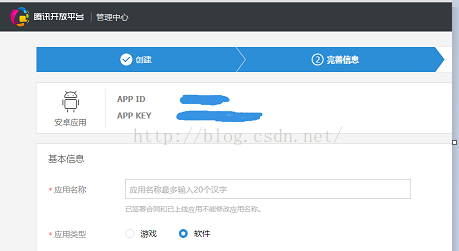
本文分為兩部分:一是完成 QQ 授權登錄;二是在授權基礎上獲取用戶的基本資料。 一、授權部分 1. 獲取 APP ID 與 APP KEY 登錄騰訊開放平台(https: