

編輯:關於 Android 程式設計
開發中用到 SoundPool 播放音效時,遇到了 "soundpool 1 not retry" 的報錯,聲音遲遲無法播放,而改用 MediaPlayer 卻能正常發聲。經過一番排查,終於定位到了原因。
下面這段代碼會出現 "soundpool 1 not retry",且無法播放聲音:
mgr = (AudioManager) MainActivity.this.getSystemService(Context.AUDIO_SERVICE);
// 初始化 soundPool:參數1 最大同時播放的聲音流數,參數2 聲音類型,參數3 品質
soundPool = new SoundPool(4, AudioManager.STREAM_MUSIC, 100);
soundPoolMap = new HashMap<Integer, Integer>();
soundPoolMap.put(1, soundPool.load(MainActivity.this, R.raw.or, 1));
soundPoolMap.put(2, soundPool.load(MainActivity.this, R.raw.sd, 1));
volume = mgr.getStreamVolume(AudioManager.STREAM_MUSIC);
// loop:循環模式(0 = 不循環,-1 = 無限循環)
soundPool.play(soundPoolMap.get(1), volume, volume, 1, 0, 1f);
問題出在 load() 之後立刻 play():soundPool.load() 是異步的,系統尚未把聲音文件準備好就調用 play(),自然無法播放,於是拋出 "not retry"。
思路是「先 load、後 play」,中間留出足夠時間讓系統完成加載。比如在初始化時就 load 好,等真正需要播放時再 play;或者在 load 之後稍作等待:
mgr = (AudioManager) MainActivity.this.getSystemService(Context.AUDIO_SERVICE);
soundPool = new SoundPool(4, AudioManager.STREAM_MUSIC, 100);
soundPoolMap = new HashMap<Integer, Integer>();
soundPoolMap.put(1, soundPool.load(MainActivity.this, R.raw.or, 1));
soundPoolMap.put(2, soundPool.load(MainActivity.this, R.raw.sd, 1));
volume = mgr.getStreamVolume(AudioManager.STREAM_MUSIC);
try {
    Thread.sleep(1000);
} catch (InterruptedException e) {
    e.printStackTrace();
}
soundPool.play(soundPoolMap.get(1), volume, volume, 1, 0, 1f);
更規範的做法是使用 SoundPool 提供的 setOnLoadCompleteListener 監聽加載完成事件,在回調裡再觸發 play,這樣既不用硬等待,也能確保音效一定準備就緒,是比 Thread.sleep 更可靠的方案。
 Android 逆向實戰:快速脫出 360 加固的 DEX
相比 iOS,Android 的安全問題往往更為突出,各種漏洞與破解層出不窮。了解破解手法,有助於我們在開發中提前防範、加強應用的安全性。本系列文章將從「破解」與「保護」
 理解並善用 adb:Android 調試橋接器完全指南
Android Debug Bridge(Android 調試橋接器),簡稱 adb,是一款用於管理模擬器或真機狀態的萬能工具。 平時開發 Android 應用時,你可能
 Android Activity 四種啟動模式完整解析
啟動模式與返回棧 Android 使用返回棧管理 Activity。開發者可透過 AndroidManifest.xml 中的 android:launchMode 指定
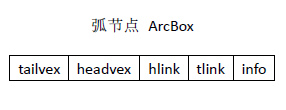 有向圖的十字鏈結串列:建圖、增刪弧與雙向遍歷輸出
本文討論有向圖的十字鏈結串列(Orthogonal List)表示法,涵蓋建圖、新增弧、刪除弧,以及以鄰接表格式輸出圖形(分為兩種視角:同尾弧串成的鏈、同頭弧串成的鏈),