

編輯:關於 Android 程式設計
以下是一個完整的 Apache 虛擬主機配置範例,示範了幾個實務上很常用的技巧:把簡短網址重寫到深層的真實路徑、啟用 SSI 伺服器端包含、以及用管線方式做日誌輪轉。
<VirtualHost *:80>
    DocumentRoot "/data/www/test"
    ServerName test.58tech.com

    RewriteEngine on

    // 把 /rule 導向到帶斜線的目錄形式
    RewriteRule ^/rule$ /rule/ [R]
    RewriteRule ^/rule/$ /test2013/5033/test/index.shtml [L,PT]

    // 短網址 another example
    RewriteRule ^/signup$ /signup/ [R]
    RewriteRule ^/signup/$ /s2013/5033/test200545034/index.shtml [L,PT]

    <Directory "/data/www/test">
        AllowOverride None
        Options Includes FollowSymLinks
        Order allow,deny
        Allow from all

        // 啟用 SSI 並讓 .shtml / .inc 被當成 HTML 處理
        Options +Includes
        AddType text/html .shtml
        AddOutputFilter INCLUDES .shtml .inc
    </Directory>

    DirectoryIndex /my/test/index/index.shtml

    #ErrorLog /dev/null
    #LogLevel crit

    // 用 rotatelogs 做每日切割,480 是與 UTC 的時差(分鐘)
    CustomLog "|/58tech/pkg/apache2/bin/rotatelogs /data/logs/58tech_access_log.%Y%m%d 86400 480" combined
</VirtualHost>
| 請求的網址 | 實際開啟的檔案 | 瀏覽器網址列顯示 |
|---|---|---|
| https://test.58tech.com | /my/test/index/index.shtml | https://test.58tech.com |
| https://test.58tech.com/rule | /test2013/5033/test/index.shtml | https://test.58tech.com/rule/ |
| https://test.58tech.com/signup | /s2013/5033/test200545034/index.shtml | https://test.58tech.com/signup/ |
這裡有個關鍵設計:兩段式重寫。第一條規則用 [R] 讓瀏覽器發出 302 轉址,把網址列改成乾淨的 /rule/;第二條規則是內部轉寫(沒有 R 旗標),伺服器在內部把請求導向真實的深層路徑,使用者完全看不到。
[R]:外部重導向,會回傳 302 給瀏覽器,網址列會改變。可寫成 [R=301] 做永久重導向(SEO 建議)。[L]:Last,表示這是規則鏈的最後一條,比對成功後不再往下嘗試。[PT]:PassThrough,把重寫後的 URI 再交給其餘的 URI 對應處理器(如 Alias、ScriptAlias)處理。做內部轉寫到非 DocumentRoot 路徑時通常需要它。Options +Includes AddType text/html .shtml AddOutputFilter INCLUDES .shtml .inc
三行缺一不可。Options Includes 開啟功能;AddType 讓伺服器以 text/html 而非單純文字回應;AddOutputFilter INCLUDES 才是真正的關鍵——它告訴 Apache 對這些副檔名的檔案套用 SSI 過濾器,讓 <!--#include file="..." --> 這類指令被解析。少了最後這行,SSI 註解會原封不動地送到瀏覽器,變成無效的 HTML 註解。
CustomLog "|/58tech/pkg/apache2/bin/rotatelogs /data/logs/58tech_access_log.%Y%m%d 86400 480" combined
管道符號 | 開頭代表把日誌餵給一個外部程式而非寫入檔案。rotatelogs 的三個參數分別是:檔案路徑(%Y%m%d 會被替換為日期)、輪轉間隔秒數(86400 = 一天)、時差分鐘數(480 = UTC+8)。這樣每天自動產生一個新檔案,不必靠 logrotate 重啟服務。
RewriteRule 在正規表達式中前面不能加斜線。虛擬主機或目錄層級的規則,比對對象是去掉開頭斜線的相對路徑,所以寫 ^/rule$ 而非 ^rule$ 在某些情境下會比對不到,需依 Apache 版本與上下文實測。RewriteEngine on 寫了兩次是範例中的冗餘,留一行即可。httpd -M | grep rewrite 確認模組已啟用。LogLevel alert rewrite:trace3,可以從 error_log 看到每一條規則的比對過程,比盲猜快得多。定位完成後記得改回正常等級,trace 等級對效能影響不小。Options 寫了兩次,第二次的 +Includes 是加法修飾,會在既有基礎上追加;若想同時保留 FollowSymLinks,這種寫法反而是正確的。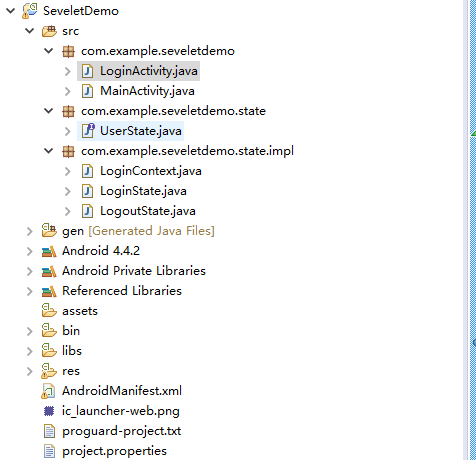 用 Android 登入案例徹底搞懂狀態模式(二)
上一篇用簡單的 Java 範例熟悉了狀態設計模式,這一篇則以 Android 登入的例子繼續講解,讓抽象的設計模式落到實處。 一、狀態模式在 Android 中的應用場景
 Android SDK 更新後 Intel 模擬器閃退?手動安裝 HAXM 才是關鍵
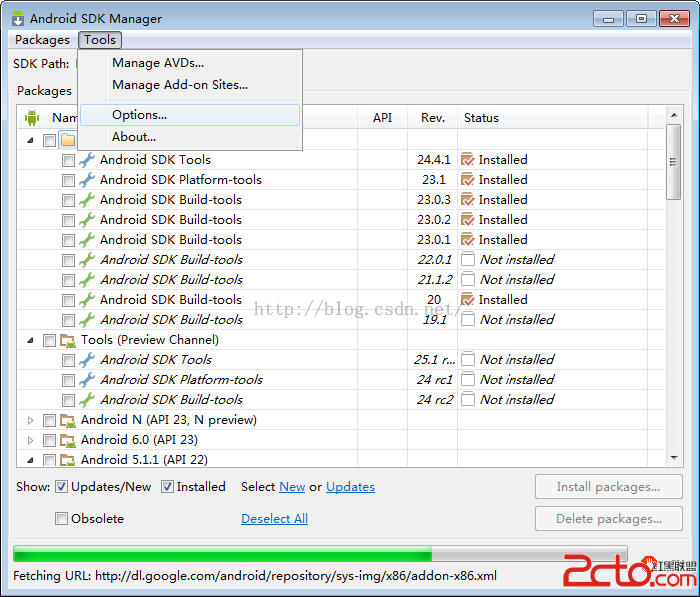
問題現象 更新 Android SDK 後,原本可正常使用的 Intel 加速模擬器突然無法啟動或閃退。常見原因是 SDK 更新後,Intel HAXM 虛擬加速程式沒有
 Android 打造炫酷導航欄(仿 UC 頭條)
年後上班格外清閒,便想搗鼓點東西。翻閱大神〈Android 教你打造炫酷的 ViewPagerIndicator〉這篇佳作時,看到下方有條評論說,要是導航欄能滑動就更好了
 一次搞懂 Activity 的四種啟動模式
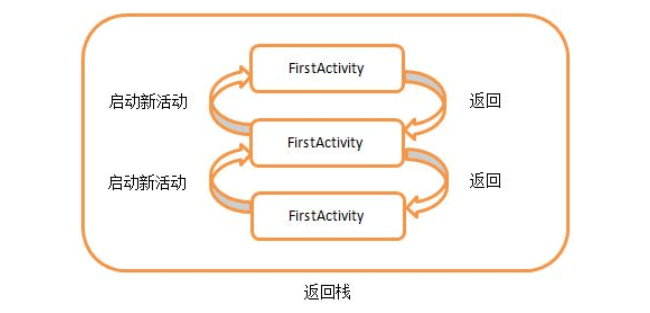
Activity 的啟動模式(launchMode)決定了「同一個頁面被開啟多次時,系統會建立新實例,還是重用舊的」。Android 一共提供四種模式:standard、