

編輯:關於 Android 程式設計
本篇以 TestIntentData 與 TestIntent 兩個工程為例,示範如何在一個應用中依據套件名稱(package name)啟動另一個 APP。核心思路是先取得目標套件的 PackageInfo,再透過 queryIntentActivities 解析出可啟動的 Activity,最後用 ComponentName 指定並啟動。
按下按鈕後會呼叫 startAnotherApp 方法,傳入目標套件的名稱:
package cn.testintentdata;
import java.util.List;
import android.net.Uri;
import android.os.Bundle;
import android.view.View;
import android.view.View.OnClickListener;
import android.widget.Button;
import android.app.Activity;
import android.content.ComponentName;
import android.content.Intent;
import android.content.pm.PackageInfo;
import android.content.pm.PackageManager.NameNotFoundException;
import android.content.pm.ResolveInfo;
public class MainActivity extends Activity {
private Button mButton;
@Override
protected void onCreate(Bundle savedInstanceState) {
super.onCreate(savedInstanceState);
setContentView(R.layout.main);
init();
}
private void init(){
mButton=(Button) findViewById(R.id.button);
mButton.setOnClickListener(new OnClickListener() {
@Override
public void onClick(View view) {
startAnotherApp("cc.testintent");
}
});
}
private void startAnotherApp(String packageName){
PackageInfo packageInfo = null;
try {
packageInfo = getPackageManager().getPackageInfo(packageName, 0);
} catch (NameNotFoundException e) {
e.printStackTrace();
}
Intent resolveIntent = new Intent(Intent.ACTION_MAIN, null);
resolveIntent.setData(Uri.parse("app://jp.co.cybird.barcodefootballer/"));
resolveIntent.addCategory(Intent.CATEGORY_LAUNCHER);
resolveIntent.setPackage(packageInfo.packageName);
List<ResolveInfo> resolveInfoList = getPackageManager().queryIntentActivities(resolveIntent, 0);
ResolveInfo resolveInfo = resolveInfoList.iterator().next();
if (resolveInfo != null ) {
String activityPackageName = resolveInfo.activityInfo.packageName;
String className = resolveInfo.activityInfo.name;
Intent intent = new Intent(Intent.ACTION_MAIN);
intent.addCategory(Intent.CATEGORY_LAUNCHER);
ComponentName componentName = new ComponentName(activityPackageName, className);
intent.setComponent(componentName);
startActivity(intent);
}
}
}
對應的版面配置 main.xml 只包含一個置中的按鈕:
<RelativeLayout xmlns:android="https://schemas.android.com/apk/res/android"
android:layout_width="match_parent"
android:layout_height="match_parent">
<Button
android:id="@+id/button"
android:layout_width="wrap_content"
android:layout_height="wrap_content"
android:text="click me"
android:layout_centerInParent="true"
/>
</RelativeLayout>
這個工程的 MainActivity 內容相當簡單,只是載入自己的版面:
package cc.testintent;
import android.os.Bundle;
import android.app.Activity;
public class MainActivity extends Activity {
@Override
protected void onCreate(Bundle savedInstanceState) {
super.onCreate(savedInstanceState);
setContentView(R.layout.main);
}
}
其版面配置顯示一段文字:
<RelativeLayout xmlns:android="https://schemas.android.com/apk/res/android"
android:layout_width="match_parent"
android:layout_height="match_parent">
<TextView
android:layout_width="wrap_content"
android:layout_height="wrap_content"
android:text="大 家 好"
android:layout_centerInParent="true"
/>
</RelativeLayout>
重點在於為目標 Activity 設定 intent-filter,特別是 android:scheme 與 LAUNCHER 類別,如此才能被正確解析並啟動:
<?xml version="1.0" encoding="utf-8"?>
<manifest xmlns:android="https://schemas.android.com/apk/res/android"
package="cc.testintent"
android:versionCode="1"
android:versionName="1.0">
<uses-sdk
android:minSdkVersion="8"
android:targetSdkVersion="8" />
<application
android:allowBackup="true"
android:icon="@drawable/ic_launcher"
android:label="@string/app_name"
android:theme="@style/AppTheme">
<activity
android:name="cc.testintent.MainActivity"
android:label="@string/app_name">
<intent-filter>
<action android:name="android.intent.action.MAIN" />
<data android:scheme="app"/>
<category android:name="android.intent.category.LAUNCHER" />
</intent-filter>
</activity>
</application>
</manifest>
透過以上兩個工程的搭配,就能實現應用之間依據套件名稱互相啟動的功能。
 Android 簡易下載管理器實作:暫停、斷點續傳與多線程調度
先看效果圖。 預覽圖中把同時最大下載數限制為 2。 其實下載管理器的實現並不複雜,把幾個要點想清楚就行: 下載必須跑在 Service 裡,才能支持後台下載; 用一張
 Android Scroller 原理與實作:打造 ListView 側滑菜單
在 Android 中,若直接使用 scrollTo 或 scrollBy 移動 View,過程通常是瞬間完成,使用者體驗較差。Scroller 的作用就是讓位移具備過渡
 你的 App 是怎麼被掉包的?Activity 劫持與安裝劫持病毒剖析
一、什麼是 App 劫持 App 劫持指的是程式的執行流程被惡意重定向。依手法不同,大致可分為 Activity 劫持、安裝劫持、流量劫持與函式執行劫持等類型。本文以近期
 讀源碼學安卓:Activity 的生命週期到底怎麼運轉
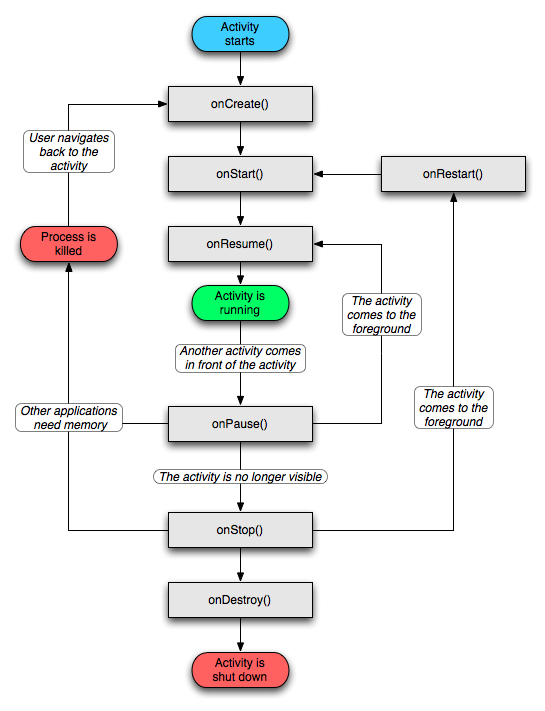
Activity、Service、BroadcastReceiver、ContentProvider 合稱 Android 四大組件。業餘玩票的人或許不必深究它們的內部實