

編輯:關於 Android 程式設計
讀取中文文字檔時,若編碼不正確,可能會出現亂碼。常見做法是明確指定 UTF-8,並避免在切割位元組時把中文字元截斷。
assets 下的檔案只能讀取,不能直接寫入。以下使用 BufferedReader 逐行讀取。
InputStream is = getAssets().open("license.txt");
BufferedReader reader = new BufferedReader(new InputStreamReader(is, "UTF-8"));

StringBuilder sb = new StringBuilder();
String line;

while ((line = reader.readLine()) != null) {
    sb.append(line).append('\n');
}

is.close();
String content = sb.toString();res/raw 下的資源也只能讀取,可透過 openRawResource 開啟。
InputStream in = getResources().openRawResource(R.raw.test);
int length = in.available();
byte[] buffer = new byte[length];
in.read(buffer);
String res = new String(buffer, "UTF-8");
in.close();應用程式私有檔案位於 /data/data/套件名稱/files 下,可用 openFileOutput 與 openFileInput 操作。
String fileName = "test.txt";
String message = "測試內容";

FileOutputStream fout = openFileOutput(fileName, MODE_PRIVATE);
fout.write(message.getBytes("UTF-8"));
fout.close();
FileInputStream fin = openFileInput(fileName);
int length = fin.available();
byte[] bytes = new byte[length];
fin.read(bytes);
String text = new String(bytes, "UTF-8");
fin.close();若需要存取 /mnt/sdcard 下的檔案,可直接使用 FileInputStream 與 FileOutputStream。
FileOutputStream fout = new FileOutputStream(fileName);
fout.write(message.getBytes("UTF-8"));
fout.close();
FileInputStream fin = new FileInputStream(fileName);
int length = fin.available();
byte[] buffer = new byte[length];
fin.read(buffer);
String res = new String(buffer, "UTF-8");
fin.close();若需要讀取大型檔案,不建議一次全部載入記憶體。若使用固定大小緩衝區,也要注意 UTF-8 中文字元可能被切斷,造成亂碼。
Android 檔案讀寫的關鍵在於選擇正確的串流與編碼。assets 與 raw 適合唯讀資源,私有檔案適合應用內部資料,SD 卡則適合較大或需對外分享檔案。
 Android 實現 Tab 頁面的四種主流寫法全整理
Tab 樣式的界面幾乎是每個 App 的標配,而實現它的方式這些年也越來越多。本文把最常見的四種思路一次排開來比較,方便你依專案規模和維護成本來挑選。 傳統 ViewP
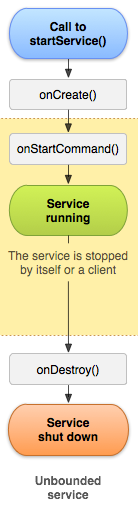 Android 四大組件之 Service 學習筆記(一):兩種啟動方式與生命週期
Service 是 Android 四大組件之一,用在後台處理事情,本身沒有界面。要特別澄清一個常見誤解:它不是我們通常所說的「服務器」,也不是一個獨立線程——Servi
 Android 網絡編程:HttpURLConnection 與 HttpClient 實戰對比
上一篇講了 URLConnection,它能很方便地與指定站點交換信息。它還有一個專為 HTTP 場景增強的子類——HttpURLConnection,在基礎上補充了一批
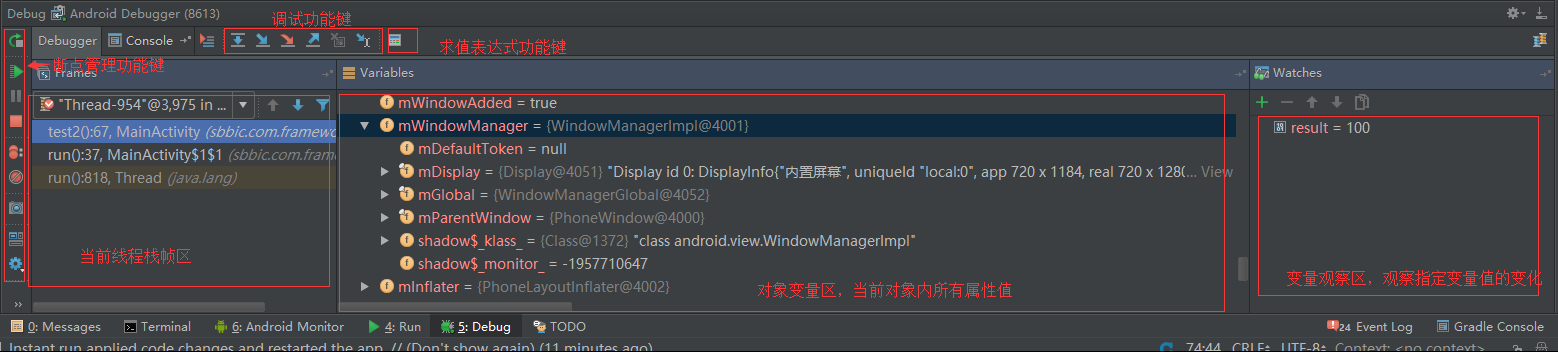 Android Studio 除錯技巧大全:從單步執行到條件斷點
Android Studio 已是 Android 開發的主力工具,而除錯、定位、修掉 bug 是日常。所謂工欲善其事必先利其器,這篇把 IDE 的除錯功能完整梳理一遍。