

編輯:關於 Android 程式設計
Tween 動畫(補間動畫)會對 View 物件的外觀進行一連串簡單的轉換。Android 在 animation 套件中提供了完整的支援類別,其中最常用的有四種基本動畫,再加上一個動畫集合類:
AlphaAnimation:透明度漸變動畫RotateAnimation:旋轉動畫ScaleAnimation:縮放動畫TranslateAnimation:位移(移動)動畫AnimationSet:多個動畫的集合類[java]
public AlphaAnimation(float fromAlpha, float toAlpha)
fromAlpha:起始透明度,1 代表完全不透明,0 代表完全透明。
toAlpha:結束時的透明度。
[java]
public RotateAnimation(float fromDegrees, float toDegrees, int pivotXType, float pivotXValue, int pivotYType, float pivotYValue)
fromDegrees:動畫起始角度。
toDegrees:動畫結束角度。
pivotXValue、pivotYValue:旋轉中心點的 X、Y 座標。
pivotXType、pivotYType:旋轉中心點的相對關係類型,共有三種——animation.absolute(相對於原點 O 的絕對座標)、animation.relative_to_self(相對於自身左上角)、animation.relative_to_parent(相對於父容器左上角)。
[java]
public ScaleAnimation(float fromX, float toX, float fromY, float toY, int pivotXType, float pivotXValue, int pivotYType, float pivotYValue)
fromX、toX:X 軸方向從起始到結束的縮放比例。
fromY、toY:Y 軸方向從起始到結束的縮放比例。
pivot 相關參數的意義與旋轉動畫相同。
[java]
public TranslateAnimation(int fromXType, float fromXValue, int toXType, float toXValue, int fromYType, float fromYValue, int toYType, float toYValue)
fromXType、fromXValue:X 軸起始點的相對類型與數值。
toXType、toXValue:X 軸結束點的相對類型與數值。
Y 軸參數同理。
這是一個動畫集合類,可設定多個動畫同時播放,用法相當直覺,這裡不再贅述。
上述各種動畫都支援以下通用設定:
setDuration(long):設定動畫執行時間。setFillAfter(boolean):設為 true 時動畫停在結束狀態,預設則會回到起始效果。setRepeatCount(int):設定重複次數,預設 0(執行一次),設為 1 則執行兩次。setRepeatMode(int):設定重複模式,有 Animation.RESTART 與 Animation.REVERSE 兩種。RESTART 會回到開頭重新播放;REVERSE 則會「來回播放」,例如淡出後再淡入。setInterpolator(Interpolator):設定動畫的變化率。
Interpolator 定義了動畫的變化率(the rate of change),讓基本的 alpha、scale、translate、rotate 動畫得以加速、減速或呈現其他節奏。它是基類,只提供一個方法 getInterpolation(float input)。Android 內建了幾種實作不同速度曲線的子類:
AccelerateDecelerateInterpolator:開始與結束較慢,中段加速。AccelerateInterpolator:開始較慢,之後逐漸加速。DecelerateInterpolator:開始較快,之後逐漸減速。CycleInterpolator:動畫循環播放特定次數,速率沿正弦曲線變化。LinearInterpolator:以均勻速率變化。AlphaAnimation 程式碼實作:
[java]
Animation alphaAnimation = new AlphaAnimation(1.0f, 0.0f);
alphaAnimation.setDuration(2000);
alphaAnimation.setRepeatMode(Animation.REVERSE);
alphaAnimation.setRepeatCount(5);
alphaAnimation.setInterpolator(new AccelerateInterpolator());
AlphaAnimation XML 實作(放在 res/anim 下):
[xml]
<?xml version="1.0" encoding="utf-8"?>
<alpha xmlns:android="https://schemas.android.com/apk/res/android"
android:fromAlpha="1.0"
android:toAlpha="0.0"
android:duration="2000"
android:repeatCount="5"
android:repeatMode="reverse"
android:interpolator="@android:anim/accelerate_interpolator" />
透過 AnimationUtils.loadAnimation(this, R.anim.alpha) 即可取得動畫物件。
RotateAnimation 程式碼實作:
[java]
Animation rotateAnimation = new RotateAnimation(0, 360, Animation.RELATIVE_TO_SELF, 0.5f, Animation.RELATIVE_TO_SELF, 0.5f);
rotateAnimation.setDuration(2000);
rotateAnimation.setRepeatMode(Animation.RESTART);
rotateAnimation.setRepeatCount(5);
rotateAnimation.setInterpolator(new LinearInterpolator());
RotateAnimation XML 實作:
[xml]
<?xml version="1.0" encoding="utf-8"?>
<rotate xmlns:android="https://schemas.android.com/apk/res/android"
android:fromDegrees="0"
android:toDegrees="360"
android:pivotX="50%"
android:pivotY="50%"
android:duration="2000"
android:repeatCount="5"
android:repeatMode="reverse"
android:interpolator="@android:anim/linear_interpolator">
</rotate>
值得留意的是 android:pivotX="50%":當中心點相對於自身時要加上「%」,相對於父容器時則不加,這一點相當關鍵。
利用 RotateAnimation 可以輕鬆做出旋轉的圓形載入動畫,以下以 XML 定義為例:
[xml]
<?xml version="1.0" encoding="utf-8"?>
<rotate xmlns:android="https://schemas.android.com/apk/res/android"
android:drawable="@drawable/loading"
android:duration="1000"
android:interpolator="@android:anim/linear_interpolator"
android:pivotX="50.0%"
android:pivotY="50.0%"
android:repeatCount="infinite" />
其餘的 Scale 與 Translate 動畫可以嘗試自行實作,參考本文的說明後相信並不困難。以上就是 Tween 動畫的完整介紹,若有疏漏之處,也歡迎提出寶貴的建議與指教。
 用 Android Studio 產出帶 ProGuard 混淆的自訂 JAR 包
要把自己寫的功能模組以 JAR 形式交付給別人,通常會希望程式碼先過一層混淆,避免實作細節被直接還原。本文記錄在 Android Studio 中產出「已混淆 JAR」的
 Android 自定義圓形進度條的實作步驟
某天無意間看到一個圓形進度條,便興起自己動手做一個的念頭,成品如下圖: 基本思路是這樣的: 1. 首先繪製一個實心圓 2. 繪製一個白色實心正方形,遮住實心圓 3. 在
 Android進階教學:Splash啟動頁的版本更新業務邏輯
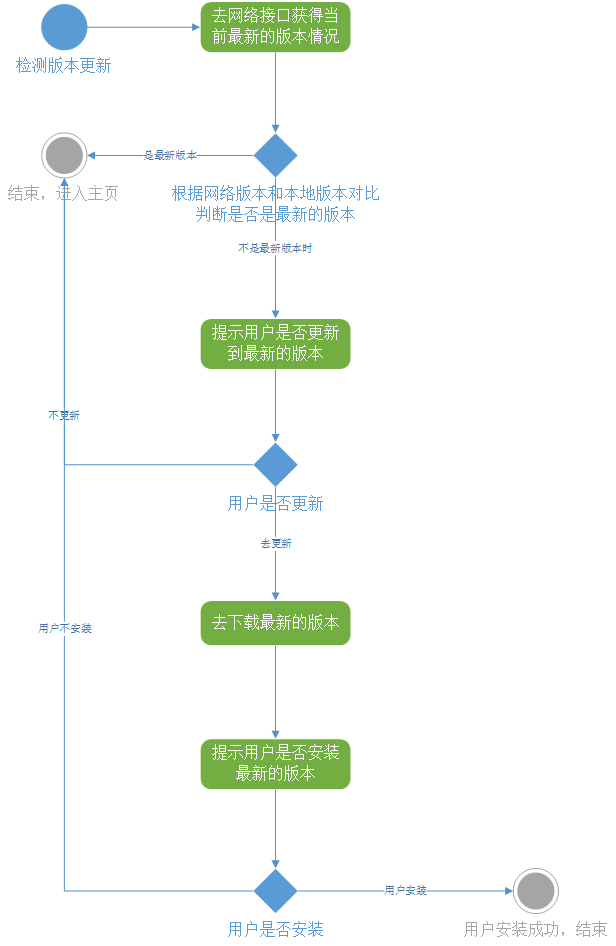
本單元聚焦於Android進階開發中常見的Splash(啟動引導頁)設計,重點在於梳理啟動頁在「版本更新」情境下的業務判斷流程:應用啟動時,Splash頁會先確認目前的版
 菜鳥起飛記:Android 四種 launchMode 的應用場景全解析
菜鳥起飛記——聊聊 Activity 的四種啟動模式該如何選用。Activity 一共有以下四種 launchMode:1. standard2. singleTop3.