

編輯:關於 Android 程式設計
動態壁紙的實現,本質上是在 Activity 中調用壁紙服務:透過綁定服務取得 IWallpaperService,再調用該接口的 attach 函數來完成壁紙的挂載。
值得特別注意的是,調用之後動態壁紙其實是顯示在 Activity 的「背後」,而 Activity 本身則以透明方式呈現,這樣用戶才能透見下方的動態壁紙。倘若 Activity 並非透明,那麼壁紙便會被完全遮擋,什麼也看不到。
代碼中會用到以下兩個接口:
IWallpaperService mService;
IWallpaperEngine mEngine;
在相應目錄下可以看到三個 aidl 接口定義,分別是:
interface IWallpaperConnection {
void attachEngine(IWallpaperEngine engine);
ParcelFileDescriptor setWallpaper(String name);
}
oneway interface IWallpaperService {
void attach(IWallpaperConnection connection, IBinder windowToken, int windowType, boolean isPreview, int reqWidth, int reqHeight);
}
oneway interface IWallpaperEngine {
void setDesiredSize(int width, int height);
void setVisibility(boolean visible);
void dispatchPointer(in MotionEvent event);
void dispatchWallpaperCommand(String action, int x, int y, int z, in Bundle extras);
void destroy();
}
private WallpaperManager mWallpaperManager = null;
private WallpaperInfo mWallpaperInfo = null;
private WallpaperConnection mWallpaperConnection = null;
private Intent mWallpaperIntent;
mWallpaperManager = WallpaperManager.getInstance(this);
mWallpaperInfo = mWallpaperManager.getWallpaperInfo();//若返回 null,則說明當前並非動態壁紙
mWallpaperIntent = new Intent(WallpaperService.SERVICE_INTERFACE);
mWallpaperIntent.setClassName(mWallpaperInfo.getPackageName(), mWallpaperInfo.getServiceName());
bindService(mIntent, this, Context.BIND_AUTO_CREATE);
其中 mService 就是前面提到的 aidl 接口。在連接監聽回調中嘗試執行 attach:
public void onServiceConnected(ComponentName name, IBinder service) {
mService = IWallpaperService.Stub.asInterface(service);
try {
mService.attach(this, view.getWindowToken(),
// WindowManager.LayoutParams.TYPE_APPLICATION_MEDIA_OVERLAY,
WindowManager.LayoutParams.TYPE_APPLICATION_MEDIA,
true, root.getWidth(), root.getHeight());
} catch (RemoteException e) {
Log.w("", "Failed attaching wallpaper; clearing", e);
}
}
在實踐過程中,我發現 bindService 總是失敗。排查之後才意識到這是權限問題——只有具備系統權限的 apk 才能使用 WallpaperService.SERVICE_INTERFACE 服務。於是問題便轉化為:該如何獲取系統權限。這一步往往需要將應用打包為系統簽名,或放入系統的特定目錄下,才能順利調用該壁紙服務。
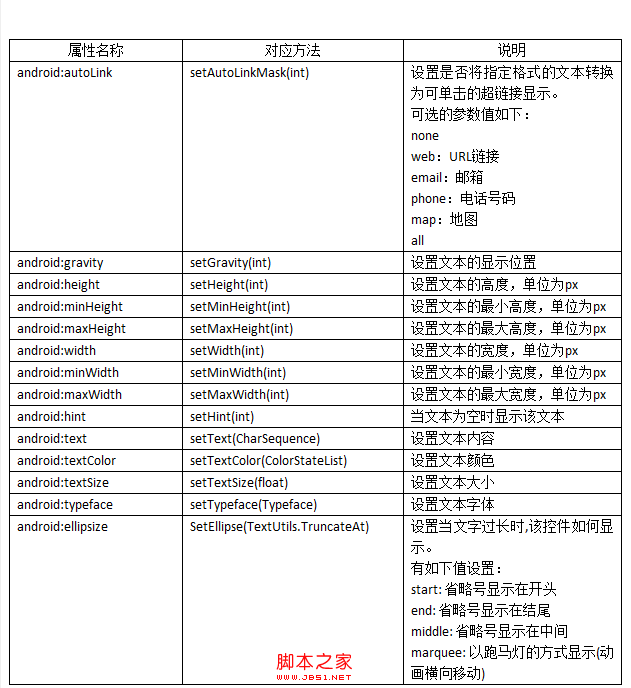 Android TextView 文本控件用法深入解析
在 Android 開發裡,文本類控件主要包括 TextView 與 EditView 兩大類,而 TextView 無疑是最基礎、使用頻率最高的一個。本節先從 Text
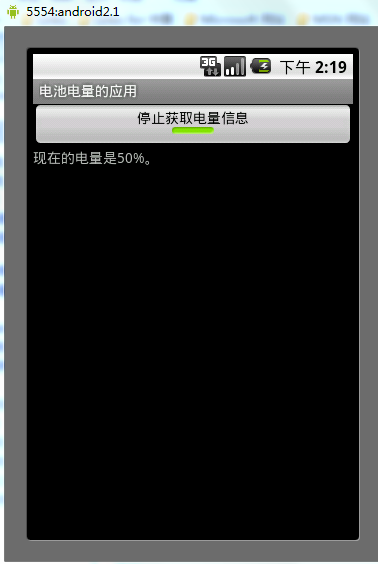 Android 取得手機電池電量:廣播接收器的完整實作
電池電量的取得在 Android 中走的是廣播機制。系統在電量變化時會發出帶有特定 Action 的 Intent,應用只要註冊 BroadcastReceiver 就能
 自定義 Android EditText 背景與輸入驗證
用 layer-list 建立背景EditText 的背景可以透過 layer-list 與 shape 定義。使用 solid 設定填充色,stroke 設定邊框,co
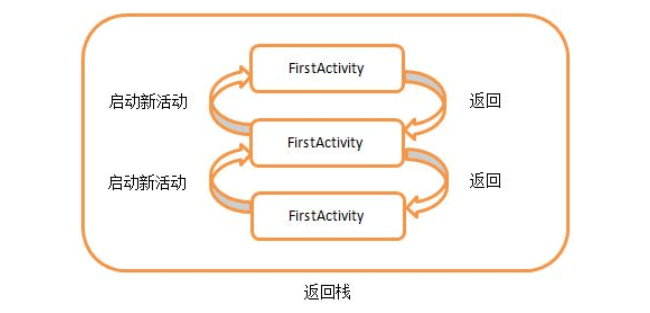 一次搞懂 Activity 的四種啟動模式
Activity 的啟動模式(launchMode)決定了「同一個頁面被開啟多次時,系統會建立新實例,還是重用舊的」。Android 一共提供四種模式:standard、