

編輯:關於 Android 程式設計
電池電量的取得在 Android 中走的是廣播機制。系統在電量變化時會發出帶有特定 Action 的 Intent,應用只要註冊 BroadcastReceiver 就能收到並解析其中的資訊。
常用的三個 Action 分別是:
Intent.ACTION_BATTERY_CHANGED:電量發生變化的通知(最常用,可攜帶完整電量資訊)。Intent.ACTION_BATTERY_LOW:電量降到系統定義的低電量門檻。Intent.ACTION_BATTERY_OKAY:電量從低電量狀態恢復正常。其中 ACTION_BATTERY_CHANGED 有個特別之處:它雖然是廣播,但屬於受保護的系統廣播,不能透過 Manifest 靜態註冊,必須在程式執行期以 registerReceiver() 動態註冊。
<?xml version="1.0" encoding="utf-8"?>
<LinearLayout xmlns:android="https://schemas.android.com/apk/res/android"
    android:orientation="vertical"
    android:layout_width="fill_parent"
    android:layout_height="fill_parent">

    <ToggleButton
        android:id="@+id/tb"
        android:layout_width="fill_parent"
        android:layout_height="wrap_content"
        android:textOn="停止獲取電量信息"
        android:textOff="獲取電量信息" />

    <TextView
        android:id="@+id/tv"
        android:layout_width="fill_parent"
        android:layout_height="wrap_content" />
</LinearLayout>
package com.ljq.activity;

import android.app.Activity;
import android.content.BroadcastReceiver;
import android.content.Context;
import android.content.Intent;
import android.content.IntentFilter;
import android.os.Bundle;
import android.widget.CompoundButton;
import android.widget.TextView;
import android.widget.ToggleButton;
import android.widget.CompoundButton.OnCheckedChangeListener;

public class BatteryActivity extends Activity {
    private ToggleButton tb = null;
    private TextView tv = null;
    private BatteryReceiver receiver = null;

    @Override
    public void onCreate(Bundle savedInstanceState) {
        super.onCreate(savedInstanceState);
        setContentView(R.layout.main);

        receiver = new BatteryReceiver();
        tv = (TextView) findViewById(R.id.tv);
        tb = (ToggleButton) findViewById(R.id.tb);

        tb.setOnCheckedChangeListener(new OnCheckedChangeListener() {
            public void onCheckedChanged(CompoundButton compoundButton, boolean isChecked) {
                if (isChecked) {
                    // 開始監聽電量
                    IntentFilter filter = new IntentFilter(Intent.ACTION_BATTERY_CHANGED);
                    registerReceiver(receiver, filter);
                } else {
                    // 停止監聽,記得解除註冊
                    unregisterReceiver(receiver);
                    tv.setText(null);
                }
            }
        });
    }

    private class BatteryReceiver extends BroadcastReceiver {
        @Override
        public void onReceive(Context context, Intent intent) {
            int current = intent.getExtras().getInt("level");  // 目前電量
            int total = intent.getExtras().getInt("scale");    // 滿電標尺
            int percent = current * 100 / total;
            tv.setText("現在的電量是" + percent + "%。");
        }
    }
}
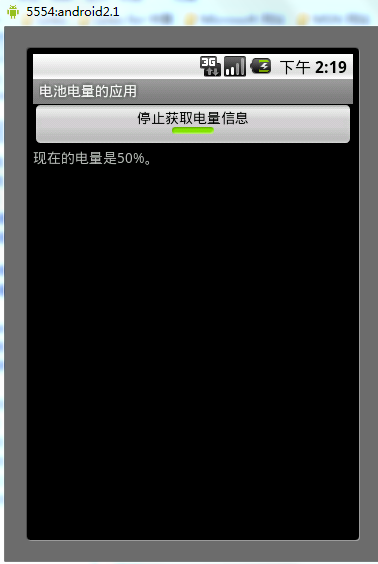
電量的計算方式。Intent 中並沒有直接給出百分比,而是提供 level(目前電量)與 scale(滿電刻度)兩個值,必須自行換算:level * 100 / scale。
註冊與解除註冊必須成對。動態註冊的 receiver 若不解除,Activity 被銷毀後 receiver 仍留在系統中,會造成記憶體洩漏。這個範例用 ToggleButton 的狀態來配對兩者,實務上也常改在 onResume()/onPause() 中處理。
其他可用的欄位。同一個 Intent 除了電量,還帶有 temperature(溫度,單位為十分之一度Celsius)、voltage(電壓,毫伏)、technology(電池技術,如 li-poly)、status(充電狀態)與 health(電池健康度)等資訊,做電池診斷類功能時相當實用。
一個更簡便的替代方案。如果只是需要「當下」的電量而不想管理 receiver,可以直接發送一個空的 ACTION_BATTERY_CHANGED 意圖,以 sendStickyBroadcast() 的形式接收系統保留的最後一筆 sticky 廣播,即可同步取得電量值,省去註冊流程。
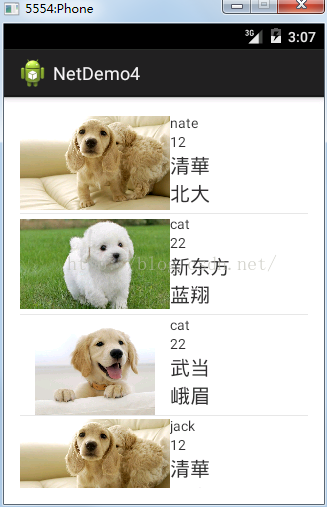 Android 網路資料處理:JSON 生成、解析與 ListView 圖片顯示
在 Android 應用中,常需要從伺服器取得 JSON 資料,再解析成物件並顯示在畫面上。本文以一個 ListView 範例,說明 JSON 字串生成、網路下載、解析、
 TabHost實現頁面內多選項卡切換的完整流程
TabHost 可以在同一個界面裡容納多個選項卡,很多應用都用它來做頂部或底部的分欄切換。本文從兩個基礎概念講起,再走一個可運行的最小範例。 一、基礎概念 TabWidg
 Android Studio 的 10 個高價值技巧:你可能一直不知道的效率捷徑
Android Studio 是每個 Android 開發每天都要打開的工具,但即使你已經用了好幾年,也很可能錯過了不少能省下大量時間的技巧。下面這十條,我不做逐句翻譯,
 解決 Android Studio 反覆提示重啟 ADB 的問題
用手機連上電腦除錯時,Android Studio 常常跳出提示要你重啟 ADB,但點了重啟之後,那個提示對話框又立刻跳出來。會這樣反覆出現,是因為 ADB 根本沒有重啟