

編輯:關於 Android 程式設計
在 Android 應用中,從伺服器抓取圖片並顯示於畫面是很常見的需求。以下範例示範如何以 HttpGet 向伺服器請求圖片,透過串流解碼為 Bitmap,再設定到 ImageView 上。
public static Bitmap getBitmapFromServer(String imagePath) {

    HttpGet get = new HttpGet(imagePath);
    HttpClient client = new DefaultHttpClient();
    Bitmap pic = null;
    try {
        HttpResponse response = client.execute(get);
        HttpEntity entity = response.getEntity();
        InputStream is = entity.getContent();

        pic = BitmapFactory.decodeStream(is); // 關鍵:將串流解碼為 Bitmap

    } catch (ClientProtocolException e) {
        e.printStackTrace();
    } catch (IOException e) {
        e.printStackTrace();
    }
    return pic;
}
其中 imagePath 是你的圖片網址。整個流程重點在於:先以 HTTP 請求取得回應,從中取出資料串流,最後以 BitmapFactory.decodeStream() 將串流解碼成 Bitmap 物件。
取得 Bitmap 後,即可透過 setImageBitmap() 把它顯示在 ImageView 上:
imageView.setImageBitmap(bitmap);
提醒:由於網路請求屬於耗時操作,實務上應將下載動作放在背景執行緒(如 AsyncTask 或 Thread)中進行,避免阻塞主 UI 執行緒導致應用無回應。
 手寫一個支持縮放與拖動的 ImageView
網上講圖片縮放拖動的文章不少,但很多都是直接引入現成的庫。這裡不依賴任何第三方,純手寫一個 BaseDragZoomImageView,把原理攤開來看。 思路 要在手機
 細說 JVM:垃圾收集的三個核心問題與四類經典算法
本文聚焦理論層面的垃圾收集算法。下一篇再談實現這些算法的具體收集器。 理解 JVM 的垃圾收集策略,其實只要回答三個問題: 一、怎麼判斷哪些內存是垃圾? 二、用什麼方
 基於XMPP協議打造Android即時通訊:IM聊天與多人聊天室全解析
由於項目需要一款基於XMPP協議的Android通訊軟件,於是便有了這次對XMPP的深入研究。本文從協議基礎出發,一路講到Smack的IM聊天與MultiUserChat
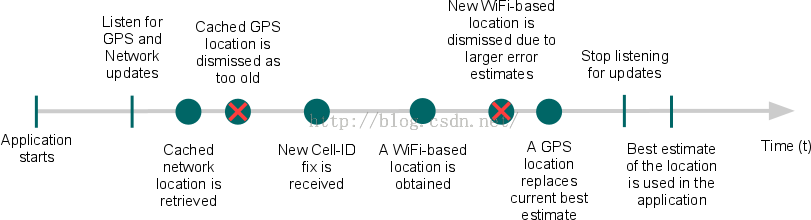 Android 定位策略指南:兼顧精度與電量的取捨
本文所述的策略適用於平台內建的定位 API(android.location)。若使用 Google Play 服務中的融合定位 API(Fused Location P