

編輯:關於 Android 程式設計
把 Eclipse、SDK 與 ADT 都更新到最新版之後,家裡的環境一切正常;換到公司機器上執行模擬器卻直接失敗。錯誤訊息大致如下:
Failed to create Context 0x3005
emulator: WARNING: Could not initialize OpenglES emulation, using software renderer...
這個問題在換機器、換使用者環境或更新 SDK 之後特別容易出現,嘗試重開模擬器、刪除 AVD 重建通常都沒有用。
在 Google Code 的論壇上可以找到一段相當有代表性的排查紀錄:
Make sure your graphics card driver is up to date.We tried running emulator.exe from the command line (emulator -avd <name>) and noticed that OpenGL was erroring out. But interestingly emulator-x86 -avd <name> would actually work and fire up the emulator.
- Installed the Android Bundle.
- Created an AVD.
- Clicked the start button and the emulator does not open.
- No error messages are reported as the "Starting Android Emulator" dialogue times out.
We then tried moving the four DLLs from the /tools/lib directory to the /tools directory. Even more interestingly, after we did that emulator-x86 stopped working and began pitching a fit about the OpenGL ES.
So we downloaded the newest graphics driver, left the DLLs in the /tools directory, and finally the emulator would fire up from Eclipse as well as from the command line.
這段描述裡有幾個值得注意的線索:命令行執行 emulator -avd 時會看到 OpenGL 相關錯誤;改用 emulator-x86 -avd 反而能啟動;而搬動 tools/lib 下的 DLL 會讓情況變得更糟。種種現象都指向同一個方向——圖形驅動的問題,而不是模擬器本身的問題。
關鍵就在 newest graphics driver 這句話。裝一個驅動檢測工具掃一下,就會發現顯卡驅動可能停留在好幾年前的版本(例如 2008 年版)。把它升級到最新版、重新開機,模擬器就能正常啟動了。
所以遇到 Failed to create Context 0x3005 時,建議的排查順序是:
Sun Graphics Device 相關選項在「Host GPU」與「Software」之間切換試試。若實體顯卡支援不足,改用軟體渲染能繞過問題。tools/lib 下的檔案有其載入路徑依賴,手動搬移只會製造新的錯誤。現代 Android Studio 的模擬器(QEME 引擎)在這方面的處理已改善不少,若在舊版 SDK 上遇到此問題且驅動更新無效,考慮改用實體裝置除錯往往比繼續折騰模擬器更省時間。
 Android 筆記:configChanges 與 onConfigurationChanged 完整解析
做 Android 開發很難避開廣告 SDK。整合了幾套 SDK 之後你會發現,幾乎每一家都會要求你在 AndroidManifest.xml 的 Activity 上補
 react-native-easy-toast:Android 與 iOS 通用的簡易 Toast 元件
簡介react-native-easy-toast 是一款簡單易用的 React Native Toast 元件,支援 Android 與 iOS,適合在操作成功、錯誤提
 在 Android Studio 中生成 .so 庫的完整實踐
簡介 本文記錄了在 Android Studio 中生成 so 庫的實踐過程。上一篇記錄的是通過 Eclipse 生成 so 的方法,這裡則記錄一下如何在 Android
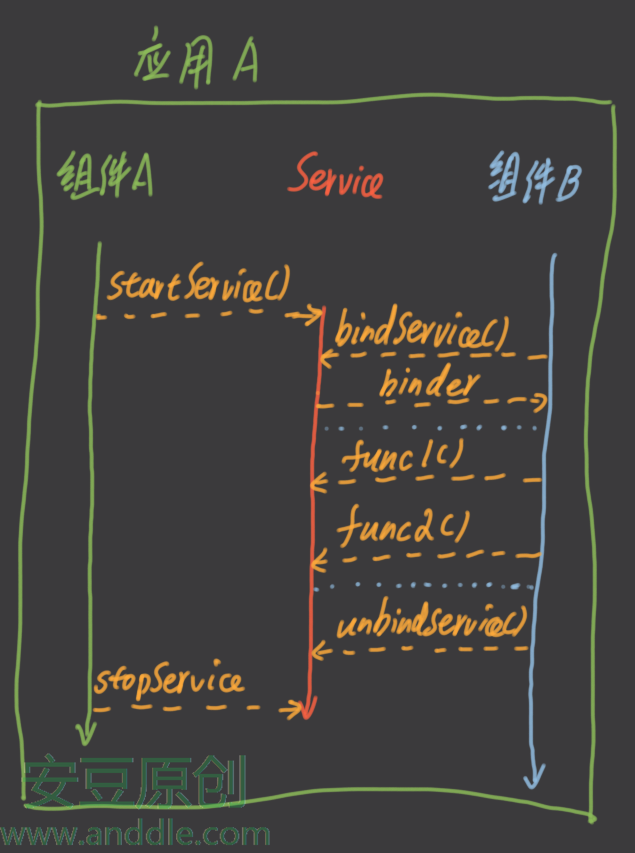 四大組件之 Service(三)——Service 的跨進程調用
第4節 遠程調用 前面聊過,如果以「Service 與觸發它的組件是否處在同一進程」為標準來切分,Service 可以分成兩類:本地 Service 與遠程 Servic