

編輯:關於 Android 程式設計
先前寫過一篇關於攔截 PhoneGap WebView 事件的方法:在實作 CordovaInterface 的 Activity 中,於 onMessage 裡依第一個參數的 message name 判斷 WebView 的載入狀態。
但這個做法在 Fragment 場景下會失效。若同一個 Activity 內掛載了多個含 WebView 的 Fragment,onMessage 就無法分辨事件究竟來自哪一個 WebView。
經過嘗試後發現,仍然可以用 setWebViewClient() 的方式解決:覆寫 WebViewClient 的 onPageStarted、onPageFinished、onReceivedError 等回呼,各自處理對應的載入階段。因為每個 WebView 各自持有自己的 client 物件,事件來源自然不會混淆。
CordovaWebView webView = (CordovaWebView) findViewById(R.id.webView);

CordovaInterface cordovaInterface = (CordovaInterface) context;

CordovaWebViewClient cordovaWebViewClient = new CordovaWebViewClient(cordovaInterface, webView) {
    @Override
    public void onPageStarted(WebView view, String url, Bitmap favicon) {
        LogUtil.debug("onPageStarted " + url);
        super.onPageStarted(view, url, favicon);
        progressBar.setVisibility(View.VISIBLE);
    }

    @Override
    public void onPageFinished(WebView view, String url) {
        LogUtil.debug("onPageFinished " + url);
        super.onPageFinished(view, url);
        progressBar.setVisibility(View.GONE);
    }

    @Override
    public void onReceivedError(WebView view, int errorCode, String description, String failingUrl) {
        LogUtil.debug("onReceivedError " + failingUrl);
        super.onReceivedError(view, errorCode, description, failingUrl);
        progressBar.setVisibility(View.GONE);
        errorView.setVisibility(View.VISIBLE);
    }
};

webView.setWebViewClient(cordovaWebViewClient);
webView.loadUrl(url);
記得呼叫 super:每個覆寫方法都應先呼叫父類別的實作。CordovaWebViewClient 內除了頁面導航,還負責 bridge 與外掛的初始化等作業,漏掉的話容易出現難以定位的異常。
每個 Fragment 各自建立 client:關鍵在於 client 是綁定到個別 WebView 的。把這段程式寫在 Fragment 自己的 onCreateView() 之後,每個 Fragment 就會擁有獨立的 progressBar 與 errorView 狀態。
載入失敗的處理:onReceivedError 中把載入進度條收掉並顯示錯誤畫面,是較完整的做法;此處 also 建議改用 failingUrl 而非 url 記錄,因為前者才是真正載入失敗的位址。
 Android 瀑布流照片牆實作:讓不規則排列展現獨特美感
傳統的介面排版總是行列分明、井然有序,看久了難免讓人生出幾分審美疲勞。就在這個時候,瀑布流布局憑藉它看似隨性、實則別有韻味的排列方式,為使用者帶來耳目一新的感受,也難怪有
 在 Android 應用層驗證自訂硬體服務:內置 Java 程式
當硬體驅動與 Frameworks 服務完成後,下一步就是從應用層驗證是否能取得服務。做法是建立一個內置的 Java 應用程式,透過 ServiceManager 取得指
 Android 效能優化(上):UI 渲染、過度繪製與布局層次
流暢畫面的底層節奏 使用者感受到的順暢,通常意味著畫面更新達到每秒四十到六十幀。以六十幀而言,每一幀大約只有 16.67 毫秒的處理時間。Android 的 UI 繪製由
 Android Activity 生命週期實務注意事項整理
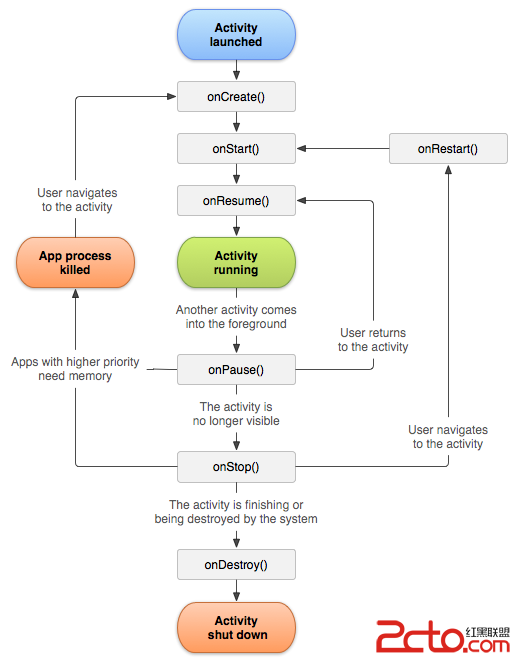
1. onDestroy() 一定會被呼叫嗎? There are situations where the system will simply kill the