

編輯:關於 Android 程式設計
正如你的應用能夠把資料分享給其他程式一樣,它也可以輕易接收來自其他程式的資料。設計接收功能時,需要考量使用者如何與你的程式互動,以及你想接收哪一類型的資料。舉例來說,一個社群網路應用通常會對接收文字內容感興趣,例如另一個程式分享過來的網址;而 Google+ 這類應用則能同時接收文字與圖片(單張或多張),讓使用者能輕鬆地從相簿把照片分享出去。
Intent 過濾器會告知系統某個元件能接收哪些 Intent。在 AndroidManifest.xml 中,使用 <intent-filter> 元素來定義。若你的程式要處理接收的文字與任意類型的圖片(單張或多張),可如下設定:
<activity android:name=".ui.MyActivity">
<intent-filter>
<action android:name="android.intent.action.SEND" />
<category android:name="android.intent.category.DEFAULT" />
<data android:mimeType="image/*" />
</intent-filter>
<intent-filter>
<action android:name="android.intent.action.SEND" />
<category android:name="android.intent.category.DEFAULT" />
<data android:mimeType="text/plain" />
</intent-filter>
<intent-filter>
<action android:name="android.intent.action.SEND_MULTIPLE" />
<category android:name="android.intent.category.DEFAULT" />
<data android:mimeType="image/*" />
</intent-filter>
</activity>
當其他應用構造 Intent 並傳給 startActivity() 來分享內容時,你的程式就會出現在 Intent 選擇器中。一旦使用者選擇了你的程式,對應的 Activity 便會啟動,此時你就能在程式碼與 UI 中處理這些內容。
要取得 Intent 傳送的內容,先呼叫 getIntent() 取得 Intent 物件,再檢查它的內容以決定後續動作。別忘了,如果被啟動的 Activity 來自系統其他部分(如 Launcher),檢查 Intent 時要特別留意。
void onCreate (Bundle savedInstanceState){
Intent intent = getIntent();
String action = intent.getAction();
String type = intent.getType();
if (Intent.ACTION_SEND.equals(action) && type != null) {
if ("text/plain".equals(type)) {
handleSendText(intent);
} else if (type.startsWith("image/")) {
handleSendImage(intent);
}
} else if (Intent.ACTION_SEND_MULTIPLE.equals(action) && type != null) {
if (type.startsWith("image/")) {
handleSendMultipleImages(intent);
}
} else {
// 處理其他 Intent,例如從主畫面啟動的情形
}
}
void handleSendText(Intent intent) {
String sharedText = intent.getStringExtra(Intent.EXTRA_TEXT);
if (sharedText != null) {
// 更新 UI 以顯示分享的文字
}
}
void handleSendImage(Intent intent) {
Uri imageUri = (Uri) intent.getParcelableExtra(Intent.EXTRA_STREAM);
if (imageUri != null) {
// 更新 UI 以顯示分享的圖片
}
}
void handleSendMultipleImages(Intent intent) {
ArrayList<Uri> imageUris = intent.getParcelableArrayListExtra(Intent.EXTRA_STREAM);
if (imageUris != null) {
// 更新 UI 以顯示分享的多張圖片
}
}
警告:務必仔細檢查輸入的資料,因為你無法預期其他程式會送來什麼內容。例如 MIME 類型可能被錯誤設定,或傳來的圖片過大。此外,二進位資料應在獨立執行緒中處理,而非在主執行緒(UI)中進行。更新 UI 可以簡單到填入 EditText,也可以複雜到對圖片套用感興趣的濾鏡效果。
 安卓手機怎麼改 HOSTS?解決 Google 服務無法登入
不少安卓使用者都碰過 Google 帳號登不入、Play 商店打不開的情況。電腦端我們會改 hosts 繞過解析問題,手機上其實也能做,只是需要先取得 root 權限。
 Activity 的創建和顯示以及源碼分析記錄
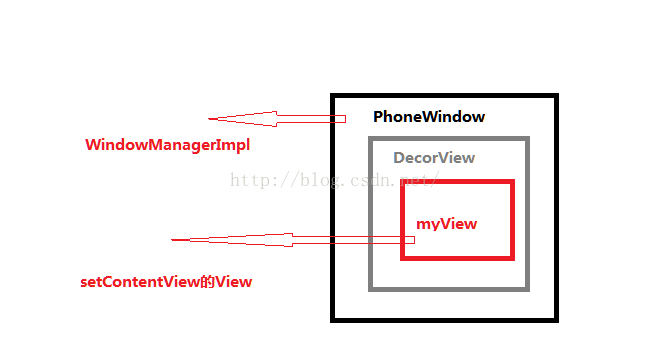
Tips:此源碼分析基於 Android 4.2。 先來看看一個 Activity 上的 UI 控件結構。 圖 1-1 Activity 中的 UI 組件結構 好了,現
 Android Low Memory Killer 深入解析:低記憶體時誰先被殺
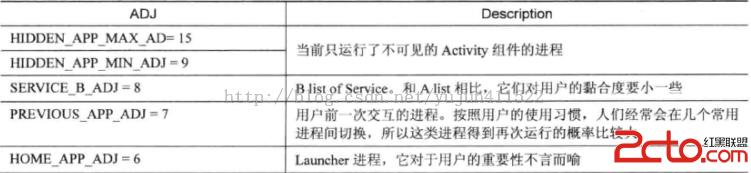
在現有技術條件下,記憶體永遠是吃緊的資源。PC 上都可能記憶體不足,行動裝置更是如此,一旦不足就會卡頓,直接影響使用者體驗。 Android 底層是 Linux,而 Li
 Android 自定義統計圖表:用 Canvas 手繪柱狀圖、折線圖與圓餅圖
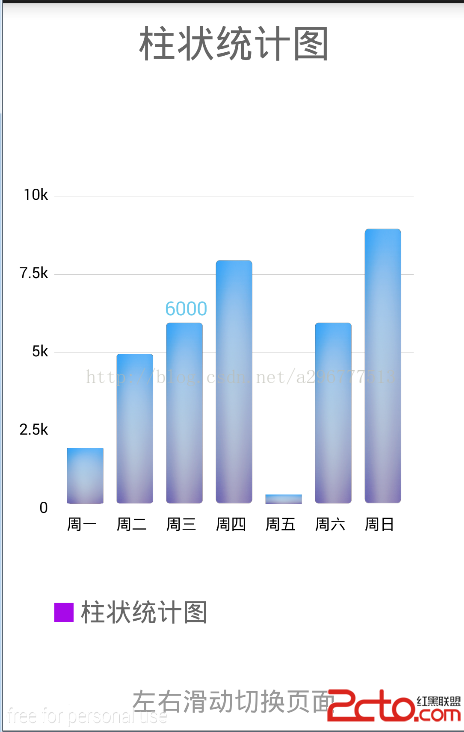
最近因為專案需要,研究了一些統計圖的做法。一開始看了很多文章,大部分都是引用第三方庫——上手快,但功能太死板,很多設計稿上的要求根本滿足不了。所以最後決定自己用 View