

編輯:關於 Android 程式設計
Android 中每個 App 各自獨立於自己的進程,Java 又不支援跨進程的記憶體共享,因此要傳物件,就得先把它拆解成作業系統能懂的資料格式,在對岸再重組回來。JavaEE 用 RMI 搭配序列化處理這件事,Android 則用 AIDL。
AIDL 是介面描述語言,用來約束兩個進程的通訊規則,並讓編譯器據此產生程式碼,完成裝置上的行程間通訊(IPC)。運作方式與 CORBA 相似:通訊內容先被轉成 AIDL 協議訊息送達對方,對方再還原成物件。因為需要雙向轉換,Android 以代理類在背後完成序列化與反序列化,而這些代理類由編譯器自動產生,對開發者完全透明。
假設 App B 要以 Service 形式對外提供 download(String path),先在 B 的 cn.itcast.aidl 下建立 IDownloadService.aidl:
package cn.itcast.aidl;

interface IDownloadService {
    void download(String path);
}
存檔後,Eclipse 會自動在 gen 目錄產生 IDownloadService.java,其中有一個 Stub 抽象類,包含你定義的方法與若干輔助方法。特別注意 asInterface(IBinder):遠程服務回傳給客戶端的是代理物件,不能直接強轉成介面型別,必須透過它來轉換。
public class ServiceBinder extends IDownloadService.Stub {
    @Override
    public void download(String path) throws RemoteException {
        Log.i("DownloadService", path);
    }
}
public class DownloadService extends Service {
    private ServiceBinder serviceBinder = new ServiceBinder();

    @Override
    public IBinder onBind(Intent intent) { return serviceBinder; }
}
其他應用可用隱式 Intent 找到它,action 名稱自訂,並在清單檔註冊:
<service android:name=".DownloadService">
    <intent-filter>
        <action android:name="cn.itcast.process.aidl.DownloadService" />
    </intent-filter>
</service>
把 aidl 檔連同 package 一起複製到客戶端專案,Eclipse 會同步產生介面檔,接著就能綁定並呼叫:
private IDownloadService downloadService;

@Override
protected void onCreate(Bundle savedInstanceState) {
    super.onCreate(savedInstanceState);
    setContentView(R.layout.main);
    bindService(new Intent("cn.itcast.process.aidl.DownloadService"),
            serviceConnection, BIND_AUTO_CREATE);
}

private ServiceConnection serviceConnection = new ServiceConnection() {
    @Override
    public void onServiceConnected(ComponentName name, IBinder service) {
        downloadService = IDownloadService.Stub.asInterface(service);
        try {
            downloadService.download("https://www.itcast.cn");
        } catch (RemoteException e) {
            Log.e("ClientActivity", e.toString());
        }
    }
    @Override
    public void onServiceDisconnected(ComponentName name) {
        downloadService = null;
    }
};
記得在 onDestroy 呼叫 unbindService。若客戶端與服務端不在同一進程,所有方法呼叫都是跨進程的,因此務必處理 RemoteException,並避免在方法裡傳遞龐大物件——Parcel 有大小限制,超過會直接拋出 TransactionTooLargeException。
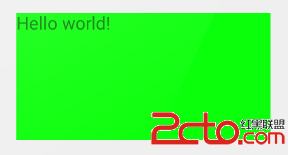 圖文並茂透解Android中用Shape定義GradientDrawable
Android為開發者準備了形形色色的Drawable,同時也允許我們用XML來靈活定義它們。本文將聚焦一個重點:如何借助XML中的shape節點,定義出一個Gradie
 自訂 ProgressBar:任何圖片都能變成轉圈動畫
今天群裡有人問怎麼自訂 Android Holo 主題下的 ProgressBar。剛好我之前做過類似的事——透過自寫動畫加上自訂 Style,可以用任何一張圖片當作 P
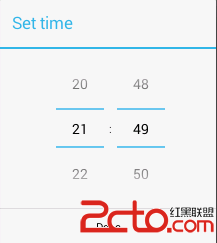 Android 日期與時間選擇對話框實作
Android 提供 DatePickerDialog 與 TimePickerDialog,讓使用者能以系統標準介面選擇日期與時間。兩者都屬於 AlertDialog
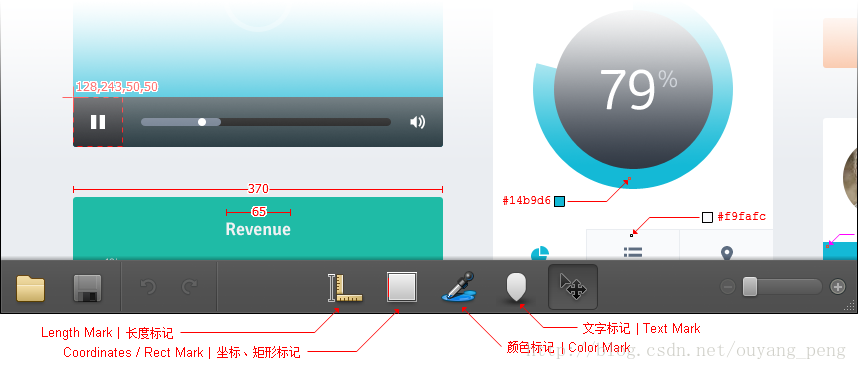 高效設計稿標注與測量工具 Markman 介紹
在 UI 開發流程中,設計稿標注與測量經常影響溝通效率。若設計稿缺少標注,開發者往往需要反覆確認尺寸與顏色。Markman 是一款可協助標注與測量的工具,適合設計師、前端