

編輯:關於 Android 程式設計
從 Android 2.2 起,系統新增了 ThumbnailUtils 類別,位於 android.media 套件下。它能協助我們從 MediaProvider 取得系統中影片或圖片檔案的縮圖,並提供三個可直接呼叫的靜態方法。
createVideoThumbnail(String filePath, int kind):取得影片縮圖,第一個參數是影片路徑(例如 /sdcard/android123.3gp),第二個參數可為 MINI_KIND 或 MICRO_KIND,最終結果與解析度有關。
extractThumbnail(Bitmap source, int width, int height, int options):直接對 Bitmap 進行縮圖,最後一個參數設為 OPTIONS_RECYCLE_INPUT 可回收資源。
extractThumbnail(Bitmap source, int width, int height):與上一方法相同,但沒有 options 選項。
透過 ContentResolver 查詢 MediaStore,再呼叫 Thumbnail 取得縮圖:
public static Bitmap getVideoThumbnail(ContentResolver cr, Uri uri) {
Bitmap bitmap = null;
BitmapFactory.Options options = new BitmapFactory.Options();
options.inDither = false;
options.inPreferredConfig = Bitmap.Config.ARGB_8888;
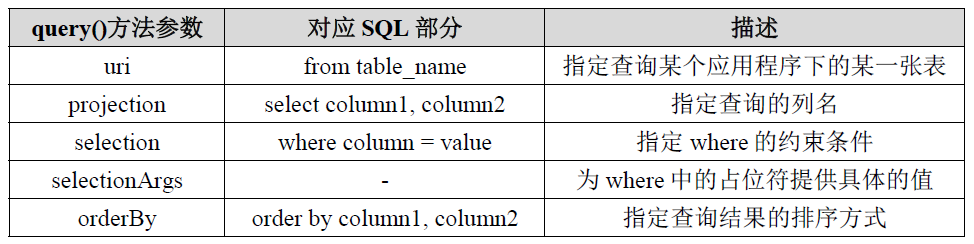
Cursor cursor = cr.query(uri, new String[]{ MediaStore.Video.Media._ID }, null, null, null);
if (cursor == null || cursor.getCount() == 0) { return null; }
cursor.moveToFirst();
String videoId = cursor.getString(cursor.getColumnIndex(MediaStore.Video.Media._ID));
if (videoId == null) { return null; }
cursor.close();
long videoIdLong = Long.parseLong(videoId);
bitmap = MediaStore.Video.Thumbnails.getThumbnail(cr, videoIdLong, Images.Thumbnails.MICRO_KIND, options);
return bitmap;
}
取得圖片縮圖時有兩個重要好處:其一,透過 inJustDecodeBounds 先讀取寬高而不實際載入 Bitmap,節省記憶體;其二,使用 ThumbnailUtils 產生的縮圖不會被拉伸。核心流程是先讀一次寬高、計算縮放比例,再重新解碼並用 ThumbnailUtils 生成指定大小的縮圖:
private Bitmap getImageThumbnail(String imagePath, int width, int height) {
Bitmap bitmap = null;
BitmapFactory.Options options = new BitmapFactory.Options();
options.inJustDecodeBounds = true; // 此時 bitmap 為 null,僅讀取寬高
bitmap = BitmapFactory.decodeFile(imagePath, options);
options.inJustDecodeBounds = false;
int h = options.outHeight, w = options.outWidth;
int beWidth = w / width, beHeight = h / height, be = 1;
be = (beWidth < beHeight) ? beWidth : beHeight;
if (be <= 0) be = 1;
options.inSampleSize = be;
bitmap = BitmapFactory.decodeFile(imagePath, options);
bitmap = ThumbnailUtils.extractThumbnail(bitmap, width, height, ThumbnailUtils.OPTIONS_RECYCLE_INPUT);
return bitmap;
}
先用 createVideoThumbnail 建立影片縮圖,再用 extractThumbnail 生成指定大小。若想要的寬高都小於 MICRO_KIND,建议使用 MICRO_KIND 以節省記憶體:
private Bitmap getVideoThumbnail(String videoPath, int width, int height, int kind) {
Bitmap bitmap = ThumbnailUtils.createVideoThumbnail(videoPath, kind);
bitmap = ThumbnailUtils.extractThumbnail(bitmap, width, height, ThumbnailUtils.OPTIONS_RECYCLE_INPUT);
return bitmap;
}
其中 MINI_KIND 為 512×384,MICRO_KIND 為 96×96。版面配置只要放入兩個 ImageView,分別顯示圖片縮圖與影片縮圖即可。這兩個方法需在 Android 2.2 以上版本使用,因為其中用到了 ThumbnailUtils。
 Android 內容提供器 ContentProvider 詳解(一):讀取與共享跨應用資料
本文為《第一行代碼 Android》的讀書筆記與摘錄。 一、Content Provider 簡介 內容提供器(Content Provider)主要用於在不同應用程式之
 Android 單執行緒與多執行緒下載比較
單執行緒下載以一個迴圈持續讀取串流並寫入檔案,實作簡單但速度受限。多執行緒下載則先取得檔案總長度,再將檔案切成多段,由不同執行緒分別下載。分段下載原理每個執行緒透過 HT
 ViewPager 與 Fragment 多層嵌套的踩坑與解法
日常開發裡,用 ViewPager 搭配 Fragment 就能應付絕大多數的頁面切換需求。可一旦遇到需要「套娃」的多層嵌套場景,事情就變得棘手起來。本文記錄一次 Vie
 Android 如何防止 APK 被反編譯:ProGuard 設定教學
難堪的现实 身為 Android 應用開發者,不得不面對一個尷尬的局面:自己花無數夜晚做出來的應用,別人幾秒鐘就能反編譯拿走。 Google 顯然也意識到了這個問題。從