

編輯:關於 Android 程式設計
Notification 類別描述了如何透過 NotificationManager 將一則持續性通知呈現給使用者。從 Android 3.0 起,官方加入了 Notification.Builder,讓建構通知變得更加直觀。本文帶你從源碼層面拆解它的常量、字段、構造函數與 Builder 建造者模式。
Notification 定義了一系列表示「使用系統預設值」的常量,可透過按位或(bitwise-or)任意組合:
public static final int DEFAULT_ALL    = ~0; // 全部使用預設值
public static final int DEFAULT_SOUND  = 1;  // 使用預設提示音
public static final int DEFAULT_VIBRATE = 2; // 使用預設震動(需 VIBRATE 權限)
public static final int DEFAULT_LIGHTS = 4;  // 使用預設燈光
此外還有預設的音频流類型 STREAM_DEFAULT = -1,目前預設採用 STREAM_RING。
Notification 透過 flags 字段的一系列標誌位來控制行為:
FLAG_SHOW_LIGHTS:為通知加上 LED 燈提示。LED 的亮滅由 ledARGB(顏色)、ledOnMS(亮)、ledOffMS(滅)控制。由於硬體各異,建議盡量使用系統預設值。FLAG_ONGOING_EVENT:讓通知常駐狀態欄,用於「正在進行」的事件(如來電),會被歸入「正在進行」分組。FLAG_INSISTENT:在通知取消或通知窗打開前,音訊會持續重複。FLAG_ONLY_ALERT_ONCE:設定後,震動與聲音只執行一次。FLAG_AUTO_CANCEL:使用者點擊後,通知自動清除。FLAG_NO_CLEAR:使用者點擊「清除全部」時,該通知不被清除。FLAG_FOREGROUND_SERVICE:表示這是一則代表正在執行的服務的通知(如退出後仍在狀態欄顯示的音樂播放器圖示)。FLAG_HIGH_PRIORITY:高優先級事件,即使狀態欄隱藏也能提醒使用者,需搭配 fullScreenIntent 使用。when:通知的時間戳,狀態欄圖標會依此排序。icon / iconLevel:狀態欄顯示的圖標及其等級。number:通知事件發生的次數(如未讀郵件數),會疊加顯示在圖標上,為 0 或負數則不顯示。contentIntent:點擊通知內容時觸發的 Intent;若要跳轉 Activity,必須包含 FLAG_ACTIVITY_NEW_TASK。deleteIntent:使用者清除通知時觸發的 Intent。fullScreenIntent:全屏狀態下代替狀態欄的 Intent。tickerText / tickerView:通知送達時在狀態欄滾動顯示的文字與自訂視圖。contentView:在展開狀態欄中代表該通知的視圖。largeIcon、sound、vibrate、ledARGB 等:分別控制大圖標、提示音、震動與燈光。Notification 提供多個構造函數,其中無參數的預設構造會把 when 設為當前時間:
public Notification() {
    this.when = System.currentTimeMillis();
}
舊式的 Notification(int icon, CharSequence tickerText, long when) 已被標記為 @Deprecated,官方建議改用 Notification.Builder。而 setLatestEventInfo() 方法同樣已被棄用。
Builder 是一個靜態內部類,內部維護了對應 Notification 各字段的成員變數(如 mWhen、mSmallIcon、mContentTitle 等)。建構時需傳入一個 Context:
public Builder(Context context) {
    mContext = context;
    mWhen = System.currentTimeMillis();
    mAudioStreamType = STREAM_DEFAULT;
}
Builder 提供了一系列流式(chaining)設置方法,呼叫後回傳 this,因此可以鏈式調用:
setWhen(long):設定事件時間。setSmallIcon(int) / setSmallIcon(int, int):設定小圖標及等級。setContentTitle(CharSequence) / setContentText(CharSequence):設定標題與內容文字。setNumber(int) / setContentInfo(CharSequence):設定右側顯示的數字或文字。setProgress(int, int, boolean):設定進度條。setContent(RemoteViews):使用自訂視圖取代標準視圖。setContentIntent(PendingIntent) / setDeleteIntent(PendingIntent):設定點擊與刪除時的 PendingIntent。setFullScreenIntent(PendingIntent, boolean):設定全屏意圖,僅適用於極高優先級通知。setTicker(CharSequence) / setTicker(CharSequence, RemoteViews):設定抵達時滾動顯示的文字。setLargeIcon(Bitmap)、setSound(Uri)、setVibrate(long[])、setLights(int, int, int):分別設定大圖標、提示音、震動與燈光。setOngoing(boolean)、setOnlyAlertOnce(boolean)、setAutoCancel(boolean):對應前述的旗標行為,內部透過私有 setFlag() 以按位運算設定。setDefaults(int):設定預設選項(DEFAULT_SOUND / DEFAULT_VIBRATE / DEFAULT_LIGHTS)。所有設置完成後,呼叫 getNotification() 即可組合出一個完整的 Notification 物件:
public Notification getNotification() {
    Notification n = new Notification();
    n.when = mWhen;
    n.icon = mSmallIcon;
    n.number = mNumber;
    n.contentView = makeContentView();
    n.contentIntent = mContentIntent;
    n.tickerText = mTickerText;
    n.sound = mSound;
    n.vibrate = mVibrate;
    n.defaults = mDefaults;
    n.flags = mFlags;
    // ...
    return n;
}
Builder 内部还会透過 makeContentView()、makeTickerView() 等私有方法,根據是否設定大圖標等條件,選擇不同的系統版面配置,最終生成對應的 RemoteViews。透過 Builder 這種建造者模式,Notification 的建構變得清晰且易於維護,也難怪成為官方推薦的標準做法。
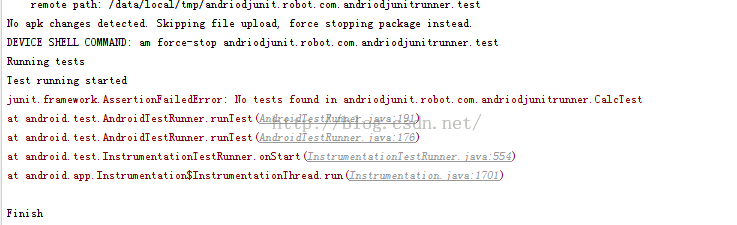 Android Studio 使用 AndroidJUnitRunner 進行單元測試
Google 目前推薦使用 AndroidJUnitRunner 作為測試執行器。本文記錄在 Android Studio 中把它跑起來的完整設定流程。 一、build.
 Android 最新做法:SwipeRefreshLayout 下拉刷新 + 自訂 ListView 上滑加載
幾乎每個專案都會用到列表的下拉刷新與上滑加載更多。過去大家最常用的是 pull-to-refresh 及其各種變種版本,而 Google 官方在 android.supp
 Android 屬性動畫(下):Evaluator、Keyframe、布局動畫與轉場動畫
前言 上一篇我們把屬性動畫的實作骨幹講完了:怎麼寫一個動畫、怎麼在沒有現成屬性的情況下自行補上屬性,以及怎麼用 ValueAnimator 驅動動畫。本篇接著把剩下的幾
 Android 動畫詳解之 View 動畫(Tween Animation)
為了讓互動更順暢,動畫在某些場景下是必要的。Android 3.0 之前支援兩種動畫:Tween 動畫與 Frame 動畫。前者負責平移、縮放、旋轉、透明度漸變這類變換,