

編輯:關於 Android 程式設計
SharedPreferences 存在 /data/data/包名/ 之下,走的是應用私有儲存空間。它的優點是 API 簡單、讀取快,但資料會佔用內部空間;當你要存的是大量資料或希望設定檔能直接被外部工具讀寫,它就顯得侷促。這種時候,用 Java 標準的 Properties 類別搭配一個檔案路徑,反而更靈活。
繼承 Properties,記住自己的檔案路徑,然後在寫入的時候順手存檔。因為 Properties 本身就是一個 Map,讀取時完全照原樣使用即可,不需要額外包裝。
package com.nil.cache;

import java.io.File;
import java.io.FileInputStream;
import java.io.FileNotFoundException;
import java.io.FileOutputStream;
import java.io.IOException;
import java.io.InputStream;
import java.util.Properties;

public class PropertiesConfig extends Properties {

    private String propertyPath = "";

    private PropertiesConfig(String path) {
        this.propertyPath = path;
    }

    public static PropertiesConfig getInstance(String path) {
        File file = new File(path);

        // 檔案不存在時建立它(注意條件是「不存在」,不是「存在」)
        if (!file.exists()) {
            try {
                File parent = file.getParentFile();
                if (parent != null && !parent.exists()) {
                    parent.mkdirs();
                }
                file.createNewFile();
            } catch (IOException e) {
                e.printStackTrace();
            }
        }

        PropertiesConfig pro = new PropertiesConfig(path);
        try {
            InputStream is = new FileInputStream(file);
            pro.load(is);
            is.close();
        } catch (Exception e) {
            e.printStackTrace();
        }
        return pro;
    }

    @Override
    public synchronized Object setProperty(String key, String value) {
        super.setProperty(key, value);
        this.store();
        return value;
    }

    public synchronized Object put(String key, String value) {
        super.put(key, value);
        this.store();
        return value;
    }

    private void store() {
        try {
            this.store(new FileOutputStream(this.propertyPath), "utf-8");
        } catch (FileNotFoundException e) {
            e.printStackTrace();
        } catch (IOException e) {
            e.printStackTrace();
        }
    }
}
// 寫入
PropertiesConfig.getInstance("/sdcard/client_config.xml").setProperty("187", "name");

// 讀取(第二個參數是找不到 key 時的預設值,不傳會得到 null)
String value = PropertiesConfig.getInstance("/sdcard/client_config.xml")
        .getProperty("187", "");
原始範例中的檔案判斷寫成了 if (file.exists()) 才去 createNewFile(),邏輯正好相反,導致檔案永遠不會被建立。上面已修正為 !file.exists(),並補上父目錄建立,避免寫到 SD 卡某個尚不存在的子目錄時失敗。
另外要留意三件事。第一,Properties 的 load 與 store 預設使用 ISO-8859-1 編碼,中文容易亂碼;在 API 9 以上請改用 load(Reader) 與 store(Writer, comment) 並明確指定 UTF-8。第二,這個實作在每次寫入時都整檔重寫,適合「偶爾改幾個設定」,不適合高頻寫入。第三,存取 /sdcard 需要 WRITE_EXTERNAL_STORAGE 權限與執行期授權,而且該路徑在 Android 4.4 之後屬於共享儲存,任何有權限的 App 都能讀到——不要把權杖、密碼這類敏感資料放在這裡,那些仍應留在 getFilesDir() 或EncryptedSharedPreferences 中。
 Android 給圖片加水印,其實只要三步
加水印聽起來像個大工程,實際核心只有三步: 1、載入原始圖片2、載入水印圖片3、保存合成後的圖片 原理說穿了很樸素:取出原圖的寬高,新建一張同尺寸的 Bitmap 當畫布
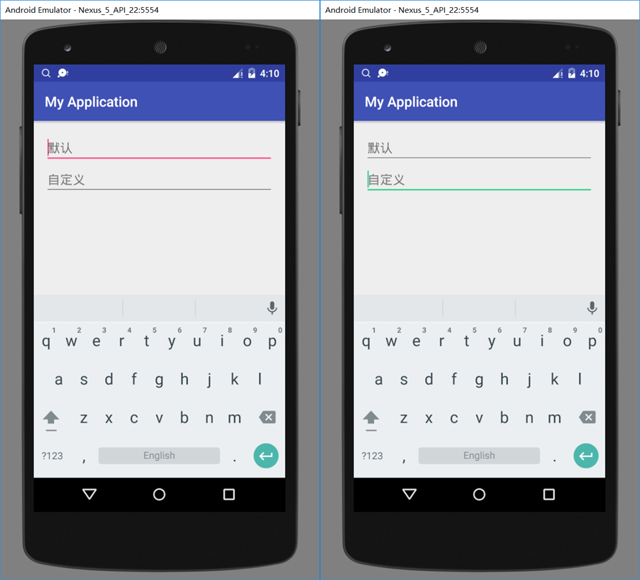 Android 修改 EditText 下劃線顏色的做法
前言 使用 AppCompatEditText(即 Layout 中的 EditText)時,預設的下劃線會跟隨主題的 colorControlNormal 與 colo
 Android 應用源碼分享:仿微信 5.2 版面配置
本文分享一份仿微信 5.2 風格的版面配置範例,預設採 GBK 編碼,有興趣的朋友可以下載來研究一下,從中學習到類似的介面排版與互動設計思路。【點擊下載】
 Android React Native 自定義組件的完整流程
假設現在有這麼一個需求:自定義一個組件,由一個小圖標和圖標下的文字說明組成,並帶有可設置的背景色、寬度和高度。下圖正是兩個這樣的組件拼成的效果。 第一步:建立組件文件