

編輯:關於 Android 程式設計
做 UI 時這幾個 TextView 屬性幾乎一定會用到,整理成速查筆記。
android:singleLine="true"
android:ellipsize="marquee"
android:marqueeRepeatLimit="marquee_forever"
android:focusable="true"
android:focusableInTouchMode="true"
各屬性的作用:
android:singleLine="true":限定單行。多行顯示時跑馬燈沒有意義,因此這是必要條件。android:ellipsize="marquee":文字過長時的處理方式,可選 none、start、middle、end;要跑馬燈就設 marquee。android:marqueeRepeatLimit:滾動次數,marquee_forever 表示無止盡循環。android:focusable 與 android:focusableInTouchMode:Android 的預設行為是「控制項取得焦點時才開始跑馬燈」。少了這兩行,在觸控模式下不會獲得焦點,文字就一直靜止不動——這是最常見的失敗原因。android:maxLines="2" android:ellipsize="end"
maxLines 限制最多顯示兩行,ellipsize="end" 讓溢出部分在結尾以「…」表示。若想保留首尾而省略中段,可改用 middle;Android 2.x 之後亦可使用 android:ellipsize 搭配 breakStrategy(API 23+)做更細緻的控制。
android:autoLink="all"
可選值包含 phone(電話號碼)、email、map(地址)、web(網址)與 all,也能以 | 串接多種,例如 android:autoLink="phone|email|web"。啟用後對應文字會自動變成可點擊的連結。
android:lineSpacingExtra 與 android:lineSpacingMultiplier,中文長段落可適度加大以改善可讀性。SpannableString 搭配 ForegroundColorSpan 等,比拆成多個 TextView 更省資源。textShadow,必要時以 android:shadowRadius="0" 關掉。sp,以尊重使用者的系統字級設定。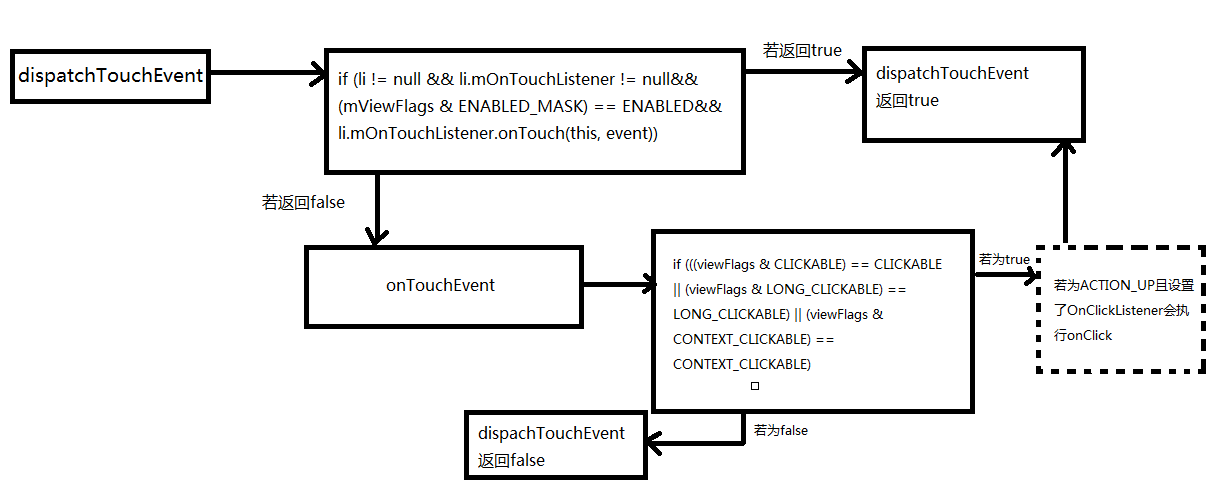 深入 Android onTouch 事件傳遞機制:從 dispatchTouchEvent 源碼說起
onTouch 是什麼 onTouch 是整個 Android 事件體系的基礎,onClick、onLongClick 這些我們更熟悉的事件,都是建立在它之上的。 它描述
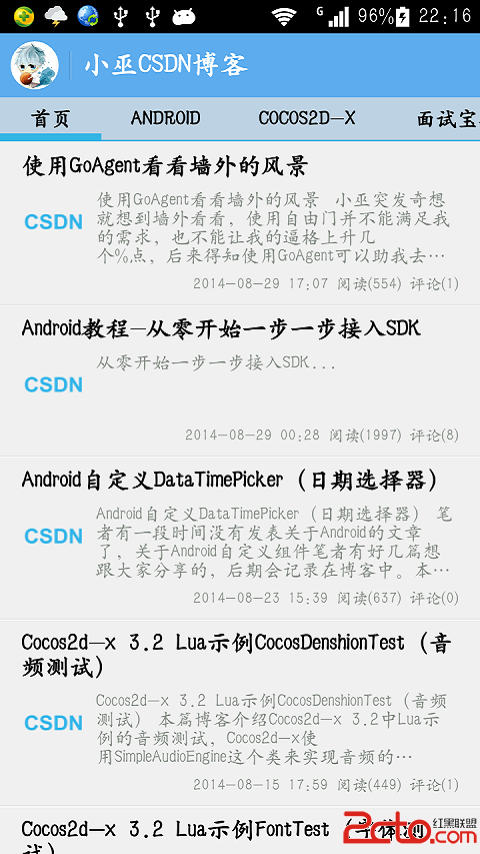 Android 實戰:自建 CSDN 部落格客戶端的起點
斷斷續續花了幾週時間,做出一款名為「小巫 CSDN 博客」的應用。它屬於私人定制的性質:所有資料都來自我自己的部落格,做法是先抓取部落格頁面的 HTML,再解析 HTML
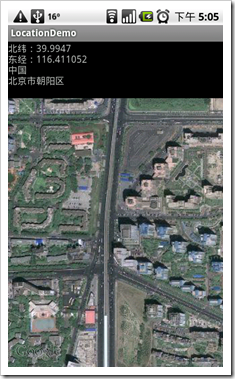 Android 透過 Location API 取得並顯示地址資訊的實作教學
想讓 App 知道使用者目前站在哪一條街上?Android 內建的 Location API 搭配 Geocoder 類別,就能把取得到的經緯度翻譯成人看得懂的地址文字。
 動手寫一個Android天氣App:RxAndroid、MVP與Retrofit的組合實戰
本文要介紹的簡易天氣App主要借助RxAndroid、MVP與Retrofit實現。先來看看最終效果。 主頁內容: 右側欄天氣列表: 左側欄城市列表: 一、Acti