

編輯:關於 Android 程式設計
ListFragment 是一個內含 ListView 的 Fragment,它能透過資料源(陣列或游標)顯示一系列資訊。它非常實用,例如 RSS 閱讀器就可以左側顯示列表、右側顯示對應內容。要建立 ListFragment,只需繼承 ListFragment 類即可。以下逐步示範。
建立一個名為 ListFragmentExample 的專案。
<?xml version="1.0" encoding="utf-8"?>
<LinearLayout xmlns:android="https://schemas.android.com/apk/res/android"
    android:layout_width="fill_parent"
    android:layout_height="fill_parent"
    android:orientation="horizontal" >

<fragment
    android:name="net.manoel.ListFragmentExample.Fragment1"
    android:id="@+id/fragment1"
    android:layout_weight="0.5"
    android:layout_width="0dp"
    android:layout_height="200dp" />

<fragment
    android:name="net.manoel.ListFragmentExample.Fragment1"
    android:id="@+id/fragment2"
    android:layout_weight="0.5"
    android:layout_width="0dp"
    android:layout_height="300dp" />

</LinearLayout>
在 res/layout 下建立 fragment1.xml:
<?xml version="1.0" encoding="utf-8"?>
<LinearLayout xmlns:android="https://schemas.android.com/apk/res/android"
    android:orientation="vertical"
    android:layout_width="fill_parent"
    android:layout_height="fill_parent">

    <ListView
        android:id="@id/android:list"
        android:layout_width="match_parent"
        android:layout_height="match_parent"
        android:layout_weight="1"
        android:drawSelectorOnTop="false"/>

</LinearLayout>
public class Fragment1 extends ListFragment {
    String[] presidents = {
        "Dwight D. Eisenhower",
        "John F. Kennedy",
        "Lyndon B. Johnson",
        "Richard Nixon",
        "Gerald Ford",
        "Jimmy Carter",
        "Ronald Reagan",
        "George H. W. Bush",
        "Bill Clinton",
        "George W. Bush",
        "Barack Obama"
    };

    @Override
    public View onCreateView(LayoutInflater inflater,
        ViewGroup container, Bundle savedInstanceState) {
        return inflater.inflate(R.layout.fragment1, container, false);
    }

    @Override
    public void onCreate(Bundle savedInstanceState) {
        super.onCreate(savedInstanceState);
        setListAdapter(new ArrayAdapter<String>(getActivity(),
                android.R.layout.simple_list_item_1, presidents));
    }

    public void onListItemClick(ListView parent, View v,
        int position, long id)
    {
        Toast.makeText(getActivity(),
                "You have selected " + presidents[position],
                Toast.LENGTH_SHORT).show();
    }
}
按 F11 在模擬器上除錯,會看到兩個資訊列表;隨便點擊一行,便會彈出一則訊息。由於在 main.xml 中分別設定了兩個 ListFragment 的 android:layout_height 屬性,因此這兩個列表的高度會有所差異。
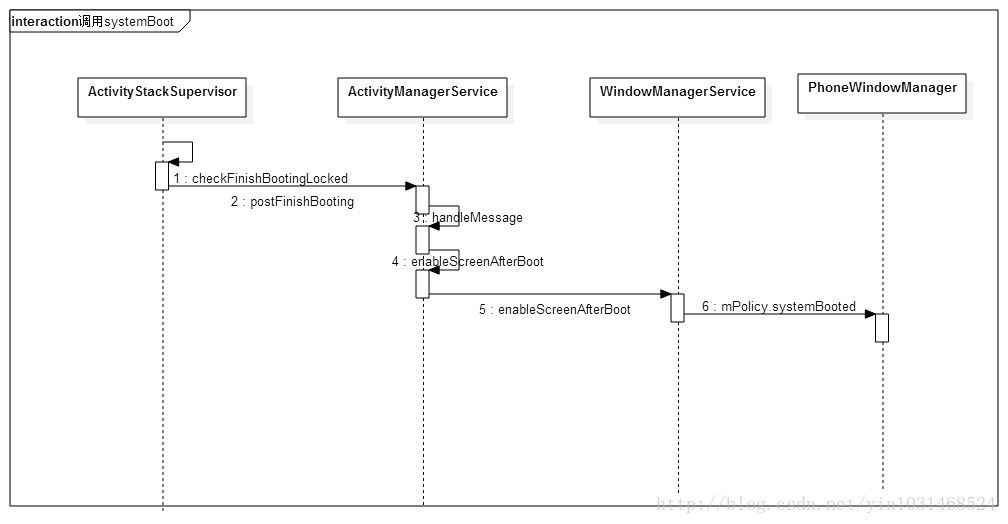 Android 7.1.1 鎖屏介面啟動流程深度解析
日前遇到一個低機率重現的問題:鎖屏介面遲遲不顯示,畫面上只看得到狀態列。為了徹底釐清原因,我沿著鎖屏介面的啟動與顯示流程完整追蹤了一遍,在此整理分享,也方便日後自己查閱。
 Android 五大布局 Layout 完全解析
Android 的版面配置由多種 Layout 組成。初學者看到複雜畫面時,可以先把畫面拆成幾個基本區塊,再選擇最適合的布局方式。常見五大布局如下:LinearLayou
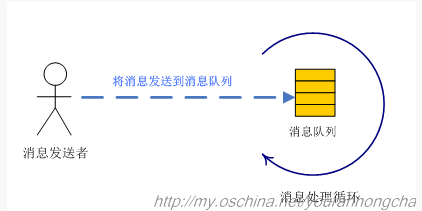 Android 5.0 Handler 訊息機制源碼流程深度解析
本文僅作為個人學習記錄,內容多彙整自網路上各路高手的精彩分享,在此摘錄並以自己的理解方式重新整理。接下來就開始學習並梳理 Handler 機制。 1、概述 在 Andro
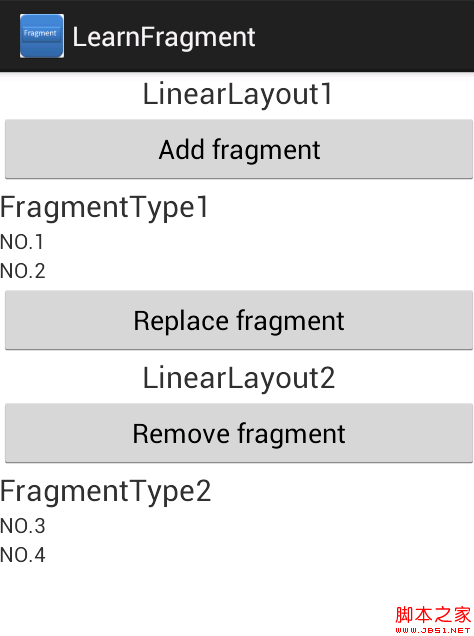 Android 使用 FragmentManager 管理 Activity 中的 Fragment
FragmentManager 要管理 Activity 中的 Fragment,必須透過 FragmentManager。取得方式是在 Activity 中呼叫 get