

編輯:關於 Android 程式設計
在上一篇討論 Android Root 安全議題的基礎上,本文将进一步剖析一個與廣告通知檢查相關的機制。360 與金山手機衛士等安全軟體都具備一個讓許多 Android 開發者頗感困擾的功能:廣告通知檢查。本文將從技術角度還原這類軟體的運作原理,並延伸探討其背後潛藏的安全隱患。
當通知欄出現廣告時,執行 360 等軟體的檢查功能,它會告訴使用者這是哪一個應用程式發出的廣告。需要說明的是,這裡的判斷並不侷限於廣告,實際上是先擷取所有的通知,再進行過濾判斷。接著它會讓使用者選擇三種處理方式:不處理、關閉通知(實際上是把對應的進程 kill 掉,使整個軟體停止運行)、或卸載此軟體。
那麼,這類安全軟體究竟是如何取得通知資訊的呢?到了關鍵處,其實核心僅是一行指令而已:
adb shell dumpsys notification透過這條指令,就能取得系統當前的通知管理器狀態。以下是一段實際的輸出範例:
Current Notification Manager state:
  Notification List:
    NotificationRecord{41453c70 pkg=com.zdworks.android.toolbox id=7f090092 tag=null pri=0}
      icon=0x0 / <name unknown>
      contentIntent=null
      ...
    NotificationRecord{415f48e8 pkg=com.zdworks.android.toolbox id=7f090080 tag=null pri=100}
      icon=0x7f0200fd / com.zdworks.android.toolbox:drawable/barttery_notify_icon
      tickerText=電量提示
      ...
    NotificationRecord{416db3e0 pkg=android id=1040414 tag=null pri=100}
      icon=0x10804f5 / android:drawable/stat_sys_adb
      tickerText=USB 調試已連接
      ...
從輸出的每一筆 NotificationRecord 中,都能清楚看到發出通知的應用程式包名(pkg=)。這正是安全軟體得以辨識「誰發出了通知」的關鍵資訊來源。
掌握核心原理後,整個處理流程便清晰可見:
dumpsys notification 這條指令並取得輸出的 log。以下示範如何在應用中執行這套流程的前兩個步驟(取得 log 並提取包名):
testButton = (Button) findViewById(R.id.exec);
testButton.setOnClickListener(new View.OnClickListener() {
    public void onClick(View v) {
        String[] commands = { "dumpsys notification" };
        Process process = null;
        DataOutputStream dataOutputStream = null;
        try {
            process = Runtime.getRuntime().exec("su");
            dataOutputStream = new DataOutputStream(process.getOutputStream());
            int length = commands.length;
            for (int i = 0; i < length; i++) {
                Log.e(TAG, "commands[" + i + "]:" + commands[i]);
                dataOutputStream.writeBytes(commands[i] + "\n");
            }
            dataOutputStream.writeBytes("exit\n");
            dataOutputStream.flush();
            process.waitFor();

            BufferedReader reader = new BufferedReader(new InputStreamReader(process.getInputStream()));
            String line = "";
            List<String> lineList = new ArrayList<String>();
            final StringBuilder log = new StringBuilder();
            String separator = System.getProperty("line.separator");
            Pattern pattern = Pattern.compile("pkg=[^\\s]+");
            while ((line = reader.readLine()) != null) {
                if (line != null && line.trim().startsWith("NotificationRecord")) {
                    Matcher matcher = pattern.matcher(line);
                    if (matcher.find()) {
                        lineList.add(matcher.group());
                    } else {
                        Log.e(TAG, "what's this?!");
                    }
                }
                log.append(line);
                log.append(separator);
            }
            Log.v(TAG, "log:" + log.toString());

            int size = lineList.size();
            for (int i = 0; i < size; i++) {
                Log.i(TAG, "app:" + lineList.get(i));
            }
        } catch (Exception e) {
            Log.e(TAG, "copy fail", e);
        } finally {
            try {
                if (dataOutputStream != null) {
                    dataOutputStream.close();
                }
                process.destroy();
            } catch (Exception e) {
            }
        }
        Log.v(TAG, "finish");
    }
});
這段程式的流程相當直觀:先透過 Runtime.getRuntime().exec("su") 取得 Root 權限,執行 dumpsys notification 指令;接著透過 process.getInputStream() 逐行讀取其輸出;然後只關注類似 NotificationRecord{... pkg=... ...} 這樣的日誌行,並利用正則表達式 pkg=[^\s]+ 從中萃取出包名。最終,所有被攔截到的應用包名會被收集到一個列表中,供後續的黑白名單比對使用。
這個機制之所以值得警惕,在於它揭示了 Root 環境下系統資訊的脆弱性。既然合法的安全軟體能透過 dumpsys notification 輕易取得所有應用的通知資訊並據此結束進程,那麼惡意程式同樣能如法炮製。舉例來說,一個名為 Fake.apk 的惡意程式完全可能在夜半時分偷偷安裝另一個程式,幾秒鐘後再執行上述操作,取得其他安全軟體的資訊並將其結束——形成一個令人防不勝防的攻擊鏈。
這也提醒我們:Root 雖然帶來了系統層面的自由度,但同時也大幅降低了系統的資訊壁壘。在使用第三方來源的應用、授予 Root 權限時,務必保持高度警覺,才能避免落入此類通知攔截的安全陷阱。
 小米手環能配其他品牌手機嗎?支援清單與功能差異說明
「小米手環是不是只有小米手機才能用?」這大概是它被問最多的問題。答案很明確:不是。下面把相容條件與功能差異講清楚。 一、非小米手機能用嗎? 任何品牌的手機都能配小米手環,
 自訂控制項三部曲之繪圖篇(十):Paint 的 setXfermode(一)
一、GPU 硬體加速 1、先說清楚 GPU 是什麼 GPU 的英文全稱是 Graphic Processing Unit,中文叫「圖形處理器」。它和 CPU 不同,是專門
 Android 自訂 View 之環形等待進度控件實作
拖了這麼久才重新更新部落格,實在是有點懈怠。寫這篇的目的,是想幫更多 Android 入門開發者理解自訂控件的奧妙——畢竟對新手來說,自訂 View 總帶著一層神秘面紗。
 動手做一個 Android 塗鴉板:從佈局到畫筆
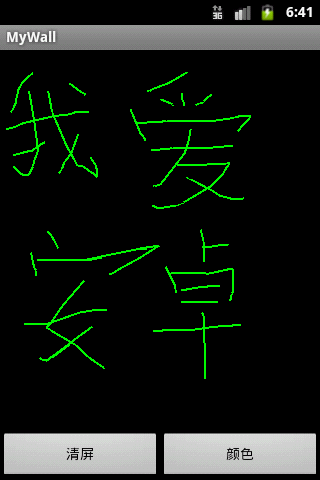
在 Android 上寫些小應用,既能鞏固知識又不無聊。塗鴉板就是個不錯的練手題目——它同時涉及 SurfaceView、Canvas、Paint 與觸摸事件,代碼量不大