

編輯:關於 Android 程式設計
幾乎每一款需要帳號的 App,都會在登入頁放兩個勾選框:「記住密碼」和「自動登入」。這兩個功能聽起來簡單,卻牽涉到資料的持久化、狀態的還原,以及頁面之間的跳轉時機。本文以一個完整的登入流程為例,說明如何使用 Android 提供的 SharedPreferences 這套輕量級持久化解法。
SharedPreferences 是 Android 平台上一個非常輕量的資料儲存類別,主要用來保存少量、結構簡單的設定型資料,例如使用者名稱、是否勾選了某個選項、上次開啟的頁面等等。它底層其實就是一個 XML 檔案,存放位置在 /data/data/<package name>/shared_prefs 目錄底下,因此不需要自己處理檔案讀寫與序列化,一行 API 就能完成。
值得注意的是,SharedPreferences 本身只是一個介面,並沒有直接提供寫入與讀取的能力。真正負責操作資料的是它內部的 Editor 介面:讀資料用 getXxx(),寫資料則要先呼叫 edit() 取得 Editor,再透過 putXxx() 放入內容,最後呼叫 commit() 或 apply() 提交。
取得 SharedPreferences 實例的方式如下:
Context.getSharedPreferences(String name, int mode)
兩個參數的意義分別是:
name:檔案名稱,不需要自己加上 .xml 副檔名,系統會自動補上。
mode:指定讀寫方式,共有三種取值:
Context.MODE_PRIVATE:僅允許本應用程式讀寫,這也是目前唯一建議使用的模式。
Context.MODE_WORLD_READABLE:允許其他應用程式讀取,但不能寫入。
Context.MODE_WORLD_WRITEABLE:允許其他應用程式讀寫。
需要特別提醒的是,後兩種「世界可讀/可寫」模式從 API 17 起已被標記為不建議使用,在較新的系統上直接呼叫甚至會丟出 SecurityException。基於安全性考量,本範例一律採用 MODE_PRIVATE。
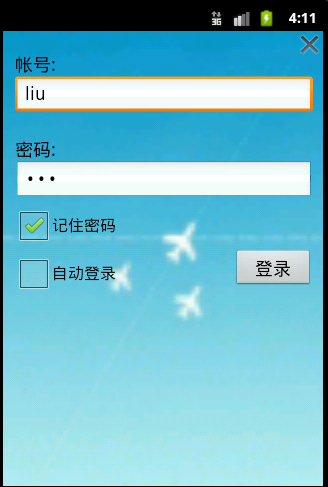
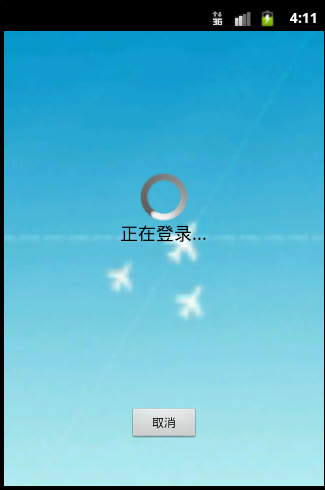

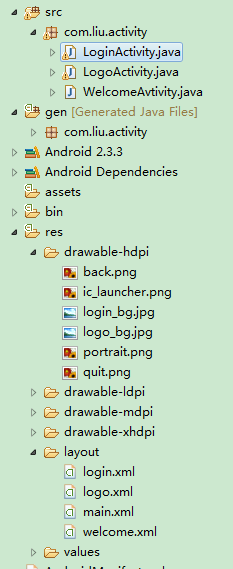
登入頁是整個流程的核心:進入頁面時先從 SharedPreferences 讀回上次記錄的狀態,按下登入鈕時把帳密寫回去,兩個勾選框的切換則即時同步狀態。
package com.liu.activity;

import android.app.Activity;
import android.content.Context;
import android.content.Intent;
import android.content.SharedPreferences;
import android.os.Bundle;
import android.view.View;
import android.view.View.OnClickListener;
import android.view.Window;
import android.widget.Button;
import android.widget.CheckBox;
import android.widget.CompoundButton;
import android.widget.CompoundButton.OnCheckedChangeListener;
import android.widget.EditText;
import android.widget.ImageButton;
import android.widget.Toast;

public class LoginActivity extends Activity {

    private EditText userName, password;
    private CheckBox rem_pw, auto_login;
    private Button btn_login;
    private ImageButton btnQuit;
    private String userNameValue, passwordValue;
    private SharedPreferences sp;

    public void onCreate(Bundle savedInstanceState) {
        super.onCreate(savedInstanceState);
        // 隱藏標題列
        this.requestWindowFeature(Window.FEATURE_NO_TITLE);
        setContentView(R.layout.login);

        // 取得 SharedPreferences 實例,檔名 userInfo
        sp = this.getSharedPreferences("userInfo", Context.MODE_PRIVATE);

        userName  = (EditText) findViewById(R.id.et_zh);
        password  = (EditText) findViewById(R.id.et_mima);
        rem_pw    = (CheckBox) findViewById(R.id.cb_mima);
        auto_login = (CheckBox) findViewById(R.id.cb_auto);
        btn_login = (Button) findViewById(R.id.btn_login);
        btnQuit   = (ImageButton) findViewById(R.id.img_btn);

        // 還原「記住密碼」的狀態
        if (sp.getBoolean("ISCHECK", false)) {
            rem_pw.setChecked(true);
            userName.setText(sp.getString("USER_NAME", ""));
            password.setText(sp.getString("PASSWORD", ""));

            // 再判斷是否要自動登入
            if (sp.getBoolean("AUTO_ISCHECK", false)) {
                auto_login.setChecked(true);
                Intent intent = new Intent(LoginActivity.this, LogoActivity.class);
                LoginActivity.this.startActivity(intent);
            }
        }

        // 登入按鈕(此處帳號固定為 liu,密碼固定為 123)
        btn_login.setOnClickListener(new OnClickListener() {
            public void onClick(View v) {
                userNameValue = userName.getText().toString();
                passwordValue = password.getText().toString();

                if (userNameValue.equals("liu") && passwordValue.equals("123")) {
                    Toast.makeText(LoginActivity.this, "登入成功", Toast.LENGTH_SHORT).show();

                    // 只有勾選「記住密碼」才寫入帳密
                    if (rem_pw.isChecked()) {
                        SharedPreferences.Editor editor = sp.edit();
                        editor.putString("USER_NAME", userNameValue);
                        editor.putString("PASSWORD", passwordValue);
                        editor.commit();
                    }

                    Intent intent = new Intent(LoginActivity.this, LogoActivity.class);
                    LoginActivity.this.startActivity(intent);
                } else {
                    Toast.makeText(LoginActivity.this, "帳號或密碼錯誤,請重新登入",
                            Toast.LENGTH_LONG).show();
                }
            }
        });

        // 監聽「記住密碼」勾選框
        rem_pw.setOnCheckedChangeListener(new OnCheckedChangeListener() {
            public void onCheckedChanged(CompoundButton buttonView, boolean isChecked) {
                if (rem_pw.isChecked()) {
                    sp.edit().putBoolean("ISCHECK", true).commit();
                } else {
                    sp.edit().putBoolean("ISCHECK", false).commit();
                }
            }
        });

        // 監聽「自動登入」勾選框
        auto_login.setOnCheckedChangeListener(new OnCheckedChangeListener() {
            public void onCheckedChanged(CompoundButton buttonView, boolean isChecked) {
                if (auto_login.isChecked()) {
                    sp.edit().putBoolean("AUTO_ISCHECK", true).commit();
                } else {
                    sp.edit().putBoolean("AUTO_ISCHECK", false).commit();
                }
            }
        });

        btnQuit.setOnClickListener(new OnClickListener() {
            @Override
            public void onClick(View v) {
                finish();
            }
        });
    }
}
package com.liu.activity;

import android.app.Activity;
import android.content.Intent;
import android.os.Bundle;
import android.view.View;
import android.view.View.OnClickListener;
import android.view.Window;
import android.widget.Button;
import android.widget.ProgressBar;

public class LogoActivity extends Activity {

    private ProgressBar progressBar;
    private Button backButton;

    protected void onCreate(Bundle savedInstanceState) {
        super.onCreate(savedInstanceState);
        this.requestWindowFeature(Window.FEATURE_NO_TITLE);
        setContentView(R.layout.logo);

        progressBar = (ProgressBar) findViewById(R.id.pgBar);
        backButton  = (Button) findViewById(R.id.btn_back);

        Intent intent = new Intent(this, WelcomeAvtivity.class);
        LogoActivity.this.startActivity(intent);

        backButton.setOnClickListener(new OnClickListener() {
            @Override
            public void onClick(View v) {
                finish();
            }
        });
    }
}
package com.liu.activity;

import android.app.Activity;
import android.os.Bundle;

public class WelcomeAvtivity extends Activity {
    @Override
    protected void onCreate(Bundle savedInstanceState) {
        super.onCreate(savedInstanceState);
        setContentView(R.layout.welcome);
    }
}
login.xml:
android:layout_height="fill_parent"
android:background="@drawable/logo_bg"
android:orientation="vertical">
    android:layout_width="fill_parent"
    android:layout_height="wrap_content">
        android:id="@+id/img_btn"
        android:layout_width="wrap_content"
        android:layout_height="wrap_content"
        android:layout_alignParentRight="true"
        android:background="@drawable/quit"/>
    android:id="@+id/tv_zh"
        android:layout_width="wrap_content"
        android:layout_height="35dip"
        android:layout_marginLeft="12dip"
        android:layout_marginTop="10dip"
        android:gravity="bottom"
        android:text="帳號:"
        android:textColor="#000000"
        android:textSize="18sp"/>
    android:id="@+id/et_zh"
        android:layout_width="fill_parent"
        android:layout_height="40dip"
        android:layout_below="@id/tv_zh"
        android:layout_marginLeft="12dip"
        android:layout_marginRight="10dip"/>
    android:id="@+id/tv_mima"
        android:layout_width="wrap_content"
        android:layout_height="35dip"
        android:layout_below="@id/et_zh"
        android:layout_marginLeft="12dip"
        android:layout_marginTop="10dip"
        android:gravity="bottom"
        android:text="密碼:"
        android:textColor="#000000"
        android:textSize="18sp"/>
    android:id="@+id/et_mima"
        android:layout_width="fill_parent"
        android:layout_height="40dip"
        android:layout_below="@id/tv_mima"
        android:layout_marginLeft="12dip"
        android:layout_marginRight="10dip"
        android:maxLines="200"
        android:password="true"
        android:scrollHorizontally="true"/>
    android:id="@+id/cb_mima"
        android:layout_width="wrap_content"
        android:layout_height="wrap_content"
        android:layout_below="@id/et_mima"
        android:layout_marginLeft="12dip"
        android:text="記住密碼"
        android:textColor="#000000"/>
    android:id="@+id/cb_auto"
        android:layout_width="wrap_content"
        android:layout_height="wrap_content"
        android:layout_below="@id/cb_mima"
        android:layout_marginLeft="12dip"
        android:text="自動登入"
        android:textColor="#000000"/>
    android:id="@+id/btn_login"
        android:layout_width="80dip"
        android:layout_height="40dip"
        android:layout_below="@id/et_mima"
        android:layout_alignParentRight="true"
        android:layout_alignTop="@id/cb_auto"
        android:layout_marginRight="10dip"
        android:gravity="center"
        android:text="登入"
        android:textColor="#000000"
        android:textSize="18sp"/>
logo.xml:
android:layout_height="fill_parent"
android:background="@drawable/logo_bg"
android:orientation="vertical">
    android:layout_width="fill_parent"
    android:layout_height="wrap_content"
    android:layout_weight="3">
        android:id="@+id/pgBar"
        android:layout_width="wrap_content"
        android:layout_height="wrap_content"
        android:layout_centerInParent="true"/>
        android:id="@+id/tv1"
        android:layout_width="wrap_content"
        android:layout_height="wrap_content"
        android:layout_below="@id/pgBar"
        android:layout_centerHorizontal="true"
        android:text="正在登入..."
        android:textColor="#000000"
        android:textSize="18sp"/>
    android:layout_width="fill_parent"
    android:layout_height="wrap_content"
    android:layout_weight="1"
    android:gravity="center"
    android:orientation="vertical">
        android:id="@+id/btn_back"
        android:layout_width="70dip"
        android:layout_height="35dip"
        android:text="取消"
        android:textColor="#000000"
        android:textSize="12sp"/>
welcome.xml:
android:layout_height="fill_parent"
android:layout_gravity="center"
android:background="@drawable/login_bg"
android:orientation="vertical">
    android:layout_width="fill_parent"
    android:layout_height="wrap_content"
    android:gravity="center"
    android:text="登入成功,進入使用者介面"
    android:textColor="#000000"
    android:textSize="20sp"/>
上面這個範例為了示範 SharedPreferences 的讀寫流程,直接把密碼寫進 XML,這在真實產品中是不被允許的。SharedPreferences 檔案僅是應用私有的純文字 XML,只要裝置取得 root 權限或透過備份機制,內容就可能被讀出。實務上的做法是:只記住帳號與一個不可逆的登入憑證(例如 server 端核發的 token),密碼本身若要保存,至少必須經過加鹽雜湊處理,更理想的方式是改用 EncryptedSharedPreferences 或 Android Keystore 來託管金鑰。
 Android BluetoothAdapter 藍牙配接器完整 API 指南
BluetoothAdapter 代表本機的藍牙配接器。透過 BluetoothAdapter,你可以執行一連串基礎的藍牙工作,例如啟動裝置搜尋、查詢已配對(配對成功)的
 用方向傳感器實現 Android 電子指南針
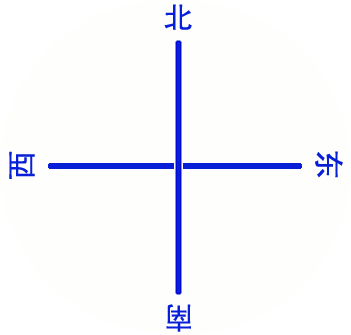
電子指南針的原理並不複雜:讀取設備的方向傳感器拿到方位角,再驅動一張指針圖片旋轉即可。本文用不到五十行代碼完成這個效果。 一、布局文件 界面只有一個居中的 Image
 GreenDAO 自訂型別轉換器與 ProGuard 混淆設定實作指南
在實體類(Entity)裡,難免會出現一些欄位在資料庫中找不到對應的型別。這種時候就得靠自訂的型別轉換器來搭橋。最典型的例子就是 Date:如果對精度要求不高,多數人會把
 Objective-C Runtime 解析(四):怎樣在 Category 中「添加」屬性
Category 是 Objective-C 擴展類能力的常用手段,它能夠在運行時為已有類追加方法,這一切都得益於 Runtime 的動態特性。但很多同學會撞上一堵牆:C