

編輯:關於 Android 程式設計
聯絡人列表常見字母索引功能,使用者可以透過右側字母列快速跳到對應姓氏或名稱。這種效果在通訊錄、好友列表與音樂應用中都很常見。本文以類似微信聯絡人的字母索引為例,說明實作思路。
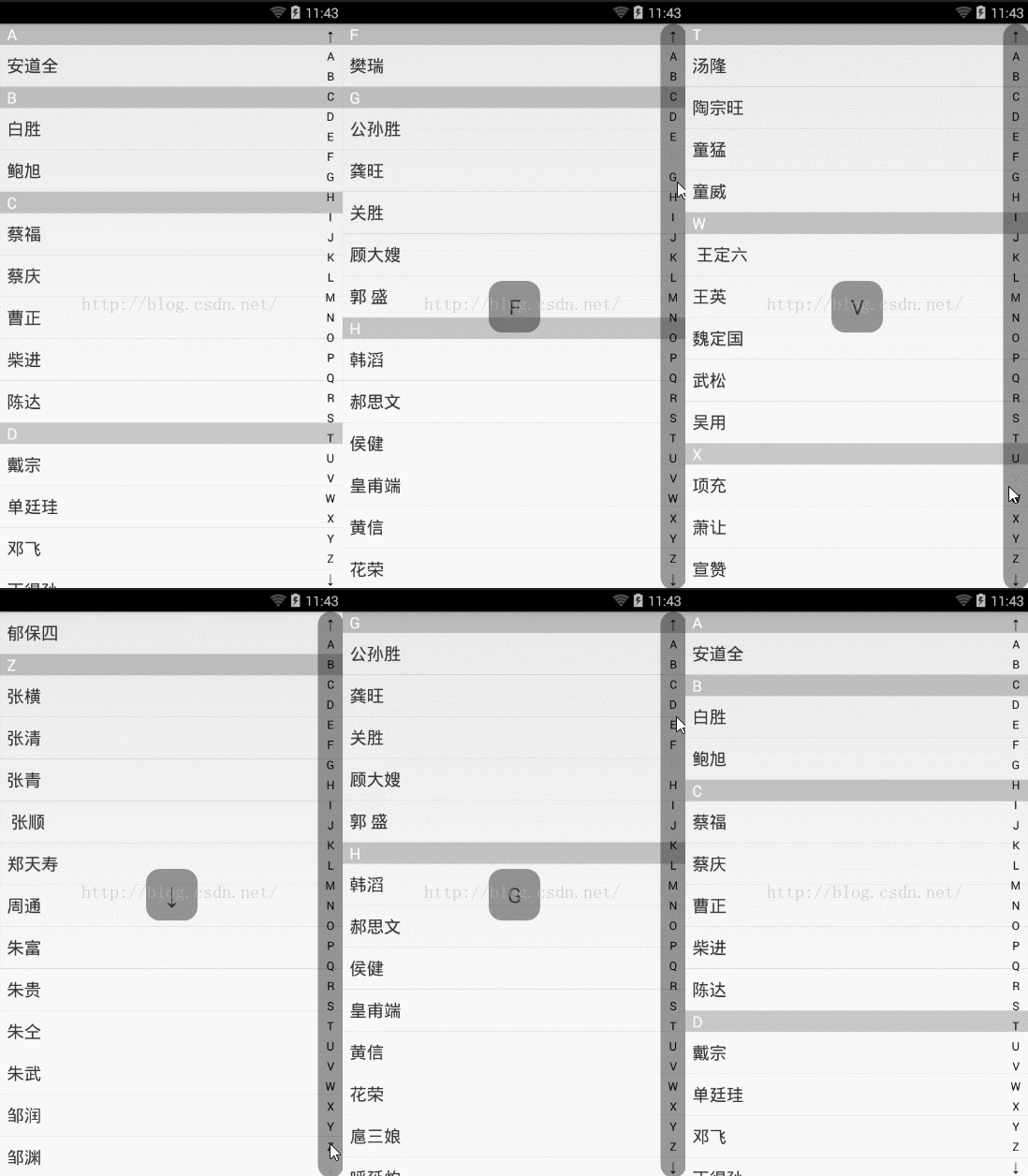
整體版面可以使用 RelativeLayout,包含:
1. ListView:顯示聯絡人資料。
2. 自訂 View:右側字母索引列。
3. TextView:中央提示方塊,顯示目前點擊的字母。
<RelativeLayout
    xmlns:android="https://schemas.android.com/apk/res/android"
    android:layout_width="match_parent"
    android:layout_height="match_parent">

    <ListView
        android:id="@+id/listView"
        android:layout_width="match_parent"
        android:layout_height="match_parent" />

    <com.example.view.QuickIndexBar
        android:id="@+id/quickIndexBar"
        android:layout_width="30dp"
        android:layout_height="match_parent"
        android:layout_alignParentRight="true" />

    <TextView
        android:id="@+id/tvHint"
        android:layout_width="60dp"
        android:layout_height="60dp"
        android:layout_centerInParent="true"
        android:gravity="center"
        android:textSize="24sp"
        android:visibility="gone" />
</RelativeLayout>右側字母列可以自訂 View 實作。繪製時,先取得 View 高度,再除以字母數量,即可得到每個字母的高度。由於字母寬度通常固定,可以直接設定一個合適的寬度。
public class QuickIndexBar extends View {
    private Paint paint;
    private String[] letters = {
        "A", "B", "C", "D", "E", "F", "G", "H",
        "I", "J", "K", "L", "M", "N", "O", "P",
        "Q", "R", "S", "T", "U", "V", "W", "X",
        "Y", "Z"
    };

    private int cellHeight;

    public QuickIndexBar(Context context) {
        super(context);
        paint = new Paint();
        paint.setTextSize(20);
        paint.setAntiAlias(true);
    }

    @Override
    protected void onSizeChanged(
        int w, int h, int oldW, int oldH) {
        super.onSizeChanged(w, h, oldW, oldH);
        cellHeight = h / letters.length;
    }

    @Override
    protected void onDraw(Canvas canvas) {
        super.onDraw(canvas);
        for (int i = 0; i < letters.length; i++) {
            float x = getWidth() / 2f
                - paint.measureText(letters[i]) / 2f;
            float y = cellHeight * i + cellHeight / 2f;
            canvas.drawText(letters[i], x, y, paint);
        }
    }
}
為了讓字母位置更精準,實際繪製時常需要計算文字基線,避免字母看起來偏移。
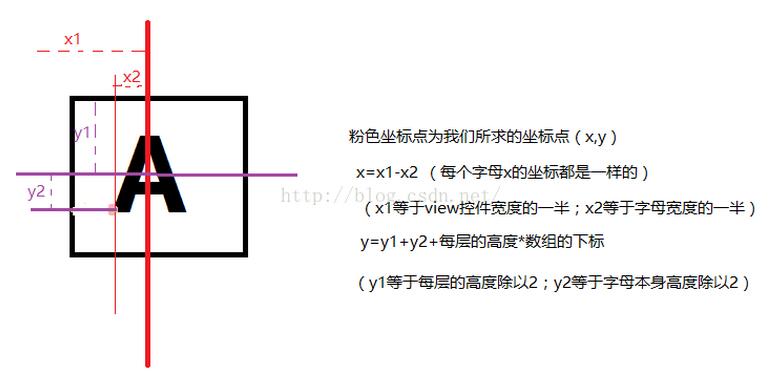
當使用者點擊或滑動右側字母列時,可以根據觸摸 Y 座標除以每格高度,計算目前對應的字母。
@Override
public boolean onTouchEvent(MotionEvent event) {
    float y = event.getY();
    int index = (int) (y / cellHeight);

    if (index >= 0 && index < letters.length) {
        if (listener != null) {
            listener.onLetterChange(letters[index]);
        }
    }
    return true;
}
接著在 Activity 中,當收到字母變更時,讓 ListView 跳到第一個符合該字母的項目。
若聯絡人名稱是中文,通常需要先轉成拼音,再取首字母。常見做法是使用 pinyin4j 或類似套件。資料模型可以保存名稱與拼音:
public class Contact {
    public String name;
    public String pinyin;

    public Contact(String name, String pinyin) {
        this.name = name;
        this.pinyin = pinyin;
    }
}
在 Adapter 中,可以比較目前項目與上一個項目的拼音首字母。若相同,隱藏左側字母標題;若不同,顯示該字母,形成分組效果。
當使用者觸摸字母列時,可以在畫面中央顯示一個提示方塊,顯示目前字母。手指離開後再隱藏。這個效果能提升操作回饋,讓使用者知道目前選到哪個索引。
仿微信聯絡人字母排序的重點在於:自訂 View 繪製字母、計算觸摸位置、將中文轉為拼音、並讓 ListView 依字母定位。理解這些步驟後,就能延伸實作出更完整的聯絡人索引體驗。
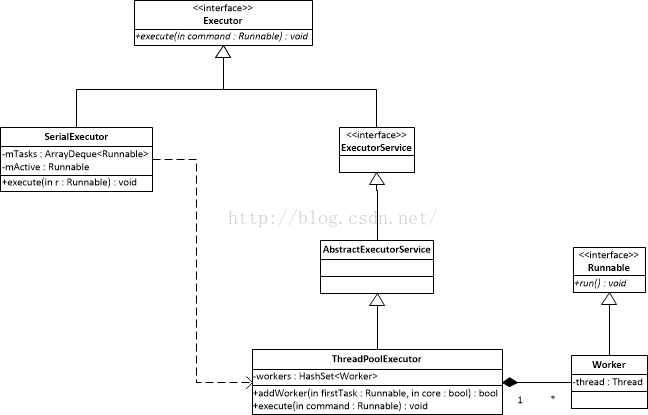 AsyncTask 原始碼剖析:從 Thread、FutureTask 到執行緒池
每個寫 Android 的人都用過 AsyncTask,但未必每個人都用得透。想用好一個東西,先理解它的原理會輕鬆很多。網路上相關說明已經不少,這裡用自己的思路重新梳理一
 Android 自定義圖形單點移動與縮放效果
單點拖曳在單指操作時,可透過 MotionEvent 取得目前座標,並更新檢視的 LayoutParams 邊距,讓圖形跟著手指移動。這種方式適合需要直接操控位置的簡單互
 Android 自定義水波紋流量球進度條控制器的實現
本篇帶大家打造一個仿水波紋的流動球進度條控制器,這是 Android 裡相當主流又吸睛的特效,效果高級大氣。以下為完整實現思路與代碼,供大家參考。 先看效果圖: Cir
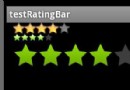 Android 自定義 RatingBar 評分控件實作教學
RatingBar 基礎介紹 RatingBar 是 SeekBar(拖動條)與 ProgressBar(狀態條)的延伸,用星形圖示來表達等級評定。 使用預設 Rati