

編輯:關於 Android 程式設計
任何一則通知都必須具備以下三項基本元素:
其餘屬性都是可選的,更多方法可參考 NotificationCompat.Builder。話雖如此,實務上通常還會為通知加上至少一個「動作(Action)」,可以是跳轉到某個 Activity、啟動 Service 或發送廣播。加入動作的方式有兩種:使用 PendingIntent,或透過大視圖通知的 Action Button(僅支援 Android 4.1 / API level 16 以上版本)。
1、實例化一個 NotificationCompat.Builder 物件:
NotificationCompat.Builder mBuilder = new NotificationCompat.Builder(this)
        .setSmallIcon(R.drawable.notification_icon)
        .setContentTitle("My notification")
        .setContentText("Hello World!");
NotificationCompat.Builder 會自動套用以下預設值:priority 為 PRIORITY_DEFAULT、when 為 System.currentTimeMillis()、audio stream 為 STREAM_DEFAULT。
2、定義並設定通知動作:
Intent resultIntent = new Intent(this, ResultActivity.class);
PendingIntent resultPendingIntent = PendingIntent.getActivity(
        this, 0, resultIntent, PendingIntent.FLAG_UPDATE_CURRENT);
mBuilder.setContentIntent(resultPendingIntent);
3、產生 Notification 物件:
Notification notification = mBuilder.build();
4、使用 NotificationManager 發送通知:
int mNotificationId = 001;
NotificationManager mNotifyMgr = (NotificationManager) getSystemService(NOTIFICATION_SERVICE);
mNotifyMgr.notify(mNotificationId, notification);
更新通知很簡單,只要再次發送相同 ID 的通知即可。若先前通知仍在,則更新其屬性;若不存在,則重新建立。
NotificationManager mNotifyMgr = (NotificationManager) getSystemService(NOTIFICATION_SERVICE);
int notifyID = 1;
NotificationCompat.Builder mNotifyBuilder = new NotificationCompat.Builder(this)
        .setContentTitle("New Message")
        .setContentText("You've received new messages.")
        .setSmallIcon(R.drawable.ic_notify_status);
int numMessages = 0;
// 處理資料並通知使用者 ...
mNotifyBuilder.setContentText("new content text")
        .setNumber(++numMessages);
// ID 不變,因此更新既有通知
mNotifyMgr.notify(notifyID, mNotifyBuilder.build());
取消通知共有四種方式:
通知有兩種視圖:普通視圖與大視圖。預設是普通視圖,可透過 setStyle() 設定為大視圖。
普通視圖:
大視圖: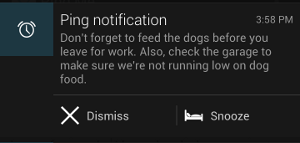
以大視圖為例,建立步驟如下:
1、建立 Action Button 的 PendingIntent:
Intent dismissIntent = new Intent(this, PingService.class);
dismissIntent.setAction(CommonConstants.ACTION_DISMISS);
PendingIntent piDismiss = PendingIntent.getService(this, 0, dismissIntent, 0);
Intent snoozeIntent = new Intent(this, PingService.class);
snoozeIntent.setAction(CommonConstants.ACTION_SNOOZE);
PendingIntent piSnooze = PendingIntent.getService(this, 0, snoozeIntent, 0);
2、建立 NotificationCompat.Builder 物件:
NotificationCompat.Builder builder = new NotificationCompat.Builder(this)
        .setSmallIcon(R.drawable.ic_stat_notification)
        .setContentTitle(getString(R.string.notification))
        .setContentText(getString(R.string.ping))
        .setDefaults(Notification.DEFAULT_ALL) // 需要 VIBRATE 權限
        .setStyle(new NotificationCompat.BigTextStyle().bigText(msg)) // Android 4.1 前會被忽略
        .addAction(R.drawable.ic_stat_dismiss, getString(R.string.dismiss), piDismiss)
        .addAction(R.drawable.ic_stat_snooze, getString(R.string.snooze), piSnooze);
3、其餘步驟與普通視圖相同。
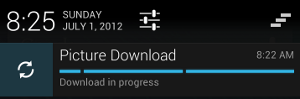
明確進度:使用 setProgress(max, progress, false) 更新進度。max 為最大進度值,progress 為當前進度,false 表示這不是不確定進度條。
以下模擬下載過程:
int id = 1;
mNotifyManager = (NotificationManager) getSystemService(Context.NOTIFICATION_SERVICE);
mBuilder = new NotificationCompat.Builder(this);
mBuilder.setContentTitle("Picture Download")
        .setContentText("Download in progress")
        .setSmallIcon(R.drawable.ic_notification);
new Thread(new Runnable() {
    @Override
    public void run() {
        int incr;
        for (incr = 0; incr <= 100; incr += 5) {
            mBuilder.setProgress(100, incr, false);
            mNotifyManager.notify(id, mBuilder.build());
            try {
                Thread.sleep(5 * 1000);
            } catch (InterruptedException e) {
                Log.d(TAG, "sleep failure");
            }
        }
        mBuilder.setContentText("Download complete")
                .setProgress(0, 0, false);//移除進度條
        mNotifyManager.notify(id, mBuilder.build());
    }
}).start();

上圖分別為下載過程中的進度條通知,以及下載完成移除進度條後的通知。
不確定進度:使用 setProgress(0, 0, true) 表示進度不明的進度條。
mBuilder.setProgress(0, 0, true); mNotifyManager.notify(id, mBuilder.build());
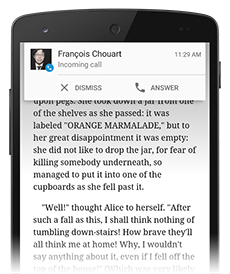
從 Android 5.0(API level 21)開始,當螢幕未鎖定且亮著時,通知可以以小視窗形式浮現在頂部,使用者無須離開當前應用即可操作。
NotificationCompat.Builder mNotifyBuilder = new NotificationCompat.Builder(this)
        .setContentTitle("New Message")
        .setContentText("You've received new messages.")
        .setSmallIcon(R.drawable.ic_notify_status)
        .setFullScreenIntent(pendingIntent, false);
以下兩種情況會觸發浮動通知:呼叫了 setFullScreenIntent();或通知具有高優先級並使用了鈴聲與震動。
從 Android 5.0 開始,通知也能顯示在鎖屏上,使用者可自行選擇是否允許敏感內容顯示於安全鎖屏。應用可透過 setVisibility() 控制顯示等級:
Android 允許使用 RemoteViews 自訂通知。普通視圖高度上限為 64dp,大視圖為 256dp。基於相容性考量,建議自訂通知盡量簡單。做法是:建立自訂布局、用 RemoteViews 定義元件、呼叫 setContent() 綁定到 Builder,最後照常發送。請注意避免為通知設定背景,因為部分裝置上可能導致文字看不清。
自 Android 2.3 起,系統提供了一套標準通知文字樣式,建議沿用,有助於確保文字清晰:
// Android 5.0 之前
android:style/TextAppearance.StatusBar.EventContent.Title // 標題樣式
android:style/TextAppearance.StatusBar.EventContent      // 內容樣式
// Android 5.0 及更高版本
android:style/TextAppearance.Material.Notification.Title // 標題樣式
android:style/TextAppearance.Material.Notification       // 內容樣式
預設情況下,從通知啟動 Activity 後按返回鍵會回到主螢幕。若希望按返回鍵仍留在應用內,就要用到 TaskStackBuilder。
1、在 manifest 中定義 Activity 的父子關係:
2、建立帶返回堆疊的 PendingIntent:
Intent resultIntent = new Intent(this, ResultActivity.class);
TaskStackBuilder stackBuilder = TaskStackBuilder.create(this);
stackBuilder.addParentStack(ResultActivity.class);
stackBuilder.addNextIntent(resultIntent);
PendingIntent resultPendingIntent = stackBuilder.getPendingIntent(0, PendingIntent.FLAG_UPDATE_CURRENT);
NotificationCompat.Builder builder = new NotificationCompat.Builder(this);
builder.setContentIntent(resultPendingIntent);
NotificationManager mNotificationManager = (NotificationManager) getSystemService(Context.NOTIFICATION_SERVICE);
mNotificationManager.notify(id, builder.build());
如此一來,從通知啟動 ResultActivity 後按返回鍵,會回到 MainActivity 而非主螢幕。
預設從通知啟動的 Activity 會出現在近期任務清單中。若不希望它顯示於此,可將 Intent 設為在新的空任務中啟動:
Intent notifyIntent = new Intent(this, ResultActivity.class);
notifyIntent.setFlags(Intent.FLAG_ACTIVITY_NEW_TASK | Intent.FLAG_ACTIVITY_CLEAR_TASK);
PendingIntent notifyPendingIntent = PendingIntent.getActivity(this, 0, notifyIntent, PendingIntent.FLAG_UPDATE_CURRENT);
聲音提醒:預設聲音 notification.defaults |= Notification.DEFAULT_SOUND;;自訂聲音 notification.sound = Uri.parse("file:///sdcard0/notification.ogg");
震動提醒:預設震動 notification.defaults |= Notification.DEFAULT_VIBRATE;;自訂震動 long[] vibrate = {100, 200, 300, 400}; 表示在這些時間點交替啟動與關閉震動。
閃爍提醒:預設閃爍 notification.defaults |= Notification.DEFAULT_LIGHTS;;自訂閃爍可設定 ledARGB(燈色)、ledOnMS(亮燈毫秒數)、ledOffMS(熄燈毫秒數),並加上 FLAG_SHOW_LIGHTS 標誌。
FLAG_AUTO_CANCEL:使用者點擊後自動清除;FLAG_INSISTENT:在使用者響應前持續重複提醒音;FLAG_ONGOING_EVENT:表示正在運行的事件;FLAG_NO_CLEAR:點擊「清除」時該通知不會被清除;FLAG_FOREGROUND_SERVICE:表示當前服務為前台服務。
 MPAndroidChart 實作 BarChart 圖表
MPAndroidChart 是 Android 與 iOS 常用的開源圖表庫,支援多種圖表類型與動畫效果。本文以 BarChart 為例,說明如何建立長條圖、設定多組資
 Android 學習筆記:Gallery 畫廊視圖與圖片瀏覽
Gallery 與 Spinner 有著共同的父類 AbsSpinner,這說明兩者本質上都是「列表選擇框」。差別在方向與交互:Spinner 是垂直下拉清單,主要用途是
 Android 自學筆記(一):Eclipse 開發環境從零建置
写在前面:我是一個半路出家的菜鳥,本職在 Java 培訓班裡摸爬滾打,因為真心喜歡寫程式,所以開始自學 Android。這個系列的文章,都是我從網上到處搜刮資料、自己動手
 微信小視頻存在哪裡?儲存路徑與哪些情況不會留檔
發過朋友圈小視頻的人大概都有過這樣的困擾:動態刪了,影片也跟著找不到。想找回來,就得知道它實際被存到了哪裡。 微信小視頻的儲存路徑 預設位置是:sdcard0/Tence