

編輯:關於 Android 程式設計
1. 原理
每一個線程對應一個消息佇列 MessageQueue。要實現線程間通信,可以透過 Handler 物件把資料裝進 Message,再將消息加入消息佇列,隨後線程會依序處理佇列中的消息。
2. Message
初始化:一般使用 Message.obtain() 取得消息物件,該方法會先檢查物件池中是否有可重複利用的物件,若無才 new 一個新的。
3. 發送消息
在子線程中可呼叫主線程的 handler.sendMessage(msg) 發送消息,經過一系列呼叫後會觸發 handler 的 handleMessage 方法進行處理。常用發送方法:
handler.sendMessage(Message msg);
handler.sendMessageAtTime(Message msg, int time);
handler.sendMessageDelayed(Message msg, int time);
其中 sendMessageAtTime() 是在指定時間發送(可搭配 SystemClock.uptimeMillis() 使用),而 sendMessageDelayed() 則是延時發送。此外也可以用 post() 系列方法:
handler.post(Runnable r);
handler.postDelayed(Runnable r, int time);
5. 下載檔案並動態更新進度條
先在 AndroidManifest 中加入權限:
<uses-permission android:name="android.permission.INTERNET" />
<uses-permission android:name="android.permission.WRITE_EXTERNAL_STORAGE" />
<uses-permission android:name="android.permission.READ_EXTERNAL_STORAGE" />
布局:
<?xml version="1.0" encoding="utf-8"?>
<LinearLayout xmlns:android="https://schemas.android.com/apk/res/android"
    xmlns:tools="https://schemas.android.com/tools"
    android:layout_width="match_parent"
    android:layout_height="match_parent"
    android:orientation="vertical"
    android:padding="10dp"
    tools:context="com.studying.network.DownloadActivity">

    <ProgressBar
        android:id="@+id/progress_bar"
        android:layout_width="match_parent"
        android:layout_height="wrap_content"
        android:max="100" />

    <Button
        android:id="@+id/download"
        android:layout_width="match_parent"
        android:layout_height="wrap_content"
        android:layout_marginTop="10dp"
        android:text="@string/download" />
</LinearLayout>
Activity:
public class DownloadActivity extends Activity {
    private static final int DOWNLOAD_MESSAGE_CODE = 100001;
    private static final int DOWNLOAD_MESSAGE_FAIL_CODE = 100002;
    private static final String APP_URL = "https://clfile.imooc.com/class/assist/119/1328281/Android%20Studio%20教輔%20.pdf";
    private MyHandler mHandler;
    private ProgressBar mProgressBar;

    @Override
    protected void onCreate(Bundle savedInstanceState) {
        super.onCreate(savedInstanceState);
        setContentView(R.layout.activity_download);
        findViewById(R.id.download).setOnClickListener(new View.OnClickListener() {
            @Override
            public void onClick(View v) {
                // 開啟子線程
                new Thread(new Runnable() {
                    @Override
                    public void run() {
                        download(APP_URL);
                    }
                }).start();
            }
        });
        mProgressBar = (ProgressBar) findViewById(R.id.progress_bar);
        mHandler = new MyHandler(this);
    }

    private void download(String appUrl) {
        try {
            URL url = new URL(appUrl);
            URLConnection conn = url.openConnection();
            InputStream in = conn.getInputStream();
            int contentLength = conn.getContentLength();// 取得檔案總大小
            String downloadPath = Environment.getExternalStorageDirectory() + File.separator + "imooc" + File.separator;
            File file = new File(downloadPath);
            if (!file.exists()) {
                file.mkdir();
            }
            String fileName = downloadPath + "test.pdf";
            File apkFile = new File(fileName);
            if (apkFile.exists()) {
                apkFile.delete();
            }
            int downloadSize = 0;// 記錄已經下載的大小
            byte[] bytes = new byte[1024];
            int length = 0;
            OutputStream out = new FileOutputStream(fileName);
            while ((length = in.read(bytes)) != -1) {
                out.write(bytes, 0, length);
                downloadSize += length;
                Message msg = Message.obtain();
                msg.obj = downloadSize / contentLength * 100;// progress 為 0 到 100
                msg.what = DOWNLOAD_MESSAGE_CODE;
                mHandler.sendMessage(msg);
            }
            in.close();
            out.close();
        } catch (IOException e) {
            notifyDownloadFailed();
            e.printStackTrace();
        }
    }

    private void notifyDownloadFailed() {
        Message msg = Message.obtain();
        msg.what = DOWNLOAD_MESSAGE_FAIL_CODE;
        mHandler.sendMessage(msg);
    }

    private static class MyHandler extends Handler {
        private WeakReference<DownloadActivity> weakReference;

        MyHandler(DownloadActivity activity) {
            this.weakReference = new WeakReference<>(activity);// 以弱引用傳遞 Activity,避免記憶體洩漏
        }

        @Override
        public void handleMessage(Message msg) {
            super.handleMessage(msg);
            DownloadActivity activity = weakReference.get();
            switch (msg.what) {
                case DOWNLOAD_MESSAGE_CODE:
                    activity.mProgressBar.setProgress((Integer) msg.obj);
                    break;
                case DOWNLOAD_MESSAGE_FAIL_CODE:
                    Toast.makeText(activity, "下載失敗!", Toast.LENGTH_SHORT).show();
                    break;
            }
        }
    }
}
透過這個範例,子線程負責下載並計算進度,再透過 Handler 把進度消息送回主線程更新 ProgressBar,實現了流暢的動態進度顯示;同時使用靜態內部類加弱引用,避免 Activity 洩漏。
 Android NDK 開發入門(一):環境搭建全流程
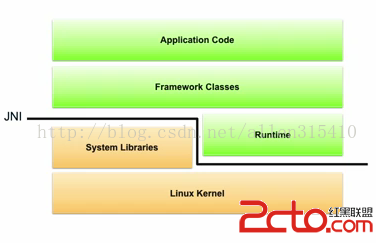
NDK 開發是 Android 開發中繞不開的一塊。透過 Google 提供的 NDK 套件,我們可以借助 JNI 這座橋樑,在 Java 與 C/C++ 之間雙向調用。
 深入解析 Android Activity 的啟動模式與任務棧運作機制
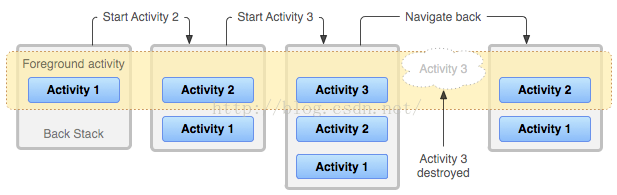
先前的文章裡,筆者已經談過 LaunchMode 的作用,並盡量避開抽象的棧概念,用 GIF 動圖把四種啟動模式講得通俗易懂。這一篇則要更進一步,把「啟動模式」與「任務棧
 通信組件之 Intent 的基本使用大全
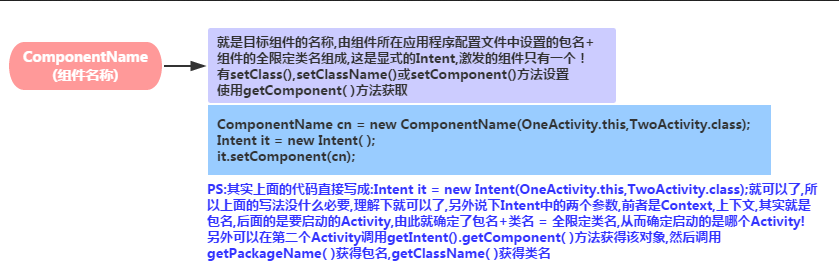
(一)概述 本節引言: 上一節結束後,意味著 Android 四大組件我們都學完了。而這一節要探討的,是四大組件之間的樞紐——Intent(意圖),名副其實的 Andro
 Android 資料存取與 IO(一):SharedPreferences 與檔案讀寫
任何應用都離不開資料的讀與寫。Android 提供兩條主要路徑:資料量小、結構簡單(字串、數值)時,用 SharedPreferences 存成 key-value 即可