

編輯:關於 Android 程式設計
下面這段簡潔的程式碼,示範了如何把 Bitmap 物件保存為 PNG 圖片檔案,具體如下:
public static void saveBitmapAsPng(Bitmap bmp, File f) {
    try {
        FileOutputStream out = new FileOutputStream(f);
        bmp.compress(Bitmap.CompressFormat.PNG, 100, out);
        out.flush();
        out.close();
    } catch (FileNotFoundException e) {
        e.printStackTrace();
    } catch (IOException e) {
        e.printStackTrace();
    }
}
這裡的核心在於 Bitmap 的 compress 方法:第一個參數指定輸出格式為 PNG,第二個參數是壓縮品質(0–100,PNG 為無損格式,傳 100 即可),第三個參數則是輸出的串流。
總結
以上程式碼非常簡單,把 Bitmap 壓縮寫入 FileOutputStream 即可,希望對你有所幫助。
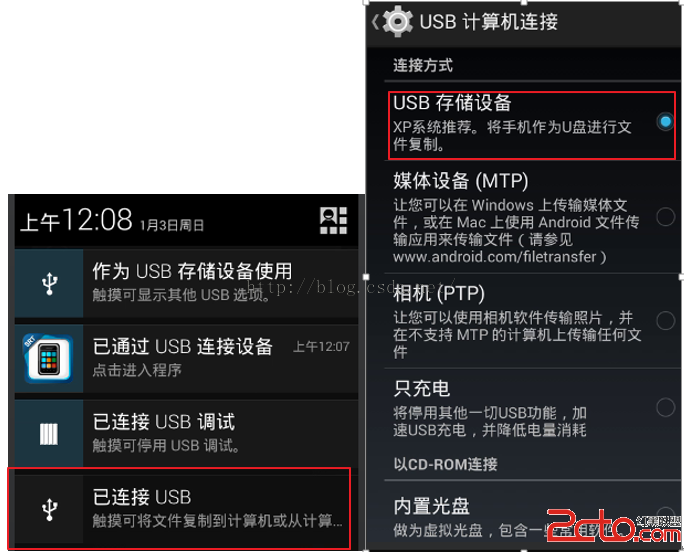 MSM8909 + Android 5.1.1 的 USB 連接方式完整整理
以下測試環境以 Windows 7 電腦為主。 先給結論: 作為 Host 使用時,接上滑鼠與 U 盤都能正常工作。 作為 Client 使用時,在 Windows 7
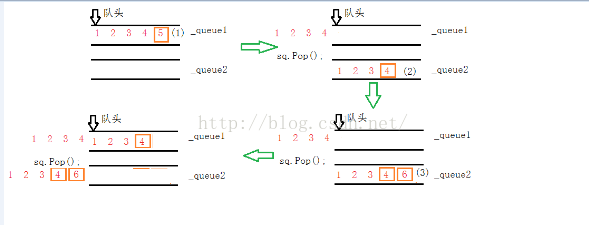 栈的应用:如何用两个队列实现一个栈
用两个队列实现一个栈 之前我实现过“两个栈实现一个队列”这道面试题,思路其实很简单,就是充分利用栈后进先出的特性:把输入的数据先压入栈 1,再把栈 1 的数据倒到栈 2,
 OkHttp 基礎用法與二次封裝詳解:Get、Post 與 Gson 集成
日常開發中,網絡層往往由同事封裝好,我們只管調用。但一旦要自己動手封裝,就會發現細節不少:線程切換、參數組織、返回數據的泛型解析、統一異常處理。本文從最原始的 get /
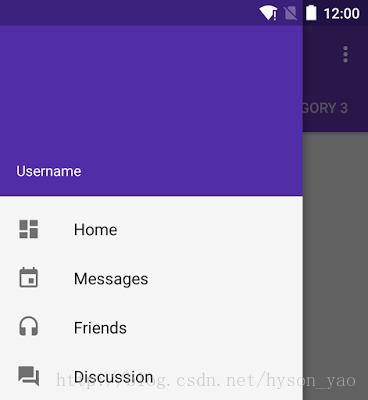 Android Design Support Library 控件使用详解
自 Android 5.0 Lollipop 推出 Material Design 設計理念並提供相容庫以來,一系列優雅的新控件極大地豐富了 Android 的介面設計。