

編輯:關於 Android 開發
系統預設的 Toast 只有一行灰底白字,功能上沒問題,但放進講究視覺細節的 App 裡總顯得突兀。自定義 Toast 的做法是把版面拆成兩件事:長什麼樣子交給 layout 與 shape 樣式檔,什麼時候出現交給 Java 程式碼。本篇先完成前半段,把樣子做出來。
res/layout 下新增 Toast 的版面資源檔 toast_customer.xml。android:id,後續程式碼要靠它取得根 View。res/drawable 下新增樣式規則檔,定義圓角、底色與描邊。<?xml version="1.0" encoding="utf-8"?>
<LinearLayout xmlns:android="https://schemas.android.com/apk/res/android"
android:id="@+id/toast_layout_root"
android:layout_width="match_parent"
android:layout_height="match_parent"
android:orientation="horizontal">
<TextView
android:id="@+id/toastMessage"
android:layout_width="wrap_content"
android:layout_height="30dp"
android:gravity="center_horizontal|center_vertical"
android:textSize="13dp"
android:textColor="#000000" />
</LinearLayout>
用 shape 標籤就能畫出圓角矩形,不必準備任何圖片素材,這也是 Android 樣式系統最實用的地方之一。
<?xml version="1.0" encoding="utf-8"?>
<shape xmlns:android="https://schemas.android.com/apk/res/android">
    <corners android:radius="8dp" />
    <solid android:color="#55FFFFFF" />
    <stroke android:width="0.5dp" android:color="#FFFFFF" />
</shape>
三個子標籤分別負責:8dp 的圓角、半透明白色底(透明度 0x55)、以及 0.5dp 的白色描邊。
<?xml version="1.0" encoding="utf-8"?>
<LinearLayout xmlns:android="https://schemas.android.com/apk/res/android"
    android:id="@+id/toast_layout_root"
    android:layout_width="match_parent"
    android:layout_height="match_parent"
    android:orientation="horizontal"
    android:background="@drawable/toast_border_bg">

    <TextView
        android:id="@+id/toastMessage"
        android:layout_width="wrap_content"
        android:layout_height="30dp"
        android:gravity="center_horizontal|center_vertical"
        android:textSize="22dp"
        android:text="測試"
        android:textColor="#000000" />
</LinearLayout>
執行後即可看到帶圓角與描邊的提示框。
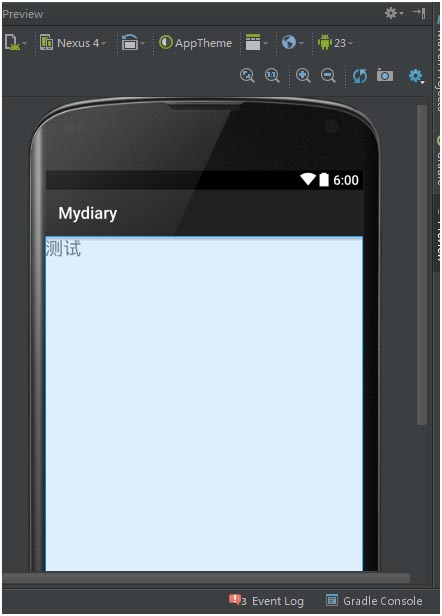
版面準備好之後,接下來只要在程式碼中透過 LayoutInflater 把這個版面填出來,塞進 Toast 並用 setView() 指定即可。屆時還可以加上自訂的置放位置與顯示時長,讓提示訊息更貼合你的設計稿。
 Android 撥號器簡單實現
撥號功能實現撥號功能可透過 Intent 完成。畫面中放置輸入框與按鈕,點擊後將號碼傳給系統撥號程式。版面配置使用 LinearLayout 垂直排列 TextView、
 原生 App、移動 Web App 與混合 App 的區別解讀
 很多人常聽到「原生開發」「混合式開發」,卻不太清楚它們的具體含義。本文將為大家釐清這幾類應用的概念與特點。
 Android SwipeRefreshLayout:下拉刷新+上拉加載+側滑刪除一站式實現
 SwipeRefreshLayout是Google官方推出的下拉刷新控件,被
 Android MotionEvent 完整解析:座標、事件類型與多點觸控
 觸摸事件是 Android 互動設計的核心。MotionEvent 不僅承載手指的位置,也描述