

編輯:關於 Android 開發
幾乎每款 App 的信息列表頂部都有自動輪轉的廣告圖。用 ViewPager 雖然能實現,但編碼較為繁瑣。這裡推薦開源控件 LoopView——一個強大的輪播大圖組件,提供了豐富的配置方法,足以滿足各種應用場景。
若項目使用 Gradle 構建,只需在 build.gradle 的 dependencies 中加入一行:
compile 'com.kevin:loopview:1.0.4'1. 在 layout.xml 中配置 LoopView
在佈局文件中加入 <com.kevin.loopview.AdLoopView>:
<RelativeLayout xmlns:android="https://schemas.android.com/apk/res/android"
    xmlns:tools="https://schemas.android.com/tools"
    xmlns:kevin="https://schemas.android.com/apk/res-auto"
    android:layout_width="match_parent"
    android:layout_height="match_parent"
    tools:context=".MainActivity">

    <com.kevin.loopview.AdLoopView
        android:id="@+id/adloop_act_adloopview"
        android:layout_width="match_parent"
        android:layout_height="192dp"
        kevin:loop_interval="5000"
        kevin:loop_dotMargin="5dp"
        kevin:loop_autoLoop="true"
        kevin:loop_dotSelector="@drawable/ad_dots_selector"
        kevin:loop_layout="@layout/ad_loopview_layout">
    </com.kevin.loopview.AdLoopView>
</RelativeLayout>
2. 在 Activity 中添加代碼:
public class AdLoopActivity extends Activity implements BaseLoopAdapter.OnItemClickListener {

    AdLoopView mLoopView;

    @Override
    protected void onCreate(Bundle savedInstanceState) {
        super.onCreate(savedInstanceState);
        setContentView(R.layout.activity_adloopview);
        initViews();
        initEvents();
    }

    private void initViews() {
        mLoopView = (AdLoopView) this.findViewById(R.id.adloop_act_adloopview);
        initRotateView();
    }

    /**
     * 初始化 LoopView
     */
    private void initRotateView() {
        // 設置自定義佈局
        // mLoopView.setLoopLayout(R.layout.ad_loopview_layout);

        // 設置數據
        String json = LocalFileUtils.getStringFormAsset(this, "loopview_date.json");
        LoopData loopData = JsonTool.toBean(json, LoopData.class);
        if (null != loopData) {
            mLoopView.refreshData(loopData);
        }

        // 設置頁面切換過度事件
        mLoopView.setScrollDuration(2000);

        // 設置頁面切換時間間隔
        mLoopView.setInterval(3000);
    }

    /**
     * 初始化事件
     */
    private void initEvents() {
        mLoopView.setOnClickListener(this);
    }

    @Override
    public void onItemClick(PagerAdapter parent, View view, int position, int realPosition) {
        LoopData loopData = mLoopView.getLoopData();
        String url = loopData.items.get(position).link;
        Intent intent = new Intent();
        intent.setData(Uri.parse(url));
        intent.setAction(Intent.ACTION_VIEW);
        startActivity(intent);
    }

    @Override
    protected void onDestroy() {
        super.onDestroy();
    }
}
3. LocalFileUtils 的主要方法(讀取 Asset 文本)
public class LocalFileUtils {
    /**
     * 獲取 Asset 下文本內容
     */
    public static String getStringFormAsset(Context context, String str) {
        BufferedReader in = null;
        try {
            in = new BufferedReader(new InputStreamReader(context.getAssets().open(str)));
            String line;
            StringBuilder buffer = new StringBuilder();
            while ((line = in.readLine()) != null) {
                buffer.append(line).append('\n');
            }
            return buffer.toString();
        } catch (IOException e) {
            e.printStackTrace();
            return "";
        } finally {
            if (in != null) {
                try {
                    in.close();
                    in = null;
                } catch (IOException e) {
                    e.printStackTrace();
                }
            }
        }
    }
}// 設置 ViewPager 頁面切換時間
mLoopView.setScrollDuration(1000);
// 設置輪轉時間間隔
mLoopView.setInterval(3000);
// 以集合方式初始化數據
mLoopView.setLoopViewPager(List<Map<String, String>> data);
// 以 JSON 方式初始化數據
mLoopView.setLoopViewPager(String jsonData);
// 以數據實體方式初始化數據
mLoopView.setLoopViewPager(LoopData rotateData);
// 以集合方式刷新數據
mLoopView.refreshData(final List<Map<String, String>> data);
// 以數據實體方式刷新數據
mLoopView.refreshData(LoopData loopData);
// 以 JSON 方式刷新數據
mLoopView.refreshData(String jsonData);
// 獲取配置的輪播數據
mLoopView.getLoopData();
// 開始自動輪轉
mLoopView.startAutoLoop();
// 延遲指定時間後自動輪轉
mLoopView.startAutoLoop(long delayTimeInMills);
// 停止自動輪轉
mLoopView.stopAutoLoop();
// 設置自定義佈局
mLoopView.setLoopLayout(int layoutResId);借助 LoopView,幾行代碼就能搞定App頂部的廣告輪播,省去大量重複造輪子的時間。
作者:傑瑞教育
出處:https://www.cnblogs.com/jerehedu/

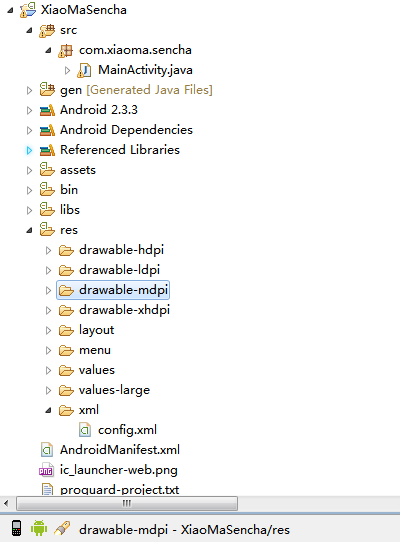 Android 開發實戰(二十七):用 Sencha 打造 APK 局部模組化更新
忙裡偷閒,想跟大家聊聊這段時間摸索出來、自己也頗為得意的成果——「Android APK 局部模組化更新」。做這主題前我上網翻了不少資料,可惜多半是輾轉複製、缺乏新意。剛
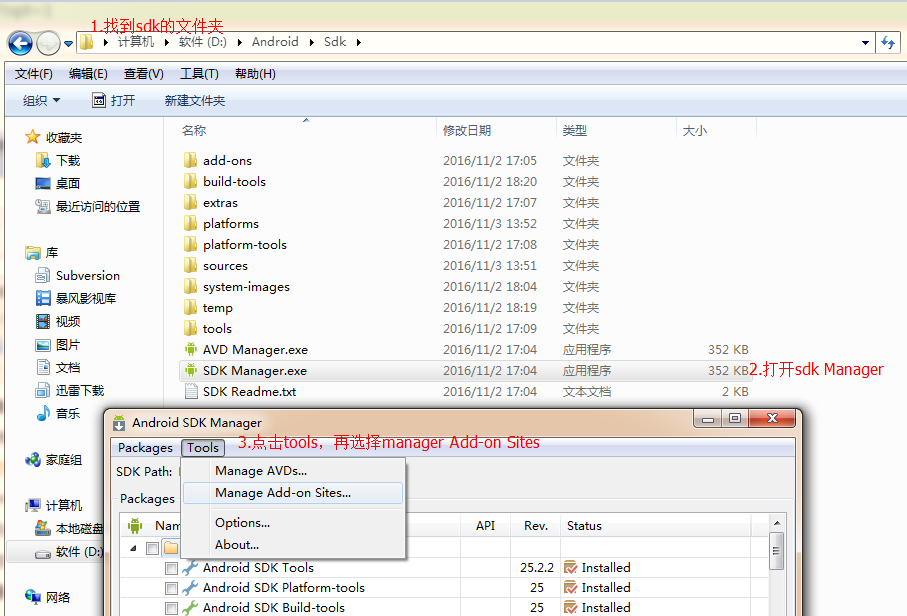 Android 開發環境建置指南:從 SDK 鏡像到環境變數一次搞定
 想開始學習 Android 開發,第一步通常不是寫程式,而是把開發環境準備好。若網路環境不順暢,下載
 HelloCharts 圖表框架實戰(三):圓餅圖也能畫得漂亮
 折線圖、柱狀圖之後,這次換個口味聊圓餅圖。HelloCharts 的 API 設計相當親切,一個 PieC
 PullToZoomListViewEx 實作下拉縮放頭像:還原新浪微博登入頁的拉伸動效(一)
 如果你仔細觀察過新浪微博的手機客戶端,會發現登入頁有一個很細膩的互動:手