

編輯:關於 Android 開發
1、Drawable就是一個可畫的對象,其可能是一張位圖(BitmapDrawable),也可能是一個圖形(ShapeDrawable),還有可能是一個圖層(LayerDrawable),我們根據畫圖的需求,創建相應的可畫對象
2、Canvas畫布,繪圖的目的區域,用於繪圖
3、Bitmap位圖,用於圖的處理
4、Matrix矩陣
在 Android 圖像處理體系中,Drawable、Canvas、Bitmap 與 Matrix 是最基礎也最常用的幾個角色,理解它們各自的職責,是掌握圖形繪製的關鍵。
Resources res = getResources(); Bitmap bmp = BitmapFactory.decodeResource(res, R.drawable.icon);
public byte[] Bitmap2Bytes(Bitmap bm) { ByteArrayOutputStream baos = new ByteArrayOutputStream(); bm.compress(Bitmap.CompressFormat.PNG, 100, baos); return baos.toByteArray(); }
public Bitmap Bytes2Bimap(byte[] b) { if (b.length != 0) { return BitmapFactory.decodeByteArray(b, 0, b.length); } else { return null; } }
public static Bitmap zoomBitmap(Bitmap bitmap, int width, int height) { int w = bitmap.getWidth(); int h = bitmap.getHeight(); Matrix matrix = new Matrix(); float scaleWidth = ((float) width / w); float scaleHeight = ((float) height / h); matrix.postScale(scaleWidth, scaleHeight); Bitmap newbmp = Bitmap.createBitmap(bitmap, 0, 0, w, h, matrix, true); return newbmp; }
public static Bitmap drawableToBitmap(Drawable drawable) { // 取 drawable 的長寬 int w = drawable.getIntrinsicWidth(); int h = drawable.getIntrinsicHeight(); // 取 drawable 的顏色格式 Bitmap.Config config = drawable.getOpacity() != PixelFormat.OPAQUE ? Bitmap.Config.ARGB_8888 : Bitmap.Config.RGB_565; // 建立對應 bitmap Bitmap bitmap = Bitmap.createBitmap(w, h, config); // 建立對應 bitmap 的畫布 Canvas canvas = new Canvas(bitmap); drawable.setBounds(0, 0, w, h); // 把 drawable 內容畫到畫布中 drawable.draw(canvas); return bitmap; }
public static Bitmap getRoundedCornerBitmap(Bitmap bitmap, float roundPx) { int w = bitmap.getWidth(); int h = bitmap.getHeight(); Bitmap output = Bitmap.createBitmap(w, h, Config.ARGB_8888); Canvas canvas = new Canvas(output); final int color = 0xff424242; final Paint paint = new Paint(); final Rect rect = new Rect(0, 0, w, h); final RectF rectF = new RectF(rect); paint.setAntiAlias(true); canvas.drawARGB(0, 0, 0, 0); paint.setColor(color); canvas.drawRoundRect(rectF, roundPx, roundPx, paint); paint.setXfermode(new PorterDuffXfermode(Mode.SRC_IN)); canvas.drawBitmap(bitmap, rect, rect, paint); return output; }
public static Bitmap createReflectionImageWithOrigin(Bitmap bitmap) { final int reflectionGap = 4; int w = bitmap.getWidth(); int h = bitmap.getHeight(); Matrix matrix = new Matrix(); matrix.preScale(1, -1); Bitmap reflectionImage = Bitmap.createBitmap(bitmap, 0, h / 2, w, h / 2, matrix, false); Bitmap bitmapWithReflection = Bitmap.createBitmap(w, (h + h / 2), Config.ARGB_8888); Canvas canvas = new Canvas(bitmapWithReflection); canvas.drawBitmap(bitmap, 0, 0, null); Paint deafalutPaint = new Paint(); canvas.drawRect(0, h, w, h + reflectionGap, deafalutPaint); canvas.drawBitmap(reflectionImage, 0, h + reflectionGap, null); Paint paint = new Paint(); LinearGradient shader = new LinearGradient(0, bitmap.getHeight(), 0, bitmapWithReflection.getHeight() + reflectionGap, 0x70ffffff, 0x00ffffff, TileMode.CLAMP); paint.setShader(shader); // Set the Transfer mode to be porter duff and destination in paint.setXfermode(new PorterDuffXfermode(Mode.DST_IN)); // Draw a rectangle using the paint with our linear gradient canvas.drawRect(0, h, w, bitmapWithReflection.getHeight() + reflectionGap, paint); return bitmapWithReflection; }
Bitmap bm=xxx; //xxx根據你的情況獲取 BitmapDrawable bd= new BitmapDrawable(getResource(), bm); 因為BtimapDrawable是Drawable的子類,最終直接使用bd對象即可。
public static Drawable zoomDrawable(Drawable drawable, int w, int h) { int width = drawable.getIntrinsicWidth(); int height = drawable.getIntrinsicHeight(); // drawable轉換成bitmap Bitmap oldbmp = drawableToBitmap(drawable); // 創建操作圖片用的Matrix對象 Matrix matrix = new Matrix(); // 計算縮放比例 float sx = ((float) w / width); float sy = ((float) h / height); // 設置縮放比例 matrix.postScale(sx, sy); // 建立新的bitmap,其內容是對原bitmap的縮放後的圖 Bitmap newbmp = Bitmap.createBitmap(oldbmp, 0, 0, width, height, matrix, true); return new BitmapDrawable(newbmp); }
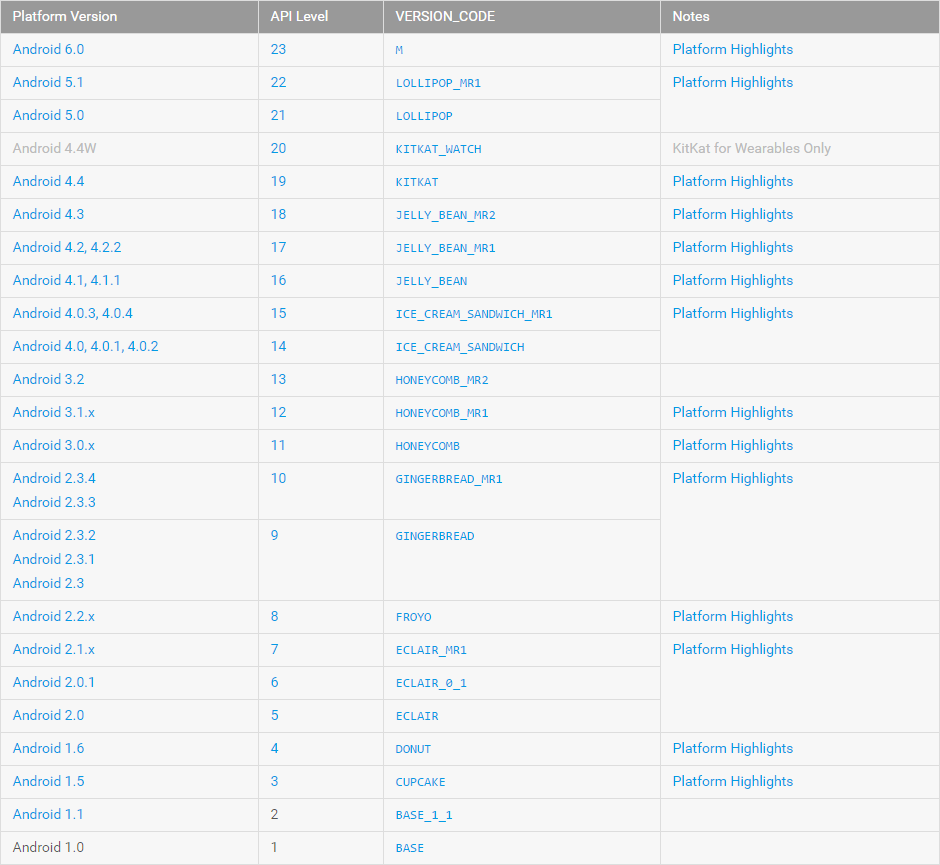 深入解析 Android 的 uses-sdk 標籤:minSdkVersion、targetSdkVersion 與 maxSdkVersion
一、為什麼需要 uses-sdk Android 系統的版本迭代從未停歇,幾乎每個新版本都會引入新的能力與行為變化。伴隨著用戶基數的不斷膨脹,開發者必須熟悉各版本的差異,
 Android 自學筆記:ProgressBar 與它的兩個分身 SeekBar、RatingBar
前言 ProgressBar 是進度條的基底元件,同時也是 SeekBar 與 RatingBar 的父類別。三者用法高度相似,差別主要在呈現形式與互動方式。把 Prog
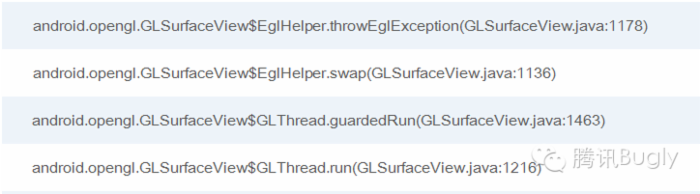 File Descriptor 洩漏導致 Crash:Too many open files 排查全記錄
 在實際的 Android 開發過程中,我們遇到了一些奇奇怪怪的
 Android 性能剖析利器 TraceView 詳解
 TraceView 是 Android 平台自帶的一款優秀性能分析工具,它能以圖形化的方式幫助我們直觀地了解程序的