

編輯:關於 Android 開發
PullToRefreshListView 是一款廣受歡迎的第三方開源自下而上刷新列表元件,QQ、微信等常見應用都曾廣泛採用。(此開源框架於 2013 年後已停止更新。)
下載地址(此開源框架於 2013 年後不再更新):點此下載
以下是 MainActivity 的實作程式碼:
1 package com.lixu.kaiyuanxiala; 2 3 import java.util.ArrayList; 4 5 import com.handmark.pulltorefresh.library.PullToRefreshBase; 6 import com.handmark.pulltorefresh.library.PullToRefreshBase.OnRefreshListener; 7 import com.handmark.pulltorefresh.library.PullToRefreshListView; 8 import android.app.Activity; 9 import android.os.AsyncTask; 10 import android.os.Bundle; 11 import android.widget.ArrayAdapter; 12 import android.widget.ListView; 13 import android.widget.TextView; 14 import android.widget.Toast; 15 16 public class MainActivity extends Activity { 17 private ArrayList<String> date; 18 private int count = 0; 19 private ArrayAdapter<String> adapter; 20 PullToRefreshListView prl; 21 22 @Override 23 protected void onCreate(Bundle savedInstanceState) { 24 super.onCreate(savedInstanceState); 25 setContentView(R.layout.activity_main); 26 27 date = new ArrayList<String>(); 28 adapter = new ArrayAdapter<String>(this, android.R.layout.simple_list_item_1, date); 29 30 prl = (PullToRefreshListView) findViewById(R.id.prl); 31 32 prl.setAdapter(adapter); 33 34 TextView tv = new TextView(this); 35 tv.setText("想看內容給我拉下來!!"); 36 37 prl.setEmptyView(tv); 38 // 監控下拉事件 每次下拉執行一次 onRefresh()。 39 prl.setOnRefreshListener(new OnRefreshListener<ListView>() { 40 41 @Override 42 public void onRefresh(PullToRefreshBase<ListView> refreshView) { 43 new MyAsync().execute(); 44 } 45 }); 46 } 47 48 private class MyAsync extends AsyncTask { 49 @Override 50 protected void onPreExecute() { 51 // 開始刷新 52 prl.setRefreshing(); 53 } 54 55 @Override 56 protected Object doInBackground(Object... params) { 57 58 return count++; 59 } 60 61 @Override 62 protected void onPostExecute(Object result) { 63 Toast.makeText(getApplicationContext(), "更新成功!", 0).show(); 64 date.add(0, "" + result); 65 // 刷新適配器 66 adapter.notifyDataSetChanged(); 67 // 結束刷新 68 prl.onRefreshComplete(); 69 70 } 71 } 72 }
對應的 XML 佈局檔如下:
1 <RelativeLayout xmlns:android="https://schemas.android.com/apk/res/android" 2 xmlns:tools="https://schemas.android.com/tools" 3 android:layout_width="match_parent" 4 android:layout_height="match_parent" > 5 6 <com.handmark.pulltorefresh.library.PullToRefreshListView 7 android:id="@+id/prl" 8 android:layout_width="match_parent" 9 android:layout_height="match_parent" 10 /> 11 12 </RelativeLayout>
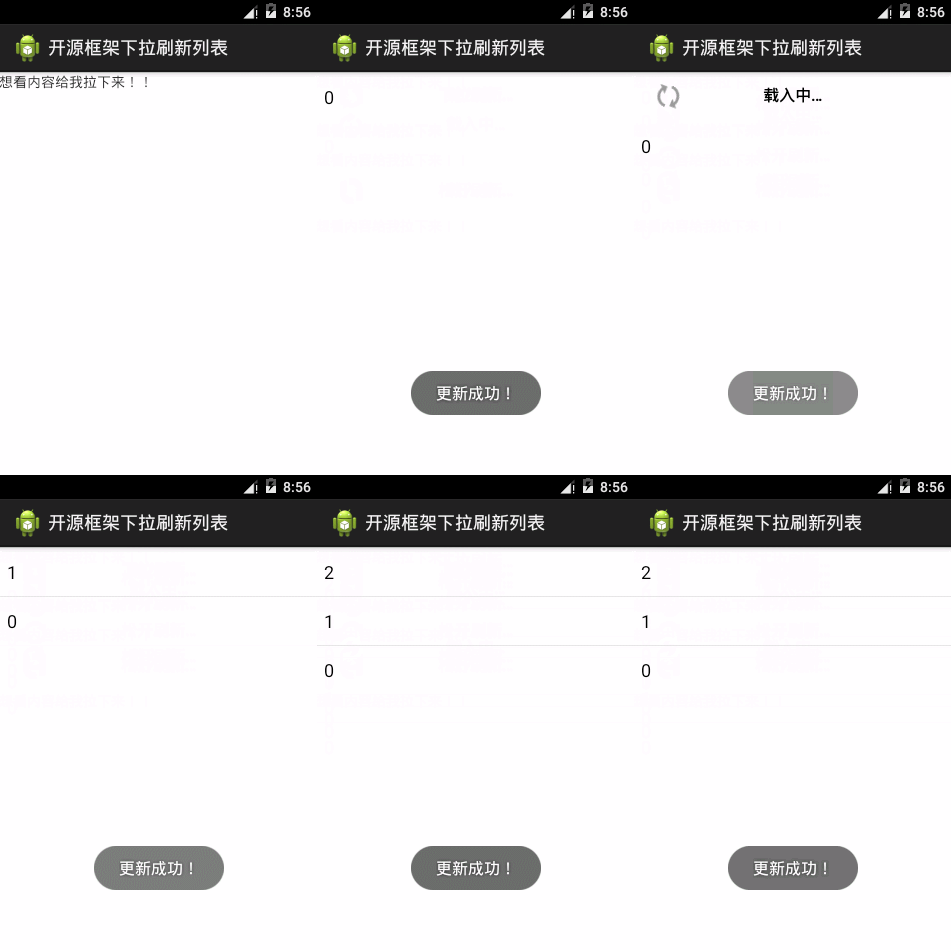
執行效果圖如下:
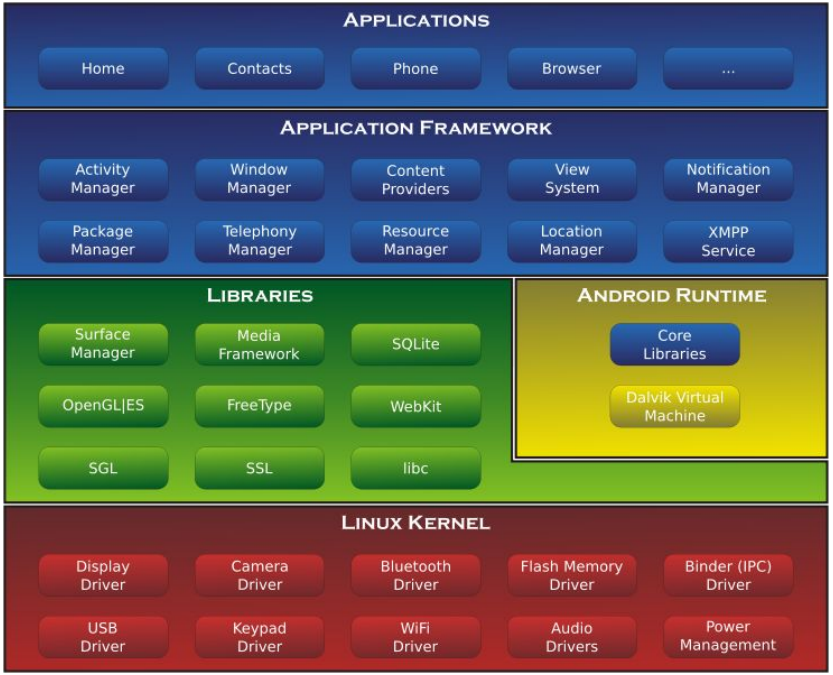 《第一行代碼》學習筆記(一):Android 四層系統架構全解析
從一段收購史說起 2013 年 10 月,Andy Rubin 創辦了 Android 公司;2005 年 8 月 Google 將其收購,並在 2008 年推出 And
 Android Studio 安裝 Genymotion 插件與常見問題
Android Studio 安裝 Genymotion 插件 Genymotion 是常用的 Android 模擬器之一,效能與操作體驗通常優於部分內建模擬器。本文說明
 二手交易平台的 Android 端實作:Dagger2 + MVP + Bmob 雲後端
專案概況 這是我的畢業設計專案,一個二手交易平台。技術主線是 Dagger2 搭配 MVP 分層,後端使用 Bmob 雲服務,並整合了百度地圖與友盟第三方登入。 系統架
 msm8909 Android 5.1.1 開啟調試串口設定指南
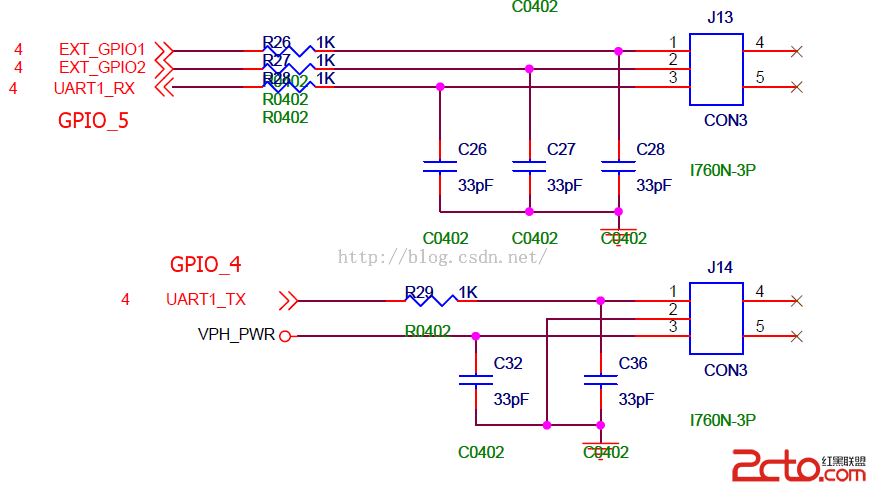
msm8909 平台開啟 UART 調試輸出本文整理 msm8909 平台在 Android 5.1.1 下開啟調試串口輸出的關鍵設定,適用於 V1.0 與 V1.1 主