

編輯:關於 Android 開發
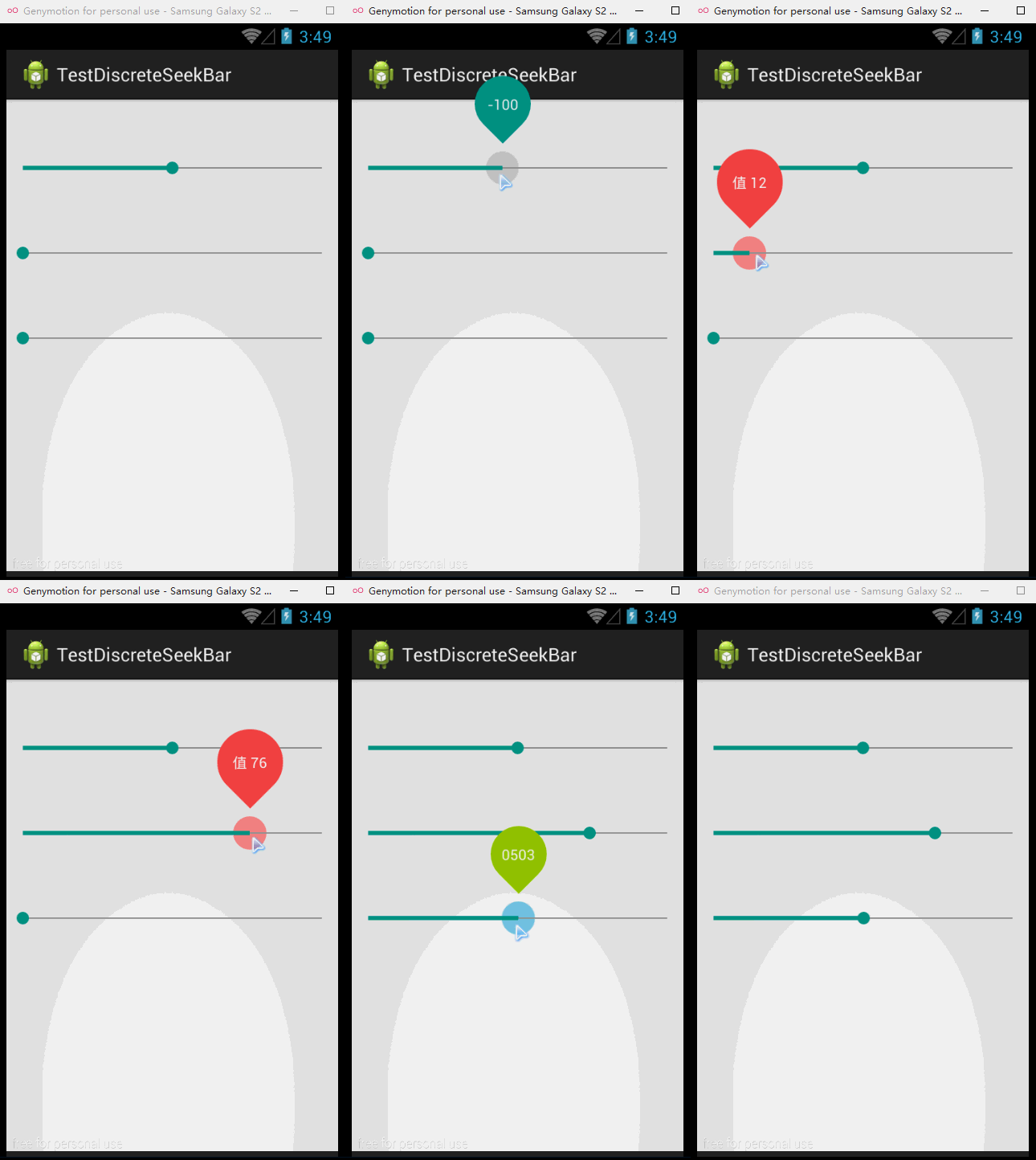
DiscreteSeekbar 在 GitHub 上的專案主頁為:https://github.com/AnderWeb/discreteSeekBar
DiscreteSeekbar 可自訂的屬性非常多,可在其 GitHub 專案主頁上查閱。它的使用方式與 Android 原生的 SeekBar 幾乎一致。
1 <LinearLayout xmlns:android="https://schemas.android.com/apk/res/android" 2 xmlns:tools="https://schemas.android.com/tools" 3 xmlns:app="https://schemas.android.com/apk/res-auto" 4 android:layout_width="match_parent" 5 android:layout_height="match_parent" 6 android:orientation="vertical" 7 tools:context="com.zzw.testdiscreteseekbar.MainActivity" > 8 9 <!-- app:dsb_max 最大值 --> 10 <!-- app:dsb_min 最小值 --> 11 <!-- app:dsb_value 當前值 --> 12 13 <org.adw.library.widgets.discreteseekbar.DiscreteSeekBar 14 android:id="@+id/discreteSeekBar1" 15 android:layout_width="match_parent" 16 android:layout_height="wrap_content" 17 android:layout_marginTop="50dp" 18 app:dsb_max="10" 19 app:dsb_min="-10" 20 app:dsb_value="0" /> 21 22 <!-- app:dsb_indicatorFormatter="值 %d"表示顯示出來的值形如:值 37 --> 23 <!-- app:dsb_indicatorColor="@android:color/holo_red_light" 氣泡顯示的顏色 --> 24 <!-- app:dsb_rippleColor="@android:color/holo_red_light" 手指拉動時候手指位置的顏色 --> 25 26 <org.adw.library.widgets.discreteseekbar.DiscreteSeekBar 27 android:id="@+id/discreteSeekBar2" 28 android:layout_width="match_parent" 29 android:layout_height="wrap_content" 30 android:layout_marginTop="50dip" 31 app:dsb_allowTrackClickToDrag="false" 32 app:dsb_indicatorColor="@android:color/holo_red_light" 33 app:dsb_indicatorFormatter="值 %d" 34 app:dsb_rippleColor="@android:color/holo_red_light" /> 35 36 <!-- app:dsb_indicatorFormatter="%04d"代表有幾位數 ,0後面是幾就是幾位數 如:0013,0135,1000 --> 37 38 <org.adw.library.widgets.discreteseekbar.DiscreteSeekBar 39 android:id="@+id/discreteSeekBar3" 40 android:layout_width="match_parent" 41 android:layout_height="wrap_content" 42 android:layout_marginTop="50dip" 43 app:dsb_indicatorColor="@android:color/holo_green_light" 44 app:dsb_indicatorFormatter="%04d" 45 app:dsb_max="1000" 46 app:dsb_min="1" 47 app:dsb_rippleColor="@android:color/holo_blue_light" /> 48 49 </LinearLayout>
1 package com.zzw.testdiscreteseekbar; 2 3 import org.adw.library.widgets.discreteseekbar.DiscreteSeekBar; 4 import org.adw.library.widgets.discreteseekbar.DiscreteSeekBar.NumericTransformer; 5 import org.adw.library.widgets.discreteseekbar.DiscreteSeekBar.OnProgressChangeListener; 6 7 import android.app.Activity; 8 import android.os.Bundle; 9 import android.util.Log; 10 11 public class MainActivity extends Activity { 12 13 protected static final String TAG = "MainActivity"; 14 15 @Override 16 protected void onCreate(Bundle savedInstanceState) { 17 super.onCreate(savedInstanceState); 18 setContentView(R.layout.activity_main); 19 20 DiscreteSeekBar discreteSeekBar1 = (DiscreteSeekBar) findViewById(R.id.discreteSeekBar1); 21 discreteSeekBar1.setNumericTransformer(new NumericTransformer() { 22 23 @Override 24 public int transform(int value) { 25 26 return value * 100; 27 } 28 }); 29 30 31 DiscreteSeekBar discreteSeekBar2 = (DiscreteSeekBar) findViewById(R.id.discreteSeekBar2); 32 discreteSeekBar2.setOnProgressChangeListener(new OnProgressChangeListener() { 33 34 @Override 35 public void onStopTrackingTouch(DiscreteSeekBar seekBar) { 36 37 } 38 39 @Override 40 public void onStartTrackingTouch(DiscreteSeekBar seekBar) { 41 42 } 43 44 @Override 45 public void onProgressChanged(DiscreteSeekBar seekBar, int value, 46 boolean fromUser) { 47 Log.d(TAG, value+""); 48 } 49 }); 50 } 51 52 }
 在 Win10 上架設 Ionic 框架開發 Android 應用的完整環境
 轉載請注明出處:https://www.cnblogs.com/titibili/p/510
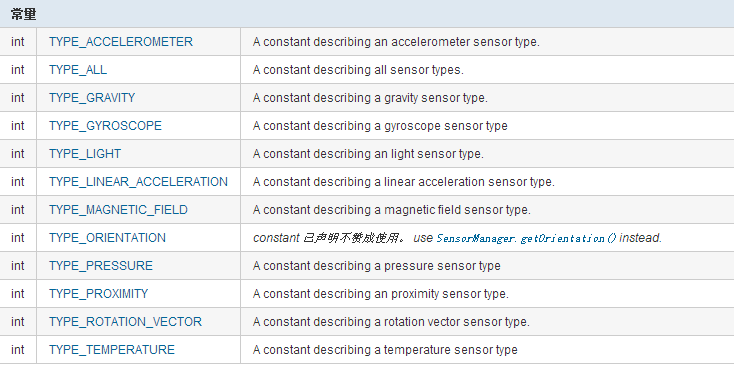 Android SensorManager 完全指南:讀懂手機裡的每一顆感測器
今天的中高階 Android 手機,幾乎都內建了一整套感測器。它們有的以硬體晶片形式存在,有的則是系統用演算法「合成」出來的軟體感測器。透過它們,App 可以感知裝置的三
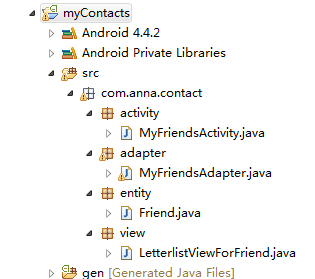 Android 通訊錄字母導航欄源碼解析(一)
本文分享一個仿通訊錄的右側字母索引導航欄完整源碼,實現手指滑動時快速定位聯絡人的效果。 整体分為四個部分:Activity、Adapter、Entity 與自定義 Vi
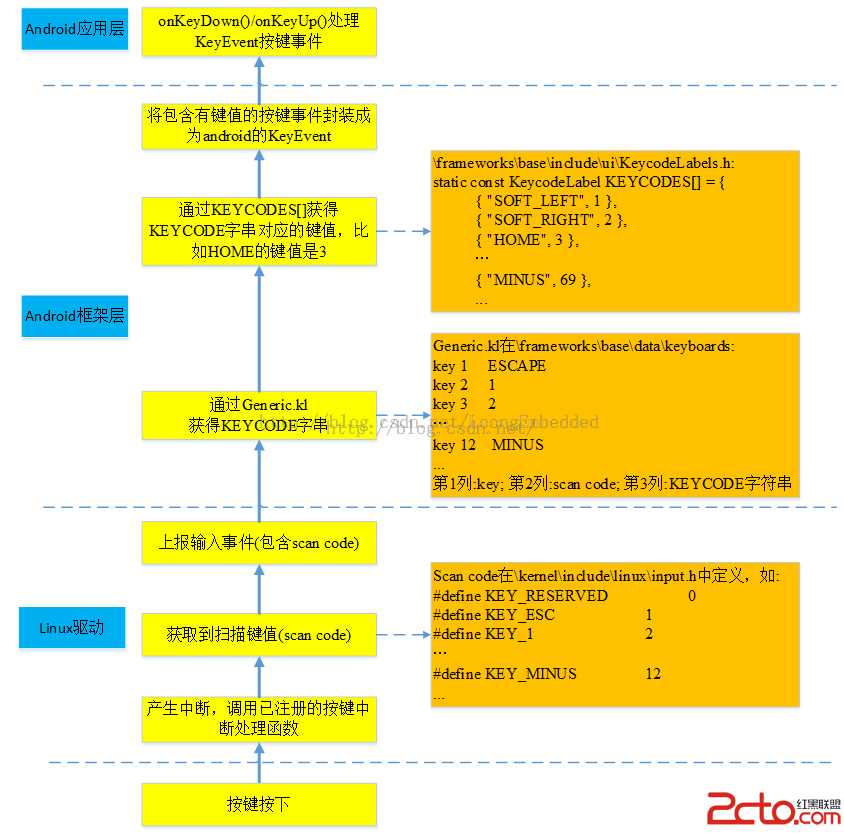 MSM8909 與 Android 5.1.1 鍵盤驅動分析:I2C、Input 子系統與掃描碼
概述 本文以 MSM8909 平台與 Android 5.1.1 為例,分析鍵盤驅動的基本實現方式。系統採用 SN7326 鍵盤擴展晶片,透過 I2C 介面讀取狀態暫存器