

編輯:關於 Android 開發
Android 的 SwipeToDismiss 是 GitHub 上一個第三方開源框架(專案連結:https://github.com/romannurik/Android-SwipeToDismiss )。該開源專案旨在:當使用者的手指在螢幕上左滑或右滑時,刪除當前的 ListView Item。本文示範將下拉刷新(SwipeRefreshLayout)與滑動刪除功能結合起來。
 1 package com.lixu.SwipeRefreshLayoutyongfa; 2 3 import java.util.ArrayList; 4 import java.util.HashMap; 5 6 import com.lixu.SwipeRefreshLayoutyongfa.SwipeDismissListViewTouchListener.DismissCallbacks; 7 import android.app.Activity; 8 import android.content.Context; 9 import android.os.AsyncTask; 10 import android.os.Bundle; 11 import android.support.v4.widget.SwipeRefreshLayout; 12 import android.support.v4.widget.SwipeRefreshLayout.OnRefreshListener; 13 import android.view.LayoutInflater; 14 import android.view.View; 15 import android.view.ViewGroup; 16 import android.widget.ArrayAdapter; 17 import android.widget.ImageView; 18 import android.widget.ListView; 19 import android.widget.TextView; 20 21 public class MainActivity extends Activity { 22 private ArrayAdapter<String> adapter; 23 private ArrayList<HashMap<String, Object>> data; 24 private int count = 0; 25 SwipeRefreshLayout srl; 26 private int[] image = { R.drawable.beijing, R.drawable.chengdu, R.drawable.guangzhou, R.drawable.hangzhou, 27 R.drawable.wuhan, R.drawable.xian, R.drawable.shenzhen }; 28 29 private String[] city = { "北京", "成都", "廣州", "杭州", "武漢", "西安", "深圳" }; 30 private String KEY_IMAGE = "image"; 31 private String KEY_TXT = "txt"; 32 33 private int i = 0; 34 private int j = 0; 35 36 ListView lv; 37 38 SwipeDismissListViewTouchListener touchlistener; 39 40 @Override 41 protected void onCreate(Bundle savedInstanceState) { 42 super.onCreate(savedInstanceState); 43 setContentView(R.layout.activity_main); 44 45 data = new ArrayList<HashMap<String, Object>>(); 46 47 lv = (ListView) findViewById(R.id.lv); 48 49 srl = (SwipeRefreshLayout) findViewById(R.id.srl); 50 // 設置刷新動畫的顏色. 51 srl.setColorSchemeResources(android.R.color.holo_green_light, android.R.color.holo_blue_bright, 52 android.R.color.holo_red_light); 53 54 srl.setOnRefreshListener(new OnRefreshListener() { 55 // SwipeRefreshLayout接管其包裹的ListView下拉事件。 56 // 每一次對ListView的下拉動作,將觸發SwipeRefreshLayout的onRefresh()。 57 @SuppressWarnings("unchecked") 58 @Override 59 public void onRefresh() { 60 61 new MyAsyncTask().execute(); 62 } 63 }); 64 adapter = new MyAdapter(this, -1); 65 66 lv.setAdapter(adapter); 67 addSwipeDismissListView(); 68 // 往listview裡面添加觸摸事件 69 lv.setOnTouchListener(touchlistener); 70 } 71 72 private void addSwipeDismissListView() { 73 touchlistener = new SwipeDismissListViewTouchListener(lv, new DismissCallbacks() { 74 75 @Override 76 public void onDismiss(ListView listView, int[] reverseSortedPositions) { 77 for (int pos : reverseSortedPositions) 78 // 獲取滑動的下標行後刪除這一行 79 data.remove(pos); 80 // 每次要刷新適配器 81 adapter.notifyDataSetChanged();
 Toast.makeText(getApplicationContext(), "刪除成功!", 0).show(); 82 } 83 84 @Override 85 public boolean canDismiss(int position) { 86 return true; 87 } 88 }); 89 } 90 91 private class MyAdapter extends ArrayAdapter { 92 private LayoutInflater flater; 93 94 public MyAdapter(Context context, int resource) { 95 super(context, resource); 96 flater = LayoutInflater.from(context); 97 } 98 99 @Override 100 public int getCount() { 101 return data.size(); 102 } 103 104 @Override 105 public View getView(int position, View convertView, ViewGroup parent) { 106 if (convertView == null) 107 convertView = flater.inflate(R.layout.item, null); 108 109 TextView tv = (TextView) convertView.findViewById(R.id.tv); 110 tv.setText(data.get(position).get(KEY_TXT) + ""); 111 112 ImageView iv = (ImageView) convertView.findViewById(R.id.iv); 113 iv.setImageResource((Integer) data.get(position).get(KEY_IMAGE)); 114 115 return convertView; 116 } 117 } 118 119 @SuppressWarnings("rawtypes") 120 private class MyAsyncTask extends AsyncTask { 121 private HashMap<String, Object> map; 122 123 @Override 124 protected void onPreExecute() { 125 // 刷新開始 126 srl.setRefreshing(true); 127 map = new HashMap<String, Object>(); 128 } 129 130 @Override 131 protected Object doInBackground(Object... params) { 132 // 防止下標越界,到達數組長度後返回開始 133 if (i == image.length) 134 i = 0; 135 if (j == city.length) 136 j = 0; 137 138 map.put(KEY_IMAGE, image[i++]); 139 map.put(KEY_TXT, city[j++]); 140 141 // 處理一些耗時的事件 142 return map; 143 } 144 145 @SuppressWarnings("unchecked") 146 @Override 147 protected void onPostExecute(Object result) { 148 // 每次從頭部添加 149 data.add(0, (HashMap<String, Object>) result); 150 // 刷新適配器 151 adapter.notifyDataSetChanged(); 152 // 刷新完畢 153 srl.setRefreshing(false); 154 } 155 } 156 157 }
需要搭配使用的 SwipeDismissListViewTouchListener 類別如下:
1 package com.lixu.SwipeRefreshLayoutyongfa; 2 3 /* 4 * Copyright 2013 Google Inc. 5 * 6 * Licensed under the Apache License, Version 2.0 (the "License"); 7 * you may not use this file except in compliance with the License. 8 * You may obtain a copy of the License at 9 * 10 * https://www.apache.org/licenses/LICENSE-2.0 11 * 12 * Unless required by applicable law or agreed to in writing, software 13 * distributed under the License is distributed on an "AS IS" BASIS, 14 * WITHOUT WARRANTIES OR CONDITIONS OF ANY KIND, either express or implied. 15 * See the License for the specific language governing permissions and 16 * limitations under the License. 17 */ 18 19 import android.animation.Animator; 20 import android.animation.AnimatorListenerAdapter; 21 import android.animation.ValueAnimator; 22 import android.graphics.Rect; 23 import android.os.SystemClock; 24 import android.view.MotionEvent; 25 import android.view.VelocityTracker; 26 import android.view.View; 27 import android.view.ViewConfiguration; 28 import android.view.ViewGroup; 29 import android.view.ViewPropertyAnimator; 30 import android.widget.AbsListView; 31 import android.widget.ListView; 32 33 import java.util.ArrayList; 34 import java.util.Collections; 35 import java.util.List; 36 37 /** 38 * A {@link View.OnTouchListener} that makes the list items in a 39 * {@link ListView} dismissable. {@link ListView} is given special treatment 40 * because by default it handles touches for its list items... i.e. it's in 41 * charge of drawing the pressed state (the list selector), handling list item 42 * clicks, etc. 43 * 44 * <p> 45 * After creating the listener, the caller should also call 46 * {@link ListView#setOnScrollListener(AbsListView.OnScrollListener)}, passing 47 * in the scroll listener returned by {@link #makeScrollListener()}. If a scroll 48 * listener is already assigned, the caller should still pass scroll changes 49 * through to this listener. This will ensure that this 50 * {@link SwipeDismissListViewTouchListener} is paused during list view 51 * scrolling. 52 * </p> 53 * 54 * <p> 55 * Example usage: 56 * </p> 57 * 58 * <pre> 59 * SwipeDismissListViewTouchListener touchListener = new SwipeDismissListViewTouchListener( 60 * listView, new SwipeDismissListViewTouchListener.OnDismissCallback() { 61 * public void onDismiss(ListView listView, 62 * int[] reverseSortedPositions) { 63 * for (int position : reverseSortedPositions) { 64 * adapter.remove(adapter.getItem(position)); 65 * } 66 * adapter.notifyDataSetChanged(); 67 * } 68 * }); 69 * listView.setOnTouchListener(touchListener); 70 * listView.setOnScrollListener(touchListener.makeScrollListener()); 71 * </pre> 72 * 73 * <p> 74 * This class Requires API level 12 or later due to use of 75 * {@link ViewPropertyAnimator}. 76 * </p> 77 * 78 * <p> 79 * For a generalized {@link View.OnTouchListener} that makes any view 80 * dismissable, see {@link SwipeDismissTouchListener}. 81 * </p> 82 * 83 * @see SwipeDismissTouchListener 84 */ 85 public class SwipeDismissListViewTouchListener implements View.OnTouchListener { 86 // Cached ViewConfiguration and system-wide constant values 87 private int mSlop; 88 private int mMinFlingVelocity; 89 private int mMaxFlingVelocity; 90 private long mAnimationTime; 91 92 // Fixed properties 93 private ListView mListView; 94 private DismissCallbacks mCallbacks; 95 private int mViewWidth = 1; // 1 and not 0 to prevent dividing by zero 96 97 // Transient properties 98 private List<PendingDismissData> mPendingDismisses = new ArrayList<PendingDismissData>(); 99 private int mDismissAnimationRefCount = 0; 100 private float mDownX; 101 private float mDownY; 102 private boolean mSwiping; 103 private int mSwipingSlop; 104 private VelocityTracker mVelocityTracker; 105 private int mDownPosition; 106 private View mDownView; 107 private boolean mPaused; 108 109 /** 110 * The callback interface used by {@link SwipeDismissListViewTouchListener} 111 * to inform its client about a successful dismissal of one or more list 112 * item positions. 113 */ 114 public interface DismissCallbacks { 115 /** 116 * Called to determine whether the given position can be dismissed. 117 */ 118 boolean canDismiss(int position); 119 120 /** 121 * Called when the user has indicated they she would like to dismiss one 122 * or more list item positions. 123 * 124 * @param listView 125 * The originating {@link ListView}. 126 * @param reverseSortedPositions 127 * An array of positions to dismiss, sorted in descending 128 * order for convenience. 129 */ 130 void onDismiss(ListView listView, int[] reverseSortedPositions); 131 } 132 133 /** 134 * Constructs a new swipe-to-dismiss touch listener for the given list view. 135 * 136 * @param listView 137 * The list view whose items should be dismissable. 138 * @param callbacks 139 * The callback to trigger when the user has indicated that she 140 * would like to dismiss one or more list items. 141 */ 142 public SwipeDismissListViewTouchListener(ListView listView, 143 DismissCallbacks callbacks) { 144 ViewConfiguration vc = ViewConfiguration.get(listView.getContext()); 145 mSlop = vc.getScaledTouchSlop(); 146 mMinFlingVelocity = vc.getScaledMinimumFlingVelocity() * 16; 147 mMaxFlingVelocity = vc.getScaledMaximumFlingVelocity(); 148 mAnimationTime = listView.getContext().getResources() 149 .getInteger(android.R.integer.config_shortAnimTime); 150 mListView = listView; 151 mCallbacks = callbacks; 152 } 153 154 /** 155 * Enables or disables (pauses or resumes) watching for swipe-to-dismiss 156 * gestures. 157 * 158 * @param enabled 159 * Whether or not to watch for gestures. 160 */ 161 public void setEnabled(boolean enabled) { 162 mPaused = !enabled; 163 } 164 165 /** 166 * Returns an {@link AbsListView.OnScrollListener} to be added to the 167 * {@link ListView} using 168 * {@link ListView#setOnScrollListener(AbsListView.OnScrollListener)}. If a 169 * scroll listener is already assigned, the caller should still pass scroll 170 * changes through to this listener. This will ensure that this 171 * {@link SwipeDismissListViewTouchListener} is paused during list view 172 * scrolling.</p> 173 * 174 * @see SwipeDismissListViewTouchListener 175 */ 176 public AbsListView.OnScrollListener makeScrollListener() { 177 return new AbsListView.OnScrollListener() { 178 @Override 179 public void onScrollStateChanged(AbsListView absListView, 180 int scrollState) { 181 setEnabled(scrollState != AbsListView.OnScrollListener.SCROLL_STATE_TOUCH_SCROLL); 182 } 183 184 @Override 185 public void onScroll(AbsListView absListView, int i, int i1, int i2) { 186 } 187 }; 188 } 189 190 @Override 191 public boolean onTouch(View view, MotionEvent motionEvent) { 192 if (mViewWidth < 2) { 193 mViewWidth = mListView.getWidth(); 194 } 195 196 switch (motionEvent.getActionMasked()) { 197 case MotionEvent.ACTION_DOWN: { 198 if (mPaused) { 199 return false; 200 } 201 202 // TODO: ensure this is a finger, and set a flag 203 // Find the child view that was touched (perform a hit test) 204 Rect rect = new Rect(); 205 int childCount = mListView.getChildCount(); 206 int[] listViewCoords = new int[2]; 207 mListView.getLocationOnScreen(listViewCoords); 208 int x = (int) motionEvent.getRawX() - listViewCoords[0]; 209 int y = (int) motionEvent.getRawY() - listViewCoords[1]; 210 View child; 211 for (int i = 0; i < childCount; i++) { 212 child = mListView.getChildAt(i); 213 child.getHitRect(rect); 214 if (rect.contains(x, y)) { 215 mDownView = child; 216 break; 217 } 218 } 219 220 if (mDownView != null) { 221 mDownX = motionEvent.getRawX(); 222 mDownY = motionEvent.getRawY(); 223 mDownPosition = mListView.getPositionForView(mDownView); 224 if (mCallbacks.canDismiss(mDownPosition)) { 225 mVelocityTracker = VelocityTracker.obtain(); 226 mVelocityTracker.addMovement(motionEvent); 227 } else { 228 mDownView = null; 229 } 230 } 231 return false; 232 } 233 234 case MotionEvent.ACTION_CANCEL: { 235 if (mVelocityTracker == null) { 236 break; 237 } 238 239 if (mDownView != null && mSwiping) { 240 // cancel 241 mDownView.animate().translationX(0).alpha(1) 242 .setDuration(mAnimationTime).setListener(null); 243 } 244 mVelocityTracker.recycle(); 245 mVelocityTracker = null; 246 mDownX = 0; 247 mDownY = 0; 248 mDownView = null; 249 mDownPosition = ListView.INVALID_POSITION; 250 mSwiping = false; 251 break; 252 } 253 254 case MotionEvent.ACTION_UP: { 255 if (mVelocityTracker == null) { 256 break; 257 } 258 259 float deltaX = motionEvent.getRawX() - mDownX; 260 mVelocityTracker.addMovement(motionEvent); 261 mVelocityTracker.computeCurrentVelocity(1000); 262 float velocityX = mVelocityTracker.getXVelocity(); 263 float absVelocityX = Math.abs(velocityX); 264 float absVelocityY = Math.abs(mVelocityTracker.getYVelocity()); 265 boolean dismiss = false; 266 boolean dismissRight = false; 267 if (Math.abs(deltaX) > mViewWidth / 2 && mSwiping) { 268 dismiss = true; 269 dismissRight = deltaX > 0; 270 } else if (mMinFlingVelocity <= absVelocityX 271 && absVelocityX <= mMaxFlingVelocity 272 && absVelocityY < absVelocityX && mSwiping) { 273 // dismiss only if flinging in the same direction as dragging 274 dismiss = (velocityX < 0) == (deltaX < 0); 275 dismissRight = mVelocityTracker.getXVelocity() > 0; 276 } 277 if (dismiss && mDownPosition != ListView.INVALID_POSITION) { 278 // dismiss 279 final View downView = mDownView; // mDownView gets null'd before 280 // animation ends 281 final int downPosition = mDownPosition; 282 ++mDismissAnimationRefCount; 283 mDownView.animate() 284 .translationX(dismissRight ? mViewWidth : -mViewWidth) 285 .alpha(0).setDuration(mAnimationTime) 286 .setListener(new AnimatorListenerAdapter() { 287 @Override 288 public void onAnimationEnd(Animator animation) { 289 performDismiss(downView, downPosition); 290 } 291 }); 292 } else { 293 // cancel 294 mDownView.animate().translationX(0).alpha(1) 295 .setDuration(mAnimationTime).setListener(null); 296 } 297 mVelocityTracker.recycle(); 298 mVelocityTracker = null; 299 mDownX = 0; 300 mDownY = 0; 301 mDownView = null; 302 mDownPosition = ListView.INVALID_POSITION; 303 mSwiping = false; 304 break; 305 } 306 307 case MotionEvent.ACTION_MOVE: { 308 if (mVelocityTracker == null || mPaused) { 309 break; 310 } 311 312 mVelocityTracker.addMovement(motionEvent); 313 float deltaX = motionEvent.getRawX() - mDownX; 314 float deltaY = motionEvent.getRawY() - mDownY; 315 if (Math.abs(deltaX) > mSlop 316 && Math.abs(deltaY) < Math.abs(deltaX) / 2) { 317 mSwiping = true; 318 mSwipingSlop = (deltaX > 0 ? mSlop : -mSlop); 319 mListView.requestDisallowInterceptTouchEvent(true); 320 321 // Cancel ListView's touch (un-highlighting the item) 322 MotionEvent cancelEvent = MotionEvent.obtain(motionEvent); 323 cancelEvent 324 .setAction(MotionEvent.ACTION_CANCEL 325 | (motionEvent.getActionIndex() << MotionEvent.ACTION_POINTER_INDEX_SHIFT)); 326 mListView.onTouchEvent(cancelEvent); 327 cancelEvent.recycle(); 328 } 329 330 if (mSwiping) { 331 mDownView.setTranslationX(deltaX - mSwipingSlop); 332 mDownView.setAlpha(Math.max(0f, 333 Math.min(1f, 1f - 2f * Math.abs(deltaX) / mViewWidth))); 334 return true; 335 } 336 break; 337 } 338 } 339 return false; 340 } 341 342 class PendingDismissData implements Comparable<PendingDismissData> { 343 public int position; 344 public View view; 345 346 public PendingDismissData(int position, View view) { 347 this.position = position; 348 this.view = view; 349 } 350 351 @Override 352 public int compareTo(PendingDismissData other) { 353 // Sort by descending position 354 return other.position - position; 355 } 356 } 357 358 private void performDismiss(final View dismissView, 359 final int dismissPosition) { 360 // Animate the dismissed list item to zero-height and fire the dismiss 361 // callback when 362 // all dismissed list item animations have completed. This triggers 363 // layout on each animation 364 // frame; in the future we may want to do something smarter and more 365 // performant. 366 367 final ViewGroup.LayoutParams lp = dismissView.getLayoutParams(); 368 final int originalHeight = dismissView.getHeight(); 369 370 ValueAnimator animator = ValueAnimator.ofInt(originalHeight, 1) 371 .setDuration(mAnimationTime); 372 373 animator.addListener(new AnimatorListenerAdapter() { 374 @Override 375 public void onAnimationEnd(Animator animation) { 376 --mDismissAnimationRefCount; 377 if (mDismissAnimationRefCount == 0) { 378 // No active animations, process all pending dismisses. 379 // Sort by descending position 380 Collections.sort(mPendingDismisses); 381 382 int[] dismissPositions = new int[mPendingDismisses.size()]; 383 for (int i = mPendingDismisses.size() - 1; i >= 0; i--) { 384 dismissPositions[i] = mPendingDismisses.get(i).position; 385 } 386 mCallbacks.onDismiss(mListView, dismissPositions); 387 388 // Reset mDownPosition to avoid MotionEvent.ACTION_UP trying 389 // to start a dismiss 390 // animation with a stale position 391 mDownPosition = ListView.INVALID_POSITION; 392 393 ViewGroup.LayoutParams lp; 394 for (PendingDismissData pendingDismiss : mPendingDismisses) { 395 // Reset view presentation 396 pendingDismiss.view.setAlpha(1f); 397 pendingDismiss.view.setTranslationX(0); 398 lp = pendingDismiss.view.getLayoutParams(); 399 lp.height = originalHeight; 400 pendingDismiss.view.setLayoutParams(lp); 401 } 402 403 // Send a cancel event 404 long time = SystemClock.uptimeMillis(); 405 MotionEvent cancelEvent = MotionEvent.obtain(time, time, 406 MotionEvent.ACTION_CANCEL, 0, 0, 0); 407 mListView.dispatchTouchEvent(cancelEvent); 408 409 mPendingDismisses.clear(); 410 } 411 } 412 }); 413 414 animator.addUpdateListener(new ValueAnimator.AnimatorUpdateListener() { 415 @Override 416 public void onAnimationUpdate(ValueAnimator valueAnimator) { 417 lp.height = (Integer) valueAnimator.getAnimatedValue(); 418 dismissView.setLayoutParams(lp); 419 } 420 }); 421 422 mPendingDismisses.add(new PendingDismissData(dismissPosition, dismissView)); 423 animator.start(); 424 } 425 }
XML 佈局檔如下:
1 <RelativeLayout xmlns:android="https://schemas.android.com/apk/res/android" 2 xmlns:tools="https://schemas.android.com/tools" 3 android:layout_width="match_parent" 4 android:layout_height="match_parent" 5 tools:context="com.lixu.SwipeRefreshLayoutyongfa.MainActivity" > 6 7 <android.support.v4.widget.SwipeRefreshLayout 8 android:id="@+id/srl" 9 android:layout_width="match_parent" 10 android:layout_height="match_parent" > 11 12 <ListView 13 android:id="@+id/lv" 14 android:layout_width="match_parent" 15 android:layout_height="match_parent" /> 16 </android.support.v4.widget.SwipeRefreshLayout> 17 18 </RelativeLayout>
1 <?xml version="1.0" encoding="utf-8"?> 2 <LinearLayout xmlns:android="https://schemas.android.com/apk/res/android" 3 android:layout_width="match_parent" 4 android:layout_height="match_parent" 5 android:orientation="vertical" > 6 7 <ImageView 8 android:id="@+id/iv" 9 android:layout_width="50dp" 10 android:layout_height="50dp" /> 11 12 <TextView 13 android:id="@+id/tv" 14 android:layout_width="wrap_content" 15 android:layout_height="wrap_content" 16 android:textSize="25sp" /> 17 18 </LinearLayout>
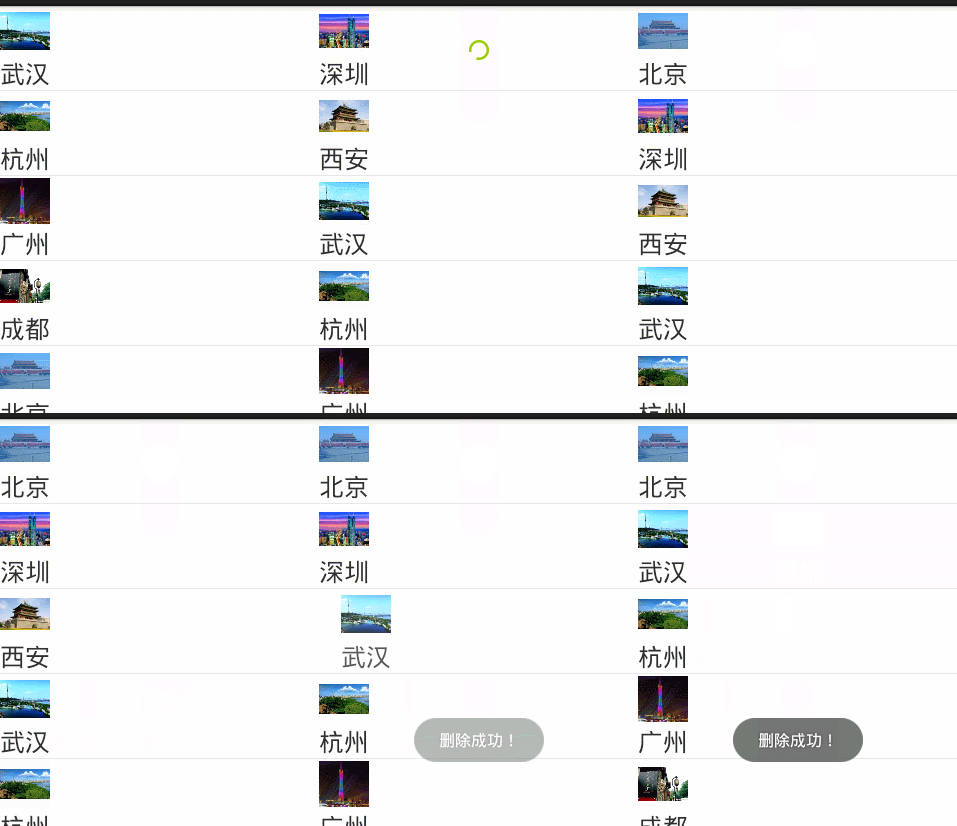
執行效果圖如下:
 Android 網路編程:Socket 通信完整總結
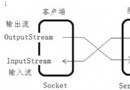
 建立伺服器端的步驟: 1. 指定連接埠並執行個體化一個 ServerSocket。 2. 呼叫 ServerSock
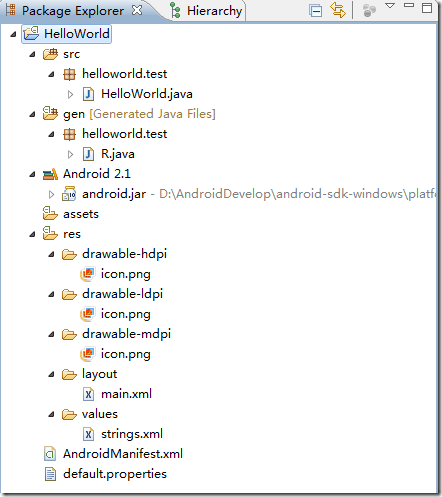 Android 專案目錄結構詳解:從 HelloWorld 看 src、gen、res 與 AndroidManifest.xml
從 HelloWorld 看專案結構 以下以簡單的 HelloWorld 專案說明 Android 專案的常見目錄結構。雖然專案內容很簡單,但已包含多數 Android
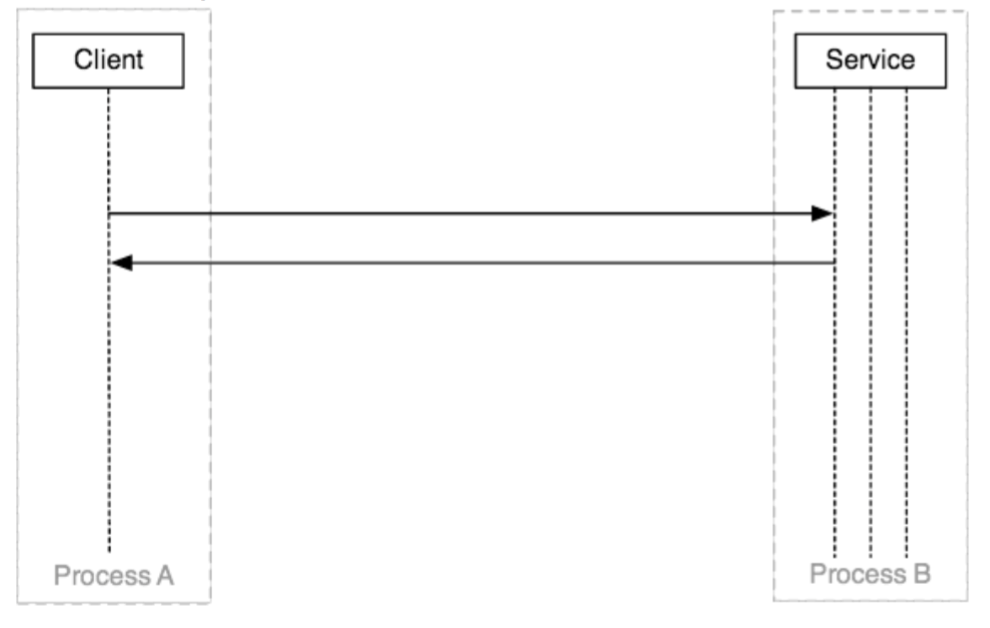 Android Binder 機制入門:架構組成、設計動機與工作流程
做過 Android 開發的人大概都有體會:入門階段的工作主要是實現各種 UI 界面與業務邏輯,這個過程裡我們會逐漸熟悉 View 系統、學會做各種界面與動畫。但當你想再
 Android 開發環境建置與第一個 HelloWorld 程式完整教學
 本文將帶你從零開始,在 Eclipse 中搭建 Android 開發環境,並完成一個可打包為 A