

編輯:關於 Android 開發
本文示範一個完整的流程:從網路下載 XML 數據,使用 XmlPullParser 解析後,透過 ListView 搭配自訂 Adapter 呈現新聞列表。由於網路請求與解析較耗時,需在子執行緒中進行,完成後再透過 Handler 通知主執行緒更新介面。
完整程式碼如下:
package com.org.demo.wangfeng; import java.io.InputStream; import java.net.HttpURLConnection; import java.net.URL; import java.util.ArrayList; import java.util.List; import org.xmlpull.v1.XmlPullParser; import com.org.demo.wangfeng.demo.News; import com.org.wangfeng.R; import android.annotation.SuppressLint; import android.app.Activity; import android.os.Bundle; import android.os.Handler; import android.util.Xml; import android.view.View; import android.view.ViewGroup; import android.widget.BaseAdapter; import android.widget.ListView; import android.widget.TextView; public class MainActivity extends Activity { private String path = ""; List<News> newsList; private ListView lv_main_list; @SuppressLint("HandlerLeak") Handler handler = new Handler() { public void handleMessage(android.os.Message msg) { lv_main_list.setAdapter(new MyAdapter()); }; }; @Override protected void onCreate(Bundle savedInstanceState) { super.onCreate(savedInstanceState); setContentView(R.layout.main); getNewInfo(); lv_main_list = (ListView) findViewById(R.id.lv_main_list); } private class MyAdapter extends BaseAdapter { @Override public int getCount() { return newsList.size(); } @Override public View getView(int positon, View convertView, ViewGroup parent) { News newss = newsList.get(positon); View v; ViewHolder myHolder; if (convertView == null) { v = View.inflate(MainActivity.this, R.layout.mainlist_item, null); myHolder = new ViewHolder(); myHolder.tv_title = (TextView) v.findViewById(R.id.tv_main_title); myHolder.tv_detail = (TextView) v.findViewById(R.id.tv_main_detail); myHolder.tv_comment = (TextView) v.findViewById(R.id.tv_main_comment); v.setTag(myHolder); } else { v = convertView; myHolder = (ViewHolder) v.getTag(); } myHolder.tv_title.setText(newss.getTitle()); myHolder.tv_detail.setText(newss.getDetail()); myHolder.tv_comment.setText(newss.getComment() + "條評論"); return v; } class ViewHolder { TextView tv_title; TextView tv_detail; TextView tv_comment; } @Override public Object getItem(int arg0) { return null; } @Override public long getItemId(int arg0) { return 0; } } private void getNewInfo() { Thread t = new Thread() { @Override public void run() { try { URL url = new URL(path); HttpURLConnection conn = (HttpURLConnection) url.openConnection(); conn.setRequestMethod("GET"); conn.setConnectTimeout(5000); conn.setReadTimeout(5000); conn.connect(); if (conn.getResponseCode() == 200) { InputStream is = conn.getInputStream(); parseNewsXml(is); } } catch (Exception e) { e.printStackTrace(); } } }; t.start(); } private void parseNewsXml(InputStream is) { XmlPullParser xp = Xml.newPullParser(); try { xp.setInput(is, "utf_8"); int type = xp.getEventType(); News news = null; while (type != XmlPullParser.END_DOCUMENT) { switch (type) { case XmlPullParser.START_TAG: if ("newslist".equals(xp.getName())) { newsList = new ArrayList<News>(); } else if ("news".equals(xp.getName())) { news = new News(); } else if ("title".equals(xp.getName())) { news.setTitle(xp.nextText()); } else if ("detail".equals(xp.getName())) { news.setDetail(xp.nextText()); } else if ("comment".equals(xp.getName())) { news.setComment(xp.nextText()); } else if ("imageUrl".equals(xp.getName())) { news.setImageUrl(xp.nextText()); } break; case XmlPullParser.END_TAG: if ("news".equals(xp.getName())) { newsList.add(news); } break; } type = xp.next(); } handler.sendEmptyMessage(1); } catch (Exception e) { e.printStackTrace(); } } }
在 Adapter 中,透過 ViewHolder 模式快取列表項中的視圖元件,可有效減少 findViewById 的呼叫次數、提升滾動流暢度。
列表項的版面配置如下:
<?xml version="1.0" encoding="utf-8"?> <RelativeLayout xmlns:android="https://schemas.android.com/apk/res/android" android:layout_width="match_parent" android:layout_height="match_parent" > <ImageView android:id="@+id/iv_main_image" android:layout_width="70dp" android:layout_height="85dp" android:contentDescription="@null" android:paddingBottom="2dp" android:paddingTop="3dp" android:scaleType="fitXY" android:src="@drawable/d" /> <TextView android:id="@+id/tv_main_title" android:layout_width="match_parent" android:layout_height="wrap_content" android:layout_toRightOf="@id/iv_main_image" android:singleLine="true" android:text="這是大標題" android:textSize="23sp" /> <TextView android:id="@+id/tv_main_detail" android:layout_width="match_parent" android:layout_height="wrap_content" android:layout_below="@id/iv_main_image" android:layout_toRightOf="@id/iv_main_image" android:lines="2" android:text="這是正文" android:textColor="@android:color/darker_gray" android:textSize="14sp" /> <TextView android:id="@+id/tv_main_comment" android:layout_width="wrap_content" android:layout_height="wrap_content" android:layout_alignParentRight="true" android:layout_below="@id/tv_main_detail" android:text="評論書" android:textColor="#ff0000" /> </RelativeLayout>
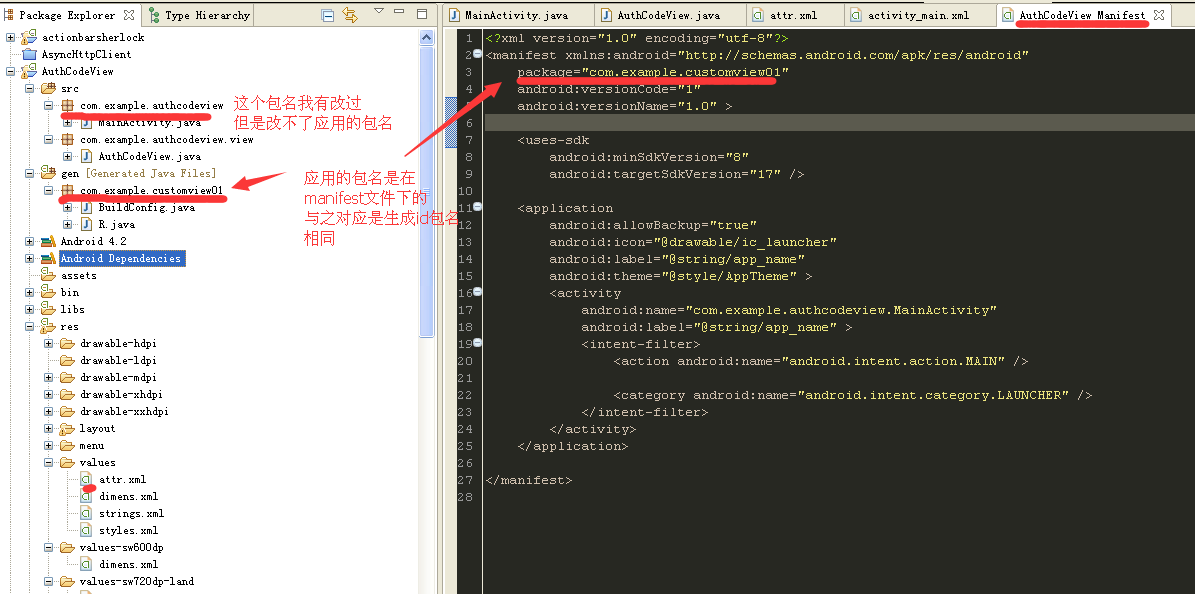 Eclipse 開發注意事項:修改 App 應用包名的正確步驟
 剛接觸 Android 開發時,我很快就投入到實際專案中,但那時連 Eclipse 的使用都還不夠熟練,很
 Android 開發(3):Intent 與 Bundle 傳值、ListView 應用與 RelativeLayout 通訊錄實作
前言 本篇要處理的是好幾個常一起出現的知識點:Intent 與 Bundle 在頁面跳轉中的用法、ListView 與各種 Adapter 的搭配,順便把 Relativ
 用 IOS_Dialog_Library 做出 iOS 7 風格的底部動作選單
本文轉載自:https://blog.csdn.net/zhangphil/article/details/44940339 想在 Android 上做出類似 iOS 7
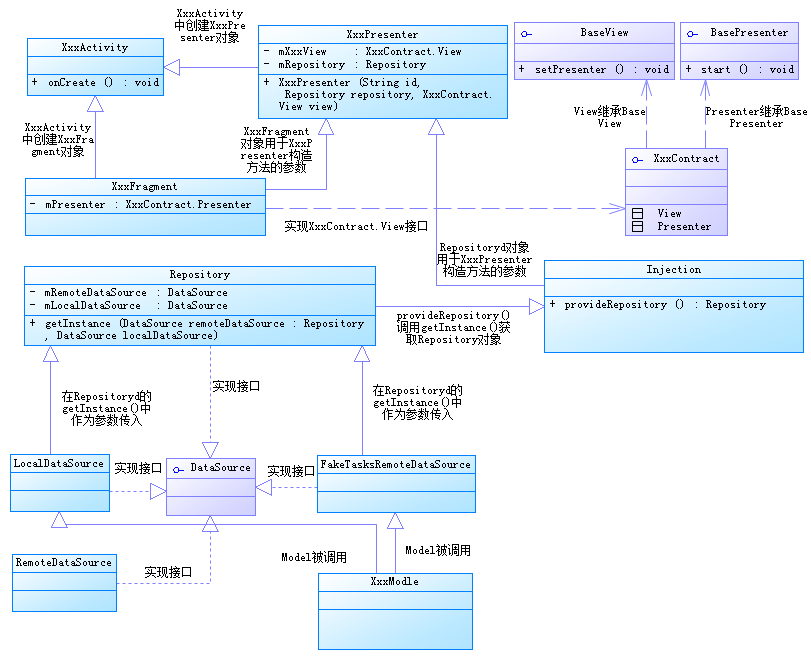 一張圖理解 Google MVP 架構
MVP 是 Model-View-Presenter 的縮寫,是一種常見於 Android 應用開發的架構模式。它的核心概念是將畫面