

編輯:關於 Android 開發
在 Android 上實現「微光閃爍」(Shimmer)這種流光效果,方法有很多,其中最值得推薦的莫過於 Facebook 開源的 shimmer-android 庫。它在 GitHub 上的專案主頁為 https://github.com/facebook/shimmer-android,另有 https://facebook.github.io/shimmer-android/ 這個入口,兩者指向的是同一個專案。它成熟穩定、接入簡單,能為「加載中」的佔位內容帶來很棒的質感。
要開始使用,先到專案主頁下載對應的 jar 檔,下載完成後直接放進 Eclipse 專案的 libs 目錄即可。接著在版面配置檔中,用 com.facebook.shimmer.ShimmerFrameLayout 把你的 View 包起來。以下以一個 TextView 為例:
<RelativeLayout xmlns:android="https://schemas.android.com/apk/res/android"
    xmlns:tools="https://schemas.android.com/tools"
    android:layout_width="match_parent"
    android:layout_height="match_parent">

    <com.facebook.shimmer.ShimmerFrameLayout
        android:id="@+id/shimmer_view_container"
        android:layout_width="wrap_content"
        android:layout_height="wrap_content"
        android:layout_centerInParent="true">

        <TextView
            android:layout_width="wrap_content"
            android:layout_height="wrap_content"
            android:background="#ffc400"
            android:padding="10dip"
            android:text="android"
            android:textColor="#eeeeee"
            android:textSize="20sp" />

    </com.facebook.shimmer.ShimmerFrameLayout>

</RelativeLayout>
接著在 Activity 中取得這個容器,設定動畫時長並啟動效果:
package com.zzw.shimmer;

import com.facebook.shimmer.ShimmerFrameLayout;
import android.app.Activity;
import android.os.Bundle;

public class MainActivity extends Activity {

    @Override
    protected void onCreate(Bundle savedInstanceState) {
        super.onCreate(savedInstanceState);
        setContentView(R.layout.activity_main);

        ShimmerFrameLayout container =
            (ShimmerFrameLayout) findViewById(R.id.shimmer_view_container);

        // 設定動畫執行時長(毫秒)
        container.setDuration(2500);

        // 啟動微光閃爍動畫
        container.startShimmerAnimation();
    }
}
就這麼簡單。透過 setDuration() 控制流光掃過的速度,再呼叫 startShimmerAnimation() 讓效果跑起來,你就能為等待畫面加上細緻的光影層次,大幅提升使用者的第一眼觀感。
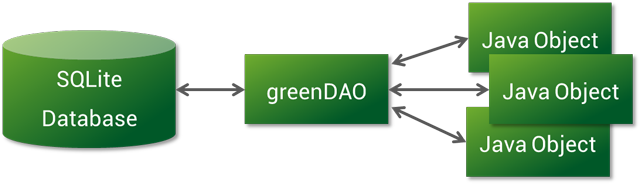 GreenDAO 3.0 入門:用注解快速完成 Android 資料庫操作
GreenDAO 3.0 的改變 GreenDAO 是 Android 上常用的 ORM 框架。3.0 之後最大的變化,是不再需要另外建立 generator 專案,而是
 Android 佈局詳解:TableLayout 表格佈局的行列規則與三大列屬性
TableLayout 表格佈局入門 不論是 Java Swing 還是 HTML,表格都是表達結構化資料的常見手法,Android 也提供了對應的容器:TableLay
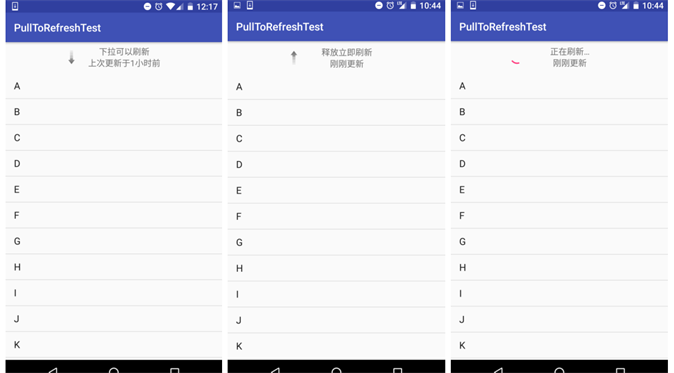 Android 自定義下拉刷新控件實作
下拉刷新控件 下拉刷新是列表常見互動。自定義 RefreshView 可在 ListView 頂部加入刷新頭,並透過狀態切換控制箭頭、文字與進度條。 實作重點包括:在
 Android學習指南之十二:列表組件ListView完全上手
上一節我們講了ProgressBar、SeekBar和RatingBar,這一節的主角是開發中使用頻率極高的列表組件ListView。使用ListView時,必須為它配備