

編輯:關於 Android 開發
DB2 中新增使用者之後,預設對既有資料表毫無權限,若表數量多達數十上百張,手動逐個 GRANT 顯然不現實。本文示範如何用一條 SQL 自動產生授權腳本,再批次執行,完成整體授權。
[root@localhost ~]# passwd ghan
Changing password for user ghan.
New UNIX password:
BAD PASSWORD: it is too short
Retype new UNIX password:
passwd: all authentication tokens updated successfully.

[root@localhost ~]# su - db2inst2
[db2inst2@localhost ~]$ db2 connect to ghan user ghan
連線成功後會顯示資料庫版本、授權標識(SQL authorization ID)與本機別名等資訊。
[db2inst2@localhost ~]$ db2 "select count(1) from db2inst2.t2"
SQL0551N "GHAN" 不具有對對象 "DB2INST2.T2" 執行操作 "SELECT" 的必需權限或特權。 SQLSTATE=42501
SQL0551N 就是典型的「權限不足」錯誤,這也說明為什麼必須進行授權。
關鍵在於查詢系統目錄表 syscat.tables,並用字串串接組出 GRANT 敘述:
[db2inst2@localhost ~]$ db2 -x +o -z commands.sql \
"select 'grant select,insert, update, delete on table ' || trim(tabschema) || '.' || trim(tabname) || ' to user ghan;' \
from syscat.tables where type = 'T'"
參數說明:-x 關閉輸出標題、+o 關閉命令回顯、-z 將結果寫入指定檔案。條件 type = 'T' 表示只取真正的資料表,排除視圖與其他物件。
產生的 commands.sql 是純文字檔,可以直接用 vi 打開,刪掉不想授權的表,或補上額外權限,例如只給 SELECT 而不給異動權限。
[db2inst2@localhost ~]$ vi commands.sql
[db2inst2@localhost ~]$ db2 -tsvf commands.sql
grant select,insert, update, delete on table DB2INST2.EMPL to user ghan
DB20000I SQL 命令成功完成。

grant select,insert, update, delete on table DB2INST2.EMPLDD to user ghan
DB20000I SQL 命令成功完成。

grant select,insert, update, delete on table DB2INST2.STAFF to user ghan
DB20000I SQL 命令成功完成。

grant select,insert, update, delete on table DB2INST2.T1 to user ghan
DB20000I SQL 命令成功完成.
參數含義:-t 允許使用分號作為敘述結束符、-s 遇到錯誤就停止、-v 回顯正在執行的命令、-f 指定輸入檔案。
[db2inst2@localhost ~]$ db2 "select count(*) from db2inst2.t1"

1
-----------
          4

  1 條記錄已選擇。
原本報 SQL0551N 的查詢現在能正常回傳結果,代表授權成功。
這套做法的精神是「讓資料庫幫你寫腳本」:查系統目錄表取得物件清單,用字串串接生成 DDL/DCL,輸出成檔後再批次執行。除了 GRANT,同樣的技巧也能用在批次重建索引、批次收集統計資訊等場景,是 DBA 日常相當實用的手法。
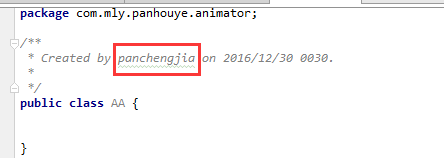 修改 Android Studio 自動生成的 Created by 使用者名稱(Windows 環境)
Android Studio 修改 created 使用者(Windows 環境) 最近常有朋友反饋:為什麼我建的 Android 專案裡,新建的類會自動生成「Creat
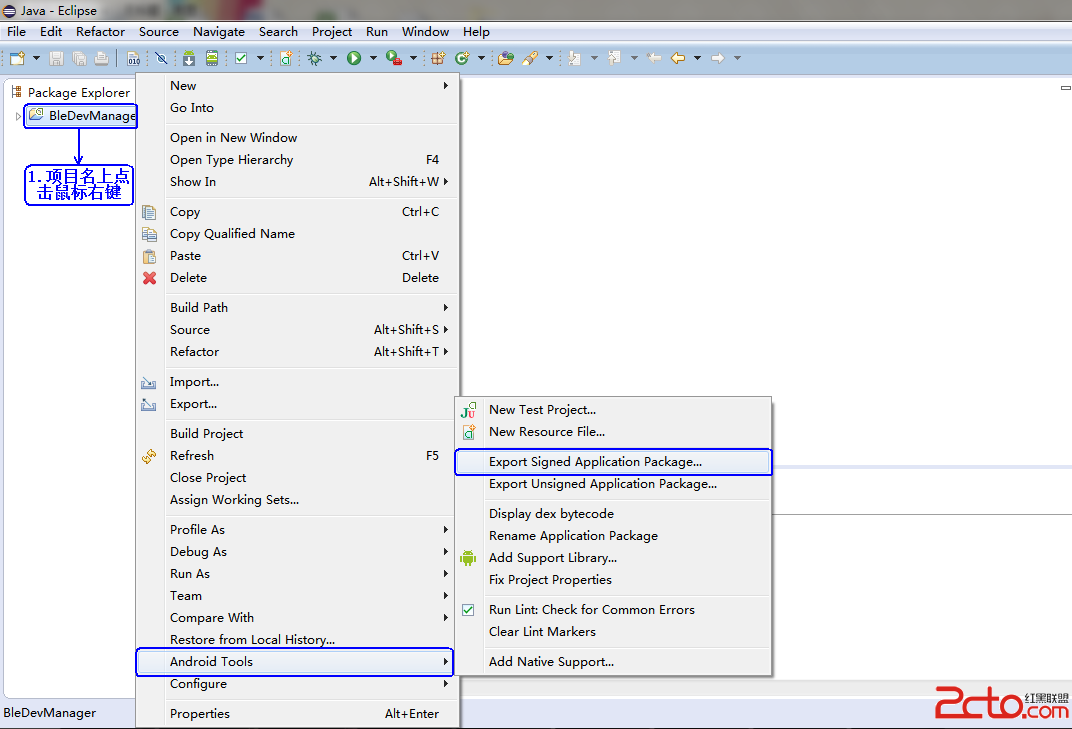 Android 應用程序簽名詳解:作用、Eclipse 操作與命令行實踐
 簽名 Android 應用程序 Android 應用以包名作為唯一標識。如果同一部手機上安裝兩個
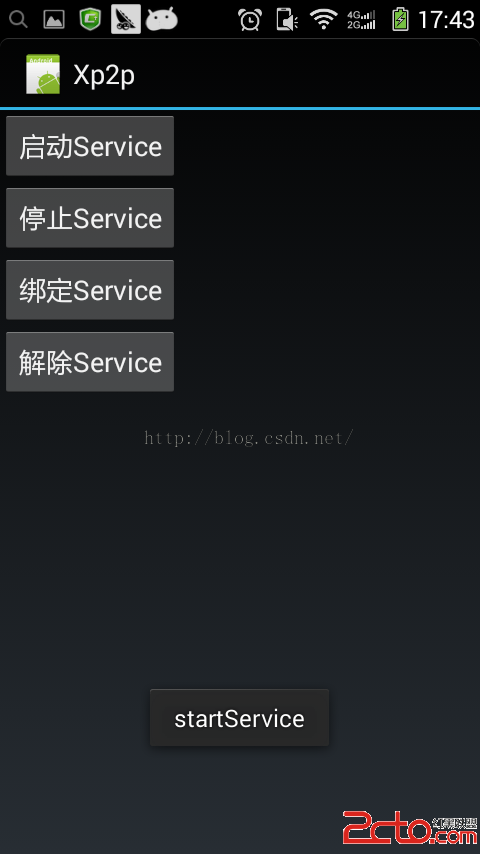 Android Service 元件實作範例:啟動、停止與綁定流程解析
Android Service 元件實作範例:啟動、停止與綁定 Service 是 Android 中負責背景工作的四大元件之一。本文以一個簡單範例說明如何透過 Acti
 【微學堂】第22期:Nginx 的性能優化
分享主題:Nginx 的性能優化分享時間:2016 年 11 月 24 日(周四)20:00特邀講師:李強(撒加)講師簡介:運維