

編輯:關於 Android 開發
前面我們講過 AndroidAnnotations 的元件注入方式,本篇系統整理 Injection 相關標註的用法,方便日後查閱。
若需要在 extras 注入完成後執行程式碼,可在方法上使用它:
@EActivity
public class MyClass {
    @Extra String someExtra;
    @Extra int anotherExtra;

    @AfterExtras
    public void doSomethingAfterExtrasInjection() {
        // someExtra、anotherExtra 已被賦值
    }
}
被 @EBean 標註的類,其建構子執行時屬性尚未注入。若想在注入完成後執行邏輯,可用它:
@EBean
public class MyClass {
    @SystemService NotificationManager notificationManager;
    @Bean MyOtherClass dependency;

    public MyClass() {
        // 此時 notificationManager、dependency 仍為 null
    }

    @AfterInject
    public void doSomethingAfterInjection() {
        // 此時已被正確注入
    }
}
被它標註的方法會在視圖綁定之後呼叫。注意:onCreate() 執行時,@ViewById 的屬性尚未注入,因此初始化視圖邏輯請放在這裡,切勿寫在 onCreate() 中,否則會拋出 NullPointerException:
@EActivity(R.layout.main)
public class MyActivity extends Activity {
    @ViewById TextView myTextView;

    @AfterViews
    void updateTextWithDate() {
        myTextView.setText("Date: " + new Date());
    }
}
用於注入 Application 類,在任何注入元件中都能使用:
@EActivity
public class MyActivity extends Activity {
    @App MyApplication application;
}
在另一個標註類或元件中注入依賴。注意:在屬性宣告處使用 @Bean 時,除非目標類是單例,否則每次都會得到一個新實例:
@EBean
public class MyOtherClass {
    @Bean MyClass myClass;
}
此外,注解生成的子類是 final 的,無法被繼承;但我們可以擴展原始類,擴展出來的類同樣能使用標註:
@EActivity
public class MyChildActivity extends MyActivity { }
把 Activity 的屬性對應到 Intent 中的 Extra。自 2.6 起,若不特別指定名稱,會直接採用屬性名:
@EActivity
public class MyActivity extends Activity {
    @Extra String myMessage;
    @Extra("myDateExtra") Date myDateExtraWithDefaultValue = new Date();
}

// 啟動時傳值
MyActivity_.intent().myMessage("hello").start();
標註 Fragment 中的參數屬性,生成的 Builder 會產生對應的 set 方法:
@EFragment
public class MyFragment extends Fragment {
    @FragmentArg String myMessage;
    @FragmentArg("myDateExtra") Date myDateArgumentWithDefaultValue = new Date();
}

MyFragment myFragment = MyFragment_.builder()
        .myMessage("Hello")
        .build();
用於在 Activity 中注入 Fragment。官方建議優先使用 @FragmentById,因為 @FragmentByTag 缺少編譯期驗證。請注意它們只能「注入」而非「創建」Fragment:
@EActivity(R.layout.fragments)
public class MyFragmentActivity extends FragmentActivity {
    @FragmentById MyFragment myFragment;
    @FragmentById(R.id.myFragment) MyFragment myFragment2;
    @FragmentByTag MyFragment myFragmentTag;
}
若要在 TextView 中顯示 HTML 文本,可用這兩個標註。@HtmlRes 會先取得字串資源,再呼叫 Html.fromHtml() 進行解析:
@EActivity
public class MyActivity extends Activity {
    @HtmlRes(R.string.hello_html) Spanned myHelloString;

    @ViewById(R.id.my_text_view)
    @FromHtml(R.string.hello_html)
    TextView textView;
}
簡化 HTTPS 請求的金鑰、信任庫與主機驗證配置,所有參數皆為可選:
@HttpsClient(trustStore = R.raw.cacerts, trustStorePwd = "changeit")
HttpClient httpsClient;

// 不指定信任庫時,會使用系統預設的 /system/etc/security/cacerts.bks
@HttpsClient HttpClient defaultClient;
當旋轉螢幕等設定變更導致 Activity 重建時,可用它保存需要在重建間保留的實例:
@EActivity
public class MyActivity extends Activity {
    @NonConfigurationInstance Bitmap someBitmap;
    @NonConfigurationInstance @Bean MyBackgroundTask myBackgroundTask;
}
在 @EBean 類中注入根元件,但僅會注入與上下文相符的類型:
@EBean
public class MyClass {
    @RootContext Context context;
    @RootContext Activity activity; // 僅當根為 Activity 時注入
    @RootContext Service service;   // 僅當根為 Service 時注入
}
等價於呼叫 Context.getSystemService(),省去記憶常數與轉型的麻煩:
@EActivity
public class MyActivity extends Activity {
    @SystemService NotificationManager notificationManager;
}
等價於 findViewById()。未指定 id 時會採用屬性名,且屬性不能為私有:
@EActivity
public class MyActivity extends Activity {
    @ViewById EditText myEditText;
    @ViewById(R.id.myTextView) TextView textView;
}
與 @ViewById 類似,但一次注入「一組」視圖,適用於 List 或 View 子類型的屬性,參數為一組 R.id.*。使用時要留意避免空資料混入。
至此,AndroidAnnotations 的 Injection 標註用法就整理完畢。
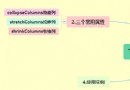 Android 佈局詳解:TableLayout 表格佈局的行列規則與三大列屬性
TableLayout 表格佈局入門 不論是 Java Swing 還是 HTML,表格都是表達結構化資料的常見手法,Android 也提供了對應的容器:TableLay
 Android實用技術(4)——Service的綁定與解綁(Ⅱ)
上一篇我們掌握了Service最基本的知識,這次繼續深入這個元件。先複習一下生命週期:相比Activity,Service的生命週期相當單純——onCreate() →
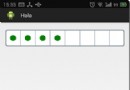 自訂 View 密碼輸入框的完整實作思路
設計準則 寫自訂 View 時有一條值得奉行的原則:把凡是會影響外觀與行為的屬性全部暴露出來,讓使用者可以透過 XML 添加和設置樣式,透過元素屬性控制外觀與行為,並提供
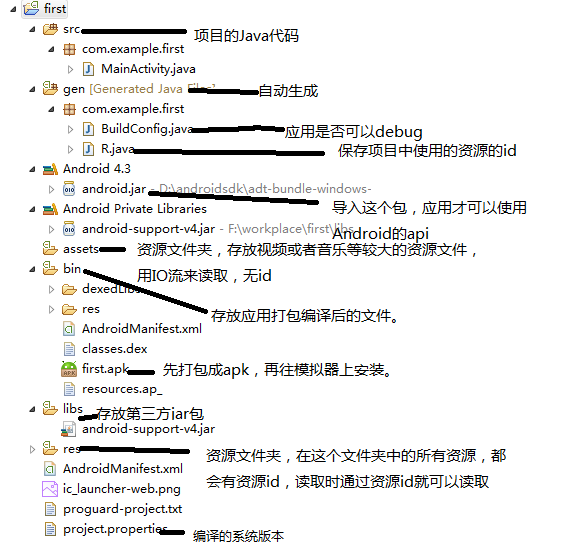 Android 專案目錄結構與清單文件
 初次建立 Android 專案時,先理解目錄結構會很有幫助。專案中通常包含原始碼、資源檔、清單文件與 Gradle 設定等部分,各