

編輯:關於 Android 開發
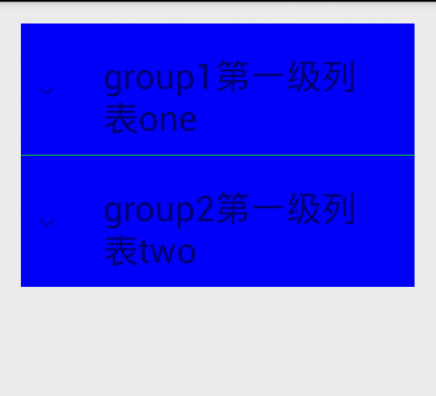
有時候我們需要這樣的界面:外層是一個列表,點擊某個條目後會展開,出現內嵌的子列表。這正是 ExpandableListView 的用武之地。下圖為程式運行後的效果:
點擊第一項後,視圖展開為:
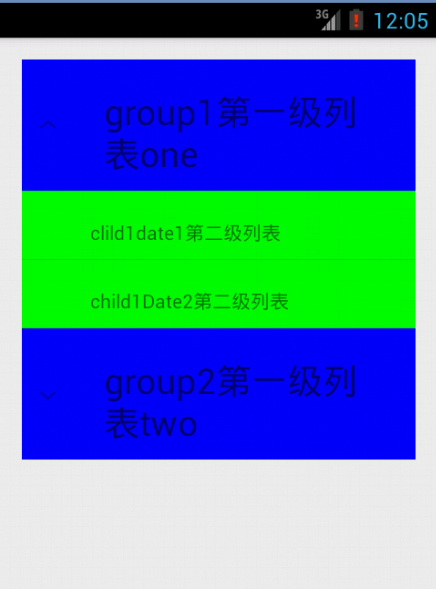
要實現這種效果,需要定義三個佈局:主佈局 activity_main、一級列表項 group、二級列表項 child。
activity_main:注意 ExpandableListView 的 id 必須為 @android:id/list,空資料提示的 TextView id 必須為 @android:id/empty,否則會出錯或失效。
<LinearLayout xmlns:android="https://schemas.android.com/apk/res/android"
    xmlns:tools="https://schemas.android.com/tools"
    android:layout_width="match_parent"
    android:layout_height="match_parent"
    android:orientation="vertical"
    android:paddingBottom="@dimen/activity_vertical_margin"
    android:paddingLeft="@dimen/activity_horizontal_margin"
    android:paddingRight="@dimen/activity_horizontal_margin"
    android:paddingTop="@dimen/activity_vertical_margin"
    tools:context="com.example.expandlistaacitvity.MainActivity" >

    <ExpandableListView
        android:id="@android:id/list"
        android:layout_width="match_parent"
        android:layout_height="wrap_content"
        android:layout_weight="1"
        android:drawSelectorOnTop="false" />

    <TextView
        android:id="@android:id/empty"
        android:layout_width="match_parent"
        android:layout_height="match_parent"
        android:background="#ff0000"
        android:text="no data" />
</LinearLayout>
group.xml(一級列表):
<?xml version="1.0" encoding="utf-8"?>
<LinearLayout xmlns:android="https://schemas.android.com/apk/res/android"
    android:layout_width="match_parent"
    android:layout_height="match_parent"
    android:orientation="vertical" >
    <TextView
        android:id="@+id/groupTo"
        android:layout_height="match_parent"
        android:layout_width="match_parent"
        android:background="#0000ff"
        android:paddingTop="20dp"
        android:paddingLeft="60dp"
        android:paddingBottom="10dp"
        android:textSize="26sp"
        android:text="no data" />
</LinearLayout>
child.xml(二級列表):
<?xml version="1.0" encoding="utf-8"?>
<LinearLayout xmlns:android="https://schemas.android.com/apk/res/android"
    android:layout_width="match_parent"
    android:layout_height="match_parent"
    android:layout_margin="5dp"
    android:orientation="vertical" >
    <TextView
        android:id="@+id/childTo"
        android:layout_height="match_parent"
        android:layout_width="match_parent"
        android:paddingTop="20dp"
        android:paddingLeft="50dp"
        android:paddingBottom="10dp"
        android:background="#00ff00"
        android:text="no data" />
</LinearLayout>
Activity 繼承 ExpandableListActivity,用巢狀的 Map 結構組織資料,再交給 SimpleExpandableListAdapter 綁定即可:
package com.example.expandlistaacitvity;

import java.util.ArrayList;
import java.util.HashMap;
import java.util.List;
import java.util.Map;
import android.app.ExpandableListActivity;
import android.os.Bundle;
import android.widget.SimpleExpandableListAdapter;

public class MainActivity extends ExpandableListActivity {
    @Override
    protected void onCreate(Bundle savedInstanceState) {
        super.onCreate(savedInstanceState);
        setContentView(R.layout.activity_main);

        // 定義兩個一級條目
        List<Map<String, String>> groups = new ArrayList<Map<String, String>>();
        Map<String, String> group1 = new HashMap<String, String>();
        group1.put("group", "group1 第一級列表 one");
        groups.add(group1);
        Map<String, String> group2 = new HashMap<String, String>();
        group2.put("group", "group2 第一級列表 two");
        groups.add(group2);

        // 第一個一級條目的二級條目
        List<Map<String, String>> child1 = new ArrayList<Map<String, String>>();
        Map<String, String> c1d1 = new HashMap<String, String>();
        c1d1.put("child", "child1 data1 第二級列表");
        child1.add(c1d1);
        Map<String, String> c1d2 = new HashMap<String, String>();
        c1d2.put("child", "child1 data2 第二級列表");
        child1.add(c1d2);

        // 第二個一級條目的二級條目
        List<Map<String, String>> child2 = new ArrayList<Map<String, String>>();
        Map<String, String> c2d1 = new HashMap<String, String>();
        c2d1.put("child", "child2 data1 第二級列表");
        child2.add(c2d1);

        // 將各二級列表彙整
        List<List<Map<String, String>>> childs = new ArrayList<List<Map<String, String>>>();
        childs.add(child1);
        childs.add(child2);

        SimpleExpandableListAdapter adapter = new SimpleExpandableListAdapter(
                this, groups, R.layout.group,
                new String[]{"group"}, new int[]{R.id.groupTo},
                childs, R.layout.child,
                new String[]{"child"}, new int[]{R.id.childTo});
        setListAdapter(adapter);
    }
}
Adapter 的參數依序是:上下文、一級資料、一級佈局、一級 key、一級控件 id、二級資料、二級佈局、二級 key、二級控件 id。搞懂這個順序,二級展開列表就難不倒你了。
 Android Drawable 與 XML 資源應用指南
 Drawable 是 Android 中用來描述可繪製內容的抽象概念。它可以是圖片、顏色、形狀、圖層組合、裁剪
 認識 Activity 概覽畫面:用 Intent Flag 與 documentLaunchMode 管理最近任務
什麼是概覽畫面 概覽畫面(Overview Screen)也被叫做「最近動靜畫面」、「最近任務列表」或「最近使用的應用」,是一個系統層級的 UI,列出使用者最近造訪過的
 Android 動畫切換元件:ViewAnimator 與子類解析
Android 動畫切換元件:ViewAnimator 與子類ViewAnimator 主要用於在同一位置切換多個子檢視,並可套用進出動畫。其 XML 屬性包含 anim
 天氣 App 布局練習(二):GridView 實作
GridView 天氣資訊練習 本練習使用 GridView 呈現濕度、能見度、風向、紫外線、氣壓與體感等天氣指標。 資料準備 可建立清單與對應資料結構,存放 title