Android教程網
  1. 首頁
  2. Android 技術
  3. Android 手機
  4. Android 系統教程
  5. Android 游戲

Android應用開發教程之四:TextView 文字控件詳解

編輯:關於 Android 開發

TextView 是 Android 中最基礎、最常用的文字顯示控件。本文將從 API 結構出發,透過豐富的實例,帶大家全面掌握 TextView 的各項屬性與用法。

先來看看 TextView 的類別結構:

java.lang.Object → android.view.View → android.widget.TextView

直接子類:Button、CheckedTextView、Chronometer、DigitalClock、EditText

間接子類:AutoCompleteTextView、CheckBox、CompoundButton、ExtractEditText、MultiAutoCompleteTextView、RadioButton、ToggleButton
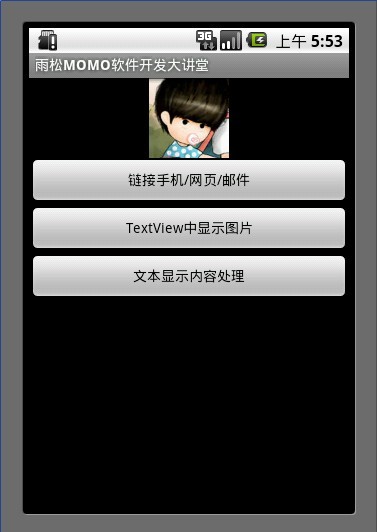
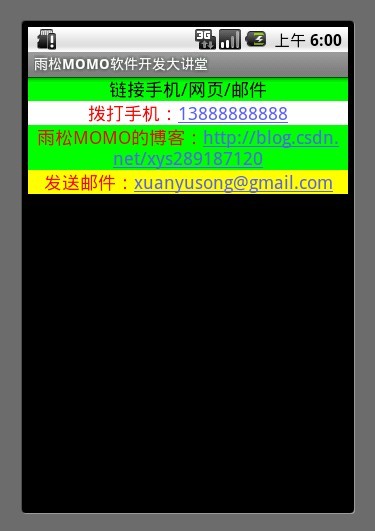
一、在 TextView 中鏈接手機號碼、網頁、郵件與地圖

android:autoLink 的可選值為 none/web/email/phone/map/all,用於設定可點擊的自動辨識連結。

例如:

android:text="撥打手機:13888888888"

android:autoLink="phone"

這裡設定了 autoLink 為 phone,它會自動辨識數字並過濾掉「撥打手機:」這段文字,點擊號碼後便會跳轉到系統撥號介面,可直接撥打電話。
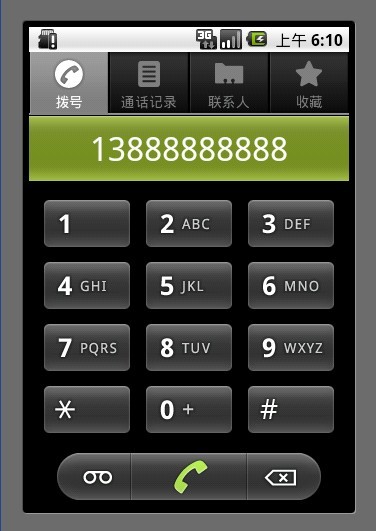
撥打手機號碼

XML 佈局:

  1. <TextView android:id="@+id/textView0"  
  2.           android:layout_width="fill_parent"  
  3.           android:layout_height="wrap_content"  
  4.           android:textColor="#FF0000"  
  5.           android:textSize="18dip"  
  6.           android:background="#FFFFFF"  
  7.           android:text="撥打手機:13888888888"  
  8.           android:gravity="center_vertical|center_horizontal"  
  9.           android:autoLink="phone"  
  10.           />  

訪問網頁

XML 佈局:

  1. <TextView android:id="@+id/textView1"  
  2.           android:layout_width="fill_parent"  
  3.           android:layout_height="wrap_content"  
  4.           android:textColor="#FF0000"  
  5.           android:textSize="18dip"  
  6.           android:background="#00FF00"  
  7.           android:text="雨松MOMO的博客:https://xuanyusong.com"  
  8.           android:gravity="center_vertical|center_horizontal"  
  9.           android:autoLink="web"  
  10.           />  

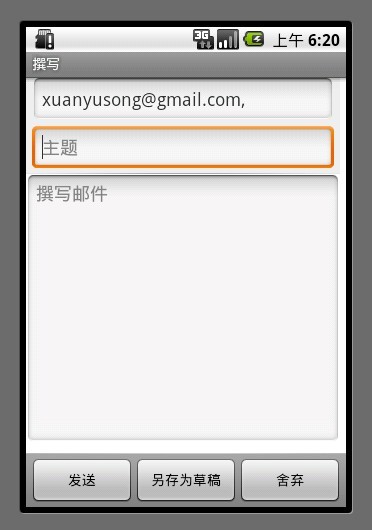
發送郵件

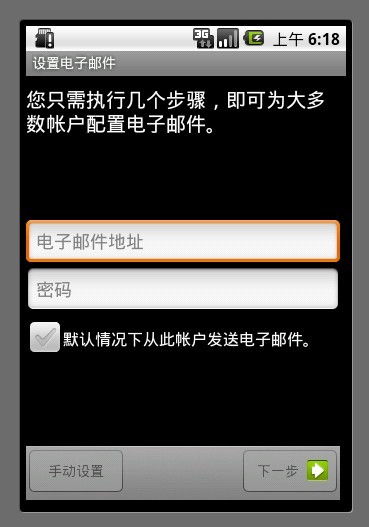
使用之前,首先需要設定自己的電子郵件帳戶,否則 Android 會不知道你從何處發送郵件。
XML 佈局:

  1. <TextView android:id="@+id/textView2"  
  2.           android:layout_width="fill_parent"  
  3.           android:layout_height="wrap_content"  
  4.           android:textColor="#FF0000"  
  5.           android:textSize="18dip"  
  6.           android:background="#FFFF00"  
  7.           android:text="發送郵件:xuanyusong@gmail.com"  
  8.           android:gravity="center_vertical|center_horizontal"  
  9.           android:autoLink="email"  
  10.           />  

谷歌地圖

設定 android:autoLink="map" 後,需要裝置上有 Google 地圖否則會報錯。

二、在 TextView 中顯示圖片

可以透過設定背景的方式顯示圖片:

android:background="@drawable/icon"

也可以透過以下屬性,將圖片設定在文字的四個錨點位置:

android:drawableBottom="@drawable/icon"

android:drawableTop="@drawable/icon"

android:drawableLeft="@drawable/icon"

android:drawableRight="@drawable/icon"
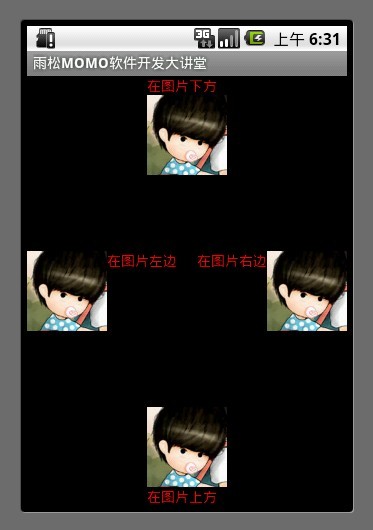
XML 佈局:

  1. <TextView android:id="@+id/TextView01"  
  2.           android:layout_width="wrap_content"  
  3.           android:layout_height="wrap_content"  
  4.           android:text="在圖片下方"  
  5.           android:textColor="#FF0000"  
  6.           android:drawableBottom="@drawable/jay"  
  7.           android:layout_alignParentTop="true"  
  8.           android:layout_centerHorizontal="true"  
  9.           >  
  10.  </TextView>  
  11.   
  12.  <TextView android:id="@+id/TextView01"  
  13.           android:layout_width="wrap_content"  
  14.           android:layout_height="wrap_content"  
  15.           android:text="在圖片上方"  
  16.           android:textColor="#FF0000"  
  17.           android:drawableTop="@drawable/jay"  
  18.           android:layout_alignParentBottom="true"  
  19.           android:layout_centerHorizontal="true"  
  20.           >  
  21.  </TextView>  
  22.  <TextView android:id="@+id/TextView01"  
  23.           android:layout_width="wrap_content"  
  24.           android:layout_height="wrap_content"  
  25.           android:text="在圖片左邊"  
  26.           android:textColor="#FF0000"  
  27.           android:drawableLeft="@drawable/jay"  
  28.           android:layout_alignParentLeft="true"  
  29.           android:layout_centerVertical="true"  
  30.           >  
  31.  </TextView>  
  32.  <TextView android:id="@+id/TextView01"  
  33.           android:layout_width="wrap_content"  
  34.           android:layout_height="wrap_content"  
  35.           android:text="在圖片右邊"  
  36.           android:textColor="#FF0000"  
  37.           android:drawableRight="@drawable/jay"  
  38.           android:layout_alignParentRight="true"  
  39.           android:layout_centerVertical="true"  
  40.           >  
  41.  </TextView>  

三、文本顯示內容的處理

在 TextView 中,我們可以實現各種各樣的文字效果,例如密碼遮罩、陰影、單行省略、字間距、粗體、斜體、字級大小以及跑馬燈捲軸等。
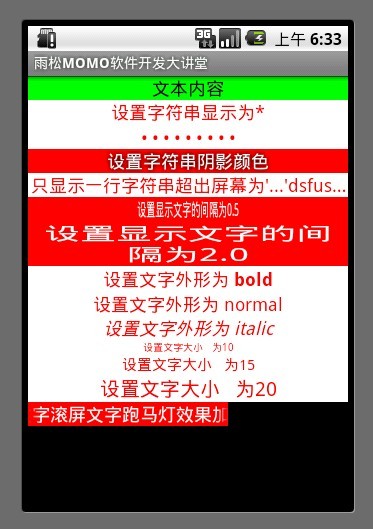
XML 佈局:

  1. <TextView android:layout_width="fill_parent"  
  2.           android:layout_height="wrap_content"  
  3.           android:textColor="#000000"  
  4.           android:textSize="18dip"  
  5.           android:background="#00FF00"  
  6.           android:text="文本內容"  
  7.           android:gravity="center_vertical|center_horizontal"  
  8. />  
  9.   
  10. <TextView android:layout_width="fill_parent"  
  11.           android:layout_height="wrap_content"  
  12.           android:textSize="18dip"  
  13.           android:background="#FFFFFF"  
  14.           android:textColor="#FF0000"  
  15.           android:text="設置字符串顯示為*"  
  16.           android:gravity="center_vertical|center_horizontal"  
  17.           />  
  18. <TextView android:layout_width="fill_parent"  
  19.           android:layout_height="wrap_content"  
  20.           android:textSize="18dip"  
  21.           android:background="#FFFFFF"  
  22.           android:textColor="#FF0000"  
  23.           android:text="設置字符串顯示為*"  
  24.           android:password="true"  
  25.           android:gravity="center_vertical|center_horizontal"  
  26.           />  
  27. <TextView android:layout_width="fill_parent"  
  28.           android:layout_height="wrap_content"  
  29.           android:textSize="18dip"  
  30.           android:background="#FF0000"  
  31.           android:textColor="#FFFFFF"  
  32.           android:text="設置字符串陰影顏色"  
  33.           android:shadowColor="#000000"  
  34.           android:shadowRadius="3.0"  
  35.           android:gravity="center_vertical|center_horizontal"  
  36.           />  
  37. <TextView android:layout_width="fill_parent"  
  38.           android:layout_height="wrap_content"  
  39.           android:textSize="18dip"  
  40.           android:background="#FFFFFF"  
  41.           android:textColor="#FF0000"  
  42.           android:singleLine="true"  
  43.           android:text="只顯示一行字符串超出屏幕為'...'dsfusdiofjdsiofjsdiofjoisdjfiosdjfoisdjfoisdf"  
  44.           android:gravity="center_vertical|center_horizontal"  
  45.           />  
  46. <TextView android:layout_width="fill_parent"  
  47.           android:layout_height="wrap_content"  
  48.           android:textSize="18dip"  
  49.           android:background="#FF0000"  
  50.           android:textColor="#FFFFFF"  
  51.           android:text="設置顯示文字的間隔為0.5"  
  52.           android:textScaleX="0.5"  
  53.           android:gravity="center_vertical|center_horizontal"  
  54.           />  
  55. <TextView android:layout_width="fill_parent"  
  56.           android:layout_height="wrap_content"  
  57.           android:textSize="18dip"  
  58.           android:background="#FF0000"  
  59.           android:textColor="#FFFFFF"  
  60.           android:text="設置顯示文字的間隔為2.0"  
  61.           android:textScaleX="2.0"  
  62.           android:gravity="center_vertical|center_horizontal"  
  63.           />  
  64. <TextView android:layout_width="fill_parent"  
  65.           android:layout_height="wrap_content"  
  66.           android:textSize="18dip"  
  67.           android:background="#FFFFFF"  
  68.           android:textColor="#FF0000"  
  69.           android:text="設置文字外形為 bold"  
  70.           android:textStyle="bold"  
  71.           android:gravity="center_vertical|center_horizontal"  
  72.           />  
  73. <TextView android:layout_width="fill_parent"  
  74.           android:layout_height="wrap_content"  
  75.           android:textSize="18dip"  
  76.           android:background="#FFFFFF"  
  77.           android:textColor="#FF0000"  
  78.           android:text="設置文字外形為 normal"  
  79.           android:textStyle="normal"  
  80.           android:gravity="center_vertical|center_horizontal"  
  81.           />  
  82. <TextView android:layout_width="fill_parent"  
  83.           android:layout_height="wrap_content"  
  84.           android:textSize="18dip"  
  85.           android:background="#FFFFFF"  
  86.           android:textColor="#FF0000"  
  87.           android:text="設置文字外形為 italic"  
  88.           android:textStyle="italic"  
  89.           android:gravity="center_vertical|center_horizontal"  
  90.           />  
  91.         <TextView android:layout_width="fill_parent"  
  92.           android:layout_height="wrap_content"  
  93.           android:background="#FFFFFF"  
  94.           android:textColor="#FF0000"  
  95.           android:text="設置文字大小   為10"  
  96.           android:textSize="10dip"  
  97.           android:gravity="center_vertical|center_horizontal"  
  98.           />  
  99.         <TextView android:layout_width="fill_parent"  
  100.           android:layout_height="wrap_content"  
  101.           android:background="#FFFFFF"  
  102.           android:textColor="#FF0000"  
  103.           android:text="設置文字大小   為15"  
  104.           android:textSize="15dip"  
  105.           android:gravity="center_vertical|center_horizontal"  
  106.           />  
  107.         <TextView android:layout_width="fill_parent"  
  108.           android:layout_height="wrap_content"  
  109.           android:background="#FFFFFF"  
  110.           android:textColor="#FF0000"  
  111.           android:text="設置文字大小   為20"  
  112.           android:textSize="20dip"  
  113.           android:gravity="center_vertical|center_horizontal"  
  114.           />  
  115.     <TextView  
  116.     android:layout_width="200px"  
  117.        android:layout_height="wrap_content"  
  118.        android:textSize="18dip"  
  119.        android:ellipsize="marquee"  
  120.        android:focusable="true"  
  121.        android:marqueeRepeatLimit="marquee_forever"  
  122.        android:focusableInTouchMode="true"  
  123.        android:scrollHorizontally="true"  
  124.        android:text="文字滾屏文字跑馬燈效果加長加長加長加長加長加長加長加長加長加長加長加長"  
  125.        android:background="#FF0000"  
  126.           android:textColor="#FFFFFF"  
  127.        >  
  128.    </TextView>  

以上便是 TextView 的核心用法總結:從自動辨識連結、圖片顯示,到豐富的文字樣式處理,掌握了這些屬性,你就能輕鬆呈現出各式各樣的文字介面效果。原始碼下載地址:https://vdisk.weibo.com/s/a9j-4
  1. 上一篇文章:
  2. 下一篇文章:
Copyright © Android教程網 All Rights Reserved