

編輯:關於 Android 開發
ToggleButton 是兩狀態的按鈕——選中與未選中,而且能為兩種狀態分別指定顯示文字,這點比一般 Button 好用。實務上最常見的應用就是開關切換,例如燈泡圖片對應開/關兩張圖。
<?xml version="1.0" encoding="utf-8"?>
<LinearLayout xmlns:android="https://schemas.android.com/apk/res/android"
    android:orientation="vertical"
    android:layout_width="fill_parent"
    android:layout_height="fill_parent">

    <ImageView android:id="@+id/imageView"
        android:layout_width="wrap_content"
        android:layout_height="wrap_content"
        android:src="@drawable/bulb_off"
        android:layout_gravity="center_horizontal" />

    <ToggleButton android:id="@+id/toggleButton"
        android:layout_width="140dip"
        android:layout_height="wrap_content"
        android:textOn="開燈"
        android:textOff="關燈"
        android:layout_gravity="center_horizontal" />
</LinearLayout>
關鍵屬性就是 android:textOn 與 android:textOff:開啟時顯示前者,關閉時顯示後者,不需要自己在程式碼裡切字串。
package com.ljq.tb;

import android.app.Activity;
import android.os.Bundle;
import android.widget.CompoundButton;
import android.widget.CompoundButton.OnCheckedChangeListener;
import android.widget.ImageView;
import android.widget.ToggleButton;

public class ToggleButtonActivity extends Activity {

    private ImageView imageView = null;
    private ToggleButton toggleButton = null;

    @Override
    public void onCreate(Bundle savedInstanceState) {
        super.onCreate(savedInstanceState);
        setContentView(R.layout.main);

        imageView = (ImageView) findViewById(R.id.imageView);
        toggleButton = (ToggleButton) findViewById(R.id.toggleButton);

        toggleButton.setOnCheckedChangeListener(new OnCheckedChangeListener() {
            public void onCheckedChanged(CompoundButton buttonView, boolean isChecked) {
                imageView.setImageResource(isChecked ? R.drawable.bulb_on : R.drawable.bulb_off);
            }
        });
    }
}
監聽器用的是 OnCheckedChangeListener(來自 CompoundButton),不是 OnClickListener;兩者都能用,但要判斷狀態時前者直觀得多。
另外,監聽器裡的那行 toggleButton.setChecked(isChecked) 有多餘之嫌——狀態已經變了,再設一次只會觸發第二次回呼,容易寫出無限遞迴的程式碼,記得移除。
若要在程式碼中預設狀態,用 setChecked(true);但要注意在設定監聽器「之前」設初始值,否則一註冊就會被回呼一次,造成非預期的副作用。至於外觀,XML 的 android:background 搭配 selector 或 drawableTop 都能替換預設樣式,新版專案則可考慮 Material 的 SwitchMaterial 或 MaterialSwitch,語意與無障礙支援都更完整。
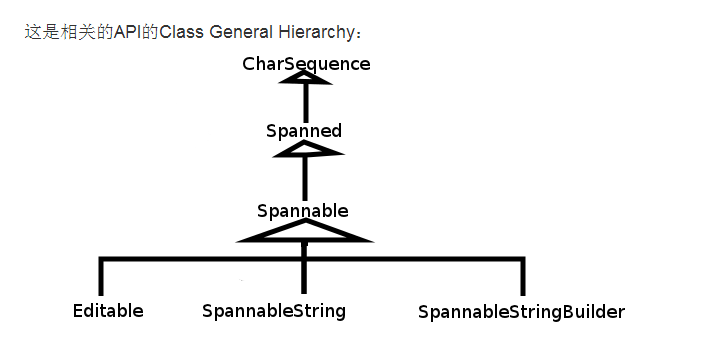 SpannableString 與 SpannableStringBuilder 用法整理
轉自:https://blog.it985.com/14433.html 一、它們與 String 的關係 SpannableString 與 SpannableStri
 Android 開發(2):事件處理、Toast、AlertDialog 與 Material 組件實作
前言 上一篇用 LinearLayout 加基礎組件做了一個體育積分認證系統的界面。本篇往下走一步:熟悉 Button、RadioButton、EditText 的行為,
 Duplicate id 報錯怎麼解:把重複 ID 從錯誤降級為警告
錯誤長什麼樣子 打包或執行時出現這段訊息: Duplicate id @+id/imageView, already defined earlier in this la
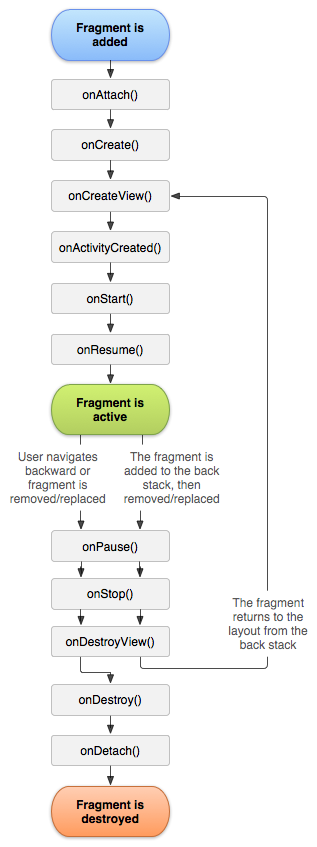 Activity 與 Fragment 生命週期的差異與解析
 理解 Activity 與 Fragment 的生命週期,是掌握 Android 頁面狀態管理的核心。以下透