

編輯:關於 Android 開發
本文將介紹幾個在 Android GUI 開發中最常用的基本組件,並附上各自的 XML 布局寫法,方便快速上手。
TextView 是最基礎的文字顯示組件,其 XML 布局如下:
<?xml version="1.0" encoding="utf-8"?>
<TextView xmlns:android="https://schemas.android.com/apk/res/android"
    android:layout_width="fill_parent"
    android:layout_height="wrap_content"
    android:text="Hello, my name is TextView, I am mainly show some text."
    />
其他常用屬性還包括:android:typeface(字體)、android:textStyle(字形樣式)、android:textColor(文字顏色)等。
按鈕是 TextView 的子類,其 XML 布局如下:
<?xml version="1.0" encoding="utf-8"?>
<Button xmlns:android="https://schemas.android.com/apk/res/android"
    android:text="Hello, my name Button, I am the subclass of TextView"
    android:layout_width="fill_parent"
    android:layout_height="fill_parent"/>
它們分別是 TextView 與 Button 的圖像類似物,都透過 android:src 屬性指定圖片位置。ImageView 的示例如下:
<?xml version="1.0" encoding="utf-8"?>
<ImageView xmlns:android="https://schemas.android.com/apk/res/android"
    android:id="@+id/icon"
    android:layout_width="fill_parent"
    android:layout_height="fill_parent"
    android:adjustViewBounds="true"
    android:src="@drawable/ffffgggg"
    />
EditText 同樣是 TextView 的子類,另外還有一些專屬屬性,如 android:autoText、android:capitalize、android:digits、android:singleLine 等。其簡單的 XML 布局如下:
<?xml version="1.0" encoding="utf-8"?>
<EditText xmlns:android="https://schemas.android.com/apk/res/android"
    android:id="@+id/field"
    android:layout_width="fill_parent"
    android:layout_height="fill_parent"
    android:text="You can type words here..."
    android:singleLine="false"
    />
掌握這些基本組件,就已經能組建出大多數簡單的 Android 界面了。隨著實作經驗累積,再搭配各種布局容器,就能靈活打造豐富的用戶介面。
 Android 安全開發:ZIP 目錄遍歷漏洞原理與修復
ZIP 目錄遍歷漏洞簡介 ZIP 壓縮檔中若包含「../」等路徑字串,且未經驗證就進行解壓,可能造成目錄遍歷風險。攻擊者可藉此覆蓋應用程式檔案,甚至進一步執行惡意程式碼。
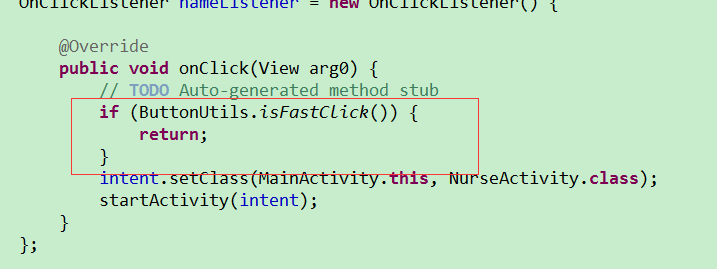 Android 快速點擊問題與 ButtonUtils 解法
Android 快速點擊問題 在使用者快速連續點擊按鈕時,可能會觸發多次事件,造成重複提交、頁面跳轉異常或應用崩潰。為避免此問題,可以加入點擊間隔判斷。 Butto
 攻破 Android 65536 方法數上限:MultiDex 與 DEX 自動拆包、動態載入實踐
問題是怎麼來的 應用成長到一定規模之後,新功能、新函式庫不斷疊上去,APK 體積一路膨脹,最終幾乎每個團隊都會撞上同一堵牆: 在 Android 2.3 或更早的機型上
 Android Studio 中的 JNI 除錯與日誌輸出設定
JNI 除錯環境設定 在 Android Studio 中進行 JNI 單步除錯,關鍵是讓 Gradle 正確產生除錯符號,並開啟 jniDebuggable。首先在模組