

編輯:關於 Android 開發
在 Android 程式設計中,我們偶爾需要自定義 Toast 提示資訊的背景顏色與邊框顏色,以搭配整體介面風格。然而系統默認的 Toast 無法實現這種效果,因此我們需要自定義布局文件;又因為 Toast 的背景是圓角的,所以還需要另外自定義一個 Shape 文件。
先在 drawable-hdpi 目錄下建立一個 my_border.xml 文件,定義背景色、邊框、內距與圓角:
<?xml version="1.0" encoding="UTF-8"?>
<shape xmlns:android="https://schemas.android.com/apk/res/android">
    <solid android:color="#ff0000ff"/>
    <stroke android:width="1dp" android:color="#FFFFFFFF" />
    <padding android:left="7dp" android:top="7dp"
        android:right="7dp" android:bottom="7dp" />
    <corners android:radius="4dp" />
</shape>
其中 <solid> 設定填充色、<stroke> 設定邊框、<padding> 設定內距、<corners> 設定圓角半徑。
接著建立一個 my_toast.xml 布局文件,並將它的背景設為上一步建立的 Shape 文件:
<?xml version="1.0" encoding="utf-8"?>
<LinearLayout xmlns:android="https://schemas.android.com/apk/res/android"
    android:layout_width="wrap_content"
    android:layout_height="wrap_content"
    android:background="@drawable/my_border">
    <TextView
        android:layout_width="wrap_content"
        android:id="@+id/TextViewInfo"
        android:layout_height="wrap_content"
        android:text="這是一個自定義背景顏色的提示框"
        android:layout_gravity="center_vertical"
        android:textColor="#ff00ff00">
    </TextView>
</LinearLayout>
最後透過 Java 加載自定義布局,並設定文字內容後顯示:
View toastRoot = getLayoutInflater().inflate(R.layout.my_toast, null);
Toast toast = new Toast(getApplicationContext());
toast.setView(toastRoot);
TextView tv = (TextView) toastRoot.findViewById(R.id.TextViewInfo);
tv.setText("說明:這是一個自定義邊框和底色的提示框。");
toast.show();
透過這三個步驟,就能打造一個擁有自定義邊框與背景顏色的 Toast 提示框,讓提示資訊更貼合你的應用整體視覺風格。
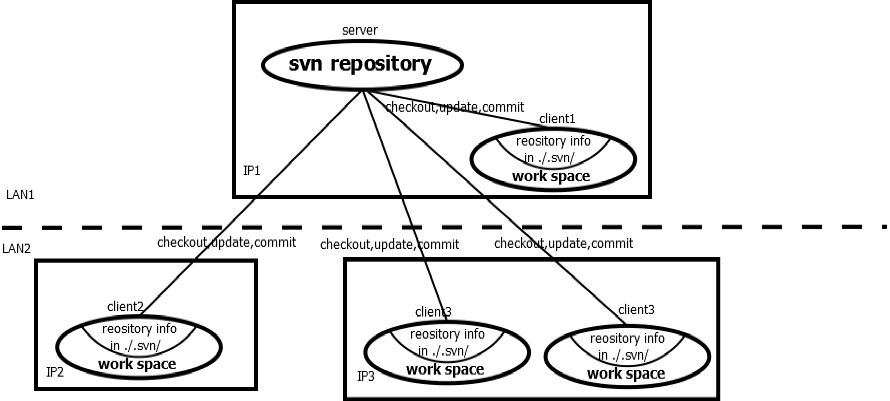 SVN 與 Git 的原理對照:從集中式到分散式的演進
很久沒回 CU 寫東西了。自從改用 orgmode 搭配 git 之後,內容組織的方式變得清爽許多,但這裡始終是我最早落筆的地方,還是情有獨鍾。往後若找到更好的整理方式,
 項目源碼分享:Android「美女的秘密」圖片瀏覽應用
 這是一個結構輕量的 Android 圖片瀏覽類項目,代碼量不大,適合初學者拿來練習列表加圖片加載的組合套路。 源
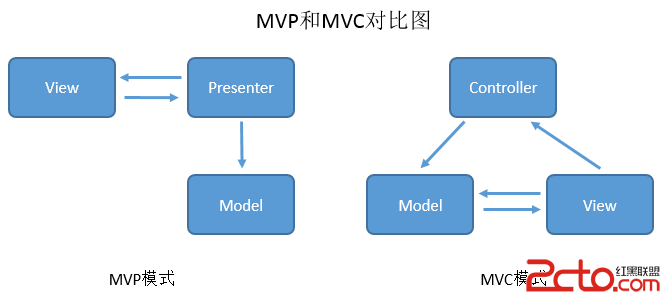 MVP 應用架構模式解析與實作要點
 MVP 是 MVC 的演化版本,全名為 Model-View-Presenter。在 Android 開發中,MVP 有助於將業務邏輯
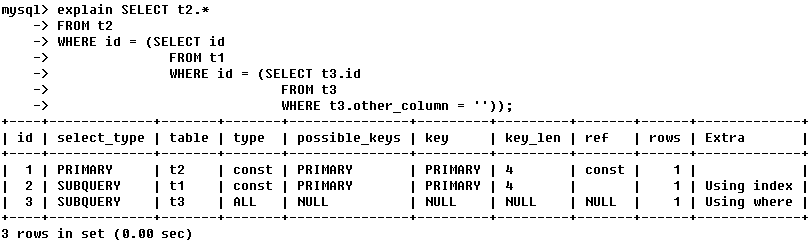 MySQL EXPLAIN 執行計劃詳解:逐欄位看懂查詢效能
對 DBA 而言,讀懂執行計劃是定位效能問題的第一道基本功。同一條 SQL,為什麼線上跑 30 毫秒、測試環境卻要 3 秒?答案往往就寫在 EXPLAIN 的輸出裡。