

編輯:關於 Android 開發
Android 開發中,依功能模組而非依檔案類型來分包,向來是比較推薦的做法。這個手機安全衛士專案大致切成幾層:
mobilesafe.activitymobilesafe.servicemobilesafe.receivermobilesafe.db.daomobilesafe.domainmobilesafe.viewmobilesafe.utilsmobilesafe.engine啟動畫面(Splash Screen)不只是好看,它通常肩定理應在背景完成的初始化工作:
四大元件都必須在這裡註冊。以下是與閃屏頁相關的片段,的重點是版本資訊、權限宣告、以及把 SplashActivity 設為啟動入口:
<manifest xmlns:android="https://schemas.android.com/apk/res/android"
    package="com.mxn.mobilesafe"
    android:versionCode="1"          <!-- 版本號,供系統比大小 -->
    android:versionName="1.0">       <!-- 版本名稱,顯示給使用者看 -->

    <uses-sdk android:minSdkVersion="16" android:targetSdkVersion="21" />

    <!-- 專案所需權限 -->
    <uses-permission android:name="android.permission.INTERNET" />
    <uses-permission android:name="android.permission.WRITE_EXTERNAL_STORAGE" />
    <uses-permission android:name="android.permission.READ_PHONE_STATE" />
    <uses-permission android:name="android.permission.RECEIVE_BOOT_COMPLETED" />
    <uses-permission android:name="android.permission.READ_CONTACTS" />
    <uses-permission android:name="android.permission.SEND_SMS" />
    <uses-permission android:name="android.permission.RECEIVE_SMS" />
    <uses-permission android:name="android.permission.ACCESS_FINE_LOCATION" />
    <uses-permission android:name="android.permission.ACCESS_COARSE_LOCATION" />
    <uses-permission android:name="android.permission.ACCESS_MOCK_LOCATION" />
    <uses-permission android:name="android.permission.VIBRATE" />
    <uses-permission android:name="android.permission.PROCESS_OUTGOING_CALLS" />
    <uses-permission android:name="android.permission.KILL_BACKGROUND_PROCESSES" />
    <uses-permission android:name="android.permission.GET_PACKAGE_SIZE" />
    <uses-permission android:name="android.permission.CLEAR_APP_CACHE" />

    <application
        android:allowBackup="true"
        android:icon="@drawable/ic_launcher"
        android:label="@string/app_name"
        android:theme="@style/AppTheme">

        <!-- 起始 Activity,帶有 MAIN/LAUNCHER 意圖 -->
        <activity android:name="com.mxn.mobilesafe.activity.SplashActivity"
            android:label="@string/app_name">
            <intent-filter>
                <action android:name="android.intent.action.MAIN" />
                <category android:name="android.intent.category.LAUNCHER" />
            </intent-filter>
        </activity>

        <activity android:name="com.mxn.mobilesafe.activity.HomeActivity" />
        <activity android:name="com.mxn.mobilesafe.activity.SettingActivity" />
        <activity android:name="com.mxn.mobilesafe.activity.LostFindActivity" />
        <activity android:name="com.mxn.mobilesafe.activity.Setup1Activity" />
        <activity android:name="com.mxn.mobilesafe.activity.Setup2Activity" />
        <activity android:name="com.mxn.mobilesafe.activity.Setup3Activity" />
        <activity android:name="com.mxn.mobilesafe.activity.Setup4Activity" />
        <activity android:name="com.mxn.mobilesafe.activity.ContactActivity" />
        <activity android:name="com.mxn.mobilesafe.activity.AtoolsActivity" />
        <activity android:name="com.mxn.mobilesafe.activity.AddressActivity" />
        <activity android:name="com.mxn.mobilesafe.activity.CallSafeActivity" />
        <activity android:name="com.mxn.mobilesafe.activity.AppManagerActivity" />
        <activity android:name="com.mxn.mobilesafe.activity.TaskManagerActivity" />
        <activity android:name="com.mxn.mobilesafe.activity.TaskManagerSettingActivity" />
        <activity android:name="com.mxn.mobilesafe.activity.AntivirusActivity" />
        <activity android:name="com.mxn.mobilesafe.activity.AppLockActivity" />
        <activity android:name="com.mxn.mobilesafe.activity.CleanCacheActivity" />

        <!-- 廣播接收者註冊;SMS 接收把 priority 拉到最高才搶得到 -->
        <receiver android:name=".receiver.BootCompleteReceiver">
            <intent-filter>
                <action android:name="android.intent.action.BOOT_COMPLETED" />
            </intent-filter>
        </receiver>
        <receiver android:name=".receiver.SmsReceiver">
            <intent-filter android:priority="2147483647">
                <action android:name="android.provider.Telephony.SMS_RECEIVED" />
            </intent-filter>
        </receiver>

        <!-- 服務註冊 -->
        <service android:name="com.mxn.mobilesafe.service.LocationService" />
        <service android:name="com.mxn.mobilesafe.service.AddressService" />
        <service android:name="com.mxn.mobilesafe.service.KillProcessService" />
        <service android:name="com.mxn.mobilesafe.service.WatchDogService" />

    </application>
</manifest>
<RelativeLayout xmlns:android="https://schemas.android.com/apk/res/android"
    xmlns:tools="https://schemas.android.com/tools"
    android:id="@+id/rl_root"
    android:layout_width="match_parent"
    android:layout_height="match_parent"
    android:background="@drawable/launcher_bg"
    tools:context="com.mxn.mobilesafe.SplashActivity">

    <TextView
        android:id="@+id/tv_version"
        android:layout_width="wrap_content"
        android:layout_height="wrap_content"
        android:layout_alignParentBottom="true"
        android:layout_centerHorizontal="true"
        android:layout_marginBottom="202dp"
        android:text="版本號:1.0"
        android:textColor="#000"
        android:textSize="22sp"
        android:shadowColor="#f00"
        android:shadowDx="1"
        android:shadowDy="1"
        android:shadowRadius="1" />

    <ProgressBar
        android:id="@+id/progressBar1"
        android:layout_width="wrap_content"
        android:layout_height="wrap_content"
        android:layout_alignTop="@+id/tv_version"
        android:layout_centerHorizontal="true"
        android:layout_marginTop="54dp" />

    <TextView
        android:id="@+id/tv_progress"
        android:visibility="gone"
        android:layout_width="wrap_content"
        android:layout_height="wrap_content"
        android:layout_alignParentBottom="true"
        android:layout_alignParentLeft="true"
        android:text="下載進度"
        android:textColor="#f00"
        android:textSize="16sp" />

</RelativeLayout>
整個閃屏頁可以拆成三條彼此獨立的任務:取得本地版本號、向伺服器詢問是否有新版、把 assets 中的資料庫複製到私有目錄。三者都完成後才進入主畫面。
public class SplashActivity extends Activity {

    protected static final int CODE_UPDATE_DIALOG = 0;
    protected static final int CODE_URL_ERROR      = 1;
    protected static final int CODE_NET_ERROR      = 2;
    protected static final int CODE_JSON_ERROR     = 3;
    protected static final int CODE_ENTER_HOME     = 4;

    private TextView tvVersion;
    private TextView tvProgress;      // 下載進度
    private String mversionName;      // 伺服器端版本名稱
    private int mversionCode;         // 伺服器端版本號
    private String mDesc;             // 版本描述
    private String mdowmloadurl;      // 下載位址
    private RelativeLayout rlRoot;
    private SharedPreferences sp;

    // 子線程不能直接更新 UI,所有畫面變更都透過 Handler 轉回主線程
    private Handler mHandler = new Handler() {
        public void handleMessage(android.os.Message msg) {
            switch (msg.what) {
                case CODE_UPDATE_DIALOG:
                    showUpdateDialog();
                    break;
                case CODE_URL_ERROR:
                    Toast.makeText(SplashActivity.this, "url 錯誤", Toast.LENGTH_SHORT).show();
                    enterHome();
                    break;
                case CODE_NET_ERROR:
                    Toast.makeText(SplashActivity.this, "網路錯誤", Toast.LENGTH_SHORT).show();
                    enterHome();
                    break;
                case CODE_JSON_ERROR:
                    Toast.makeText(SplashActivity.this, "json 解析錯誤", Toast.LENGTH_SHORT).show();
                    enterHome();
                    break;
                case CODE_ENTER_HOME:
                    enterHome();
                    break;
                default:
                    break;
            }
        }
    };

    @Override
    protected void onCreate(Bundle savedInstanceState) {
        super.onCreate(savedInstanceState);
        setContentView(R.layout.activity_splash);

        tvVersion = (TextView) findViewById(R.id.tv_version);
        tvProgress = (TextView) findViewById(R.id.tv_progress);   // 預設隱藏
        tvVersion.setText("版本號:" + getVersionCode());          // 動態取得而非寫死

        rlRoot = (RelativeLayout) findViewById(R.id.rl_root);

        // 是否要自動檢查更新,記在偏好檔裡讓使用者可關閉
        sp = getSharedPreferences("config", MODE_PRIVATE);
        boolean autoUpdate = sp.getBoolean("auto_update", true);

        copyDB("address.db");     // 拷貝號碼歸屬地資料庫
        copyDB("antivirus.db");   // 拷貝病毒庫

        if (autoUpdate) {
            checkVersion();
        } else {
            mHandler.sendEmptyMessageDelayed(CODE_ENTER_HOME, 2000);
        }

        // 簡單的淡入動畫,讓閃屏不至于生硬
        AlphaAnimation anim = new AlphaAnimation(0.3f, 1f);
        anim.setDuration(2000);
        rlRoot.startAnimation(anim);
    }

    /** 用 PackageManager 讀出自己 APK 清單檔中的版本號 */
    private int getVersionCode() {
        PackageManager pm = getPackageManager();
        try {
            PackageInfo info = pm.getPackageInfo(getPackageName(), 0);
            return info.versionCode;
        } catch (NameNotFoundException e) {
            e.printStackTrace();
        }
        return -1;
    }

    /** 向伺服器詢問版本資訊 */
    private void checkVersion() {
        final long startTime = System.currentTimeMillis();

        new Thread() {          // 網路請求必須在子線程
            public void run() {
                Message msg = Message.obtain();
                HttpURLConnection con = null;
                try {
                    // 模擬器要連本機時,用 10.0.2.2 代替 localhost
                    URL url = new URL("https://10.0.2.2:8080/update.json");
                    con = (HttpURLConnection) url.openConnection();
                    con.setRequestMethod("GET");
                    con.setConnectTimeout(5000);
                    con.setReadTimeout(5000);
                    con.connect();

                    if (con.getResponseCode() == 200) {
                        InputStream in = con.getInputStream();
                        String result = StreamUtils.readFormStream(in);
                        JSONObject jo = new JSONObject(result);
                        mversionName  = jo.getString("versionName");
                        mversionCode  = jo.getInt("versionCode");
                        mDesc         = jo.getString("description");
                        mdowmloadurl  = jo.getString("downloadUrl");

                        if (mversionCode > getVersionCode()) {
                            msg.what = CODE_UPDATE_DIALOG;
                        } else {
                            msg.what = CODE_ENTER_HOME;
                        }
                    }
                } catch (MalformedURLException e) {
                    msg.what = CODE_URL_ERROR;
                    e.printStackTrace();
                } catch (IOException e) {
                    msg.what = CODE_NET_ERROR;
                    e.printStackTrace();
                } catch (JSONException e) {
                    msg.what = CODE_JSON_ERROR;
                    e.printStackTrace();
                } finally {
                    // 網路太快也不好看,最少停留 2 秒
                    long used = System.currentTimeMillis() - startTime;
                    if (used < 2000) {
                        try {
                            Thread.sleep(2000 - used);
                        } catch (InterruptedException e) {
                            e.printStackTrace();
                        }
                    }
                    mHandler.sendMessage(msg);
                    if (con != null) con.disconnect();
                }
            }
        }.start();
    }

    /** 升級對話框 */
    private void showUpdateDialog() {
        AlertDialog.Builder builder = new AlertDialog.Builder(this);
        builder.setTitle("最新版本 " + mversionName);
        builder.setMessage(mDesc);
        builder.setPositiveButton("立即更新", new OnClickListener() {
            @Override
            public void onClick(DialogInterface dialog, int which) {
                download();
            }
        });
        builder.setNegativeButton("以後再說", new OnClickListener() {
            @Override
            public void onClick(DialogInterface dialog, int which) {
                enterHome();
            }
        });
        builder.setOnCancelListener(new OnCancelListener() {
            // 按返回鍵同樣視為暫不更新
            @Override
            public void onCancel(DialogInterface dialog) {
                enterHome();
            }
        });
        builder.show();
    }

    /** 下載新版本 APK */
    protected void download() {
        if (Environment.getExternalStorageState().equals(Environment.MEDIA_MOUNTED)) {
            tvProgress.setVisibility(View.VISIBLE);
            String target = Environment.getExternalStorageDirectory() + "/update.apk";

            HttpUtils utils = new HttpUtils();   // xUtils 框架
            utils.download(mdowmloadurl, target, new RequestCallBack<File>() {
                @Override
                public void onLoading(long total, long current, boolean isUploading) {
                    super.onLoading(total, current, isUploading);
                    tvProgress.setText("下載進度:" + current * 100 / total + "%");
                }

                @Override
                public void onSuccess(ResponseInfo<File> arg0) {
                    Toast.makeText(SplashActivity.this, "下載成功", Toast.LENGTH_SHORT).show();
                    // 交給系統安裝程式處理
                    Intent intent = new Intent(Intent.ACTION_VIEW);
                    intent.addCategory(Intent.CATEGORY_DEFAULT);
                    intent.setDataAndType(Uri.fromFile(arg0.result),
                            "application/vnd.android.package-archive");
                    startActivityForResult(intent, 0);
                }

                @Override
                public void onFailure(HttpException arg0, String arg1) {
                    Toast.makeText(SplashActivity.this, "下載失敗", Toast.LENGTH_SHORT).show();
                }
            });
        } else {
            Toast.makeText(SplashActivity.this, "沒有 SD 卡", Toast.LENGTH_SHORT).show();
        }
    }

    @Override
    protected void onActivityResult(int requestCode, int resultCode, Intent data) {
        // 使用者若中途取消安裝,也要能正常進入主畫面,否則會卡在閃屏
        enterHome();
        super.onActivityResult(requestCode, resultCode, data);
    }

    private void enterHome() {
        startActivity(new Intent(this, HomeActivity.class));
        finish();
    }

    /** 把 assets 裡的資料庫複製到 /data/data/套件名稱/files/ 下 */
    private void copyDB(String dbName) {
        File destFile = new File(getFilesDir(), dbName);
        if (destFile.exists()) {
            return;      // 已存在就不重複複製,避免每次啟動都覆蓋
        }
        FileOutputStream out = null;
        InputStream in = null;
        try {
            in = getAssets().open(dbName);
            out = new FileOutputStream(destFile);
            int len;
            byte[] buffer = new byte[1024];
            while ((len = in.read(buffer)) != -1) {
                out.write(buffer, 0, len);
            }
        } catch (IOException e) {
            e.printStackTrace();
        } finally {
            try {
                if (in != null) in.close();
                if (out != null) out.close();
            } catch (IOException e) {
                e.printStackTrace();
            }
        }
    }
}
把輸入流讀成字串,是每次做 HTTP 都會用到的重複動作,值得抽成工具類別:
public class StreamUtils {
    /** 將輸入流讀取成 String 後返回 */
    public static String readFormStream(InputStream in) throws IOException {
        ByteArrayOutputStream out = new ByteArrayOutputStream();
        int len;
        byte[] buffer = new byte[1024];
        while ((len = in.read(buffer)) != -1) {
            out.write(buffer, 0, len);
        }
        String result = out.toString();
        in.close();
        out.close();
        return result;
    }
}
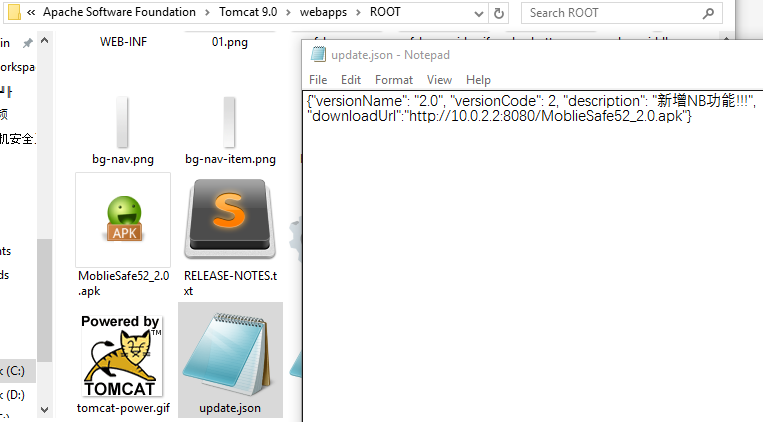
這裡用 Tomcat 當伺服器,把新版 APK 與 update.json 一起放進 webapps 目錄即可:
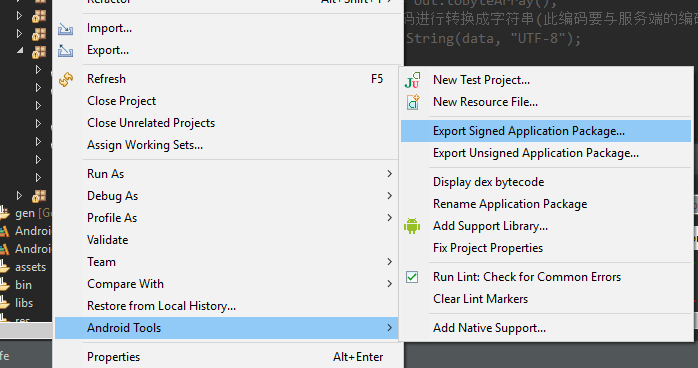
打包成 APK:
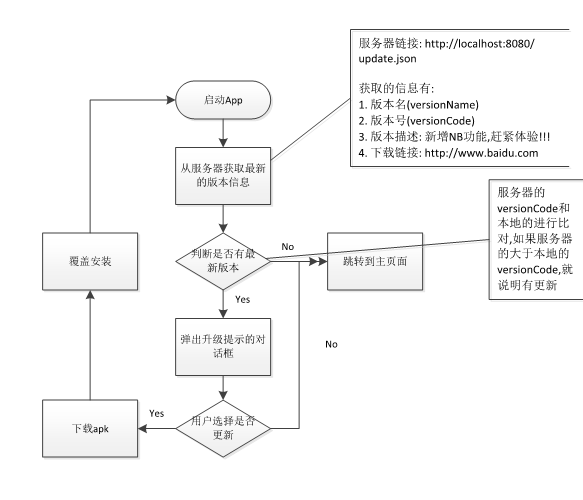
版本更新流程可以概括成:
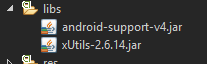
URL、HttpURLConnection。JSONObject、JSONArray。AlertDialog、AlertDialog.Builder。Handler + Message,或 runOnUiThread()。Intent。xUtils 框架可從 GitHub 取得,下載 jar 匯入專案即可:
Activity 是 Context 的子類別,因此 Activity 本身就能當 Context 傳遞。實務上建議優先傳 Activity,少用 getApplicationContext(),因為後者生命週期長、容易引發記憶體或視窗相關的 bug。建構子如 AlertDialog.Builder(this) 之所以能直接帶入 this,正是這個緣故。
 徹底搞懂 Git:從核心概念到日常操作的完整解析
 Git 詳解 自從 Android 興起以來,Git 就一直是主流的版本管理工具。然而,很多人是從 SVN 開始使用的,
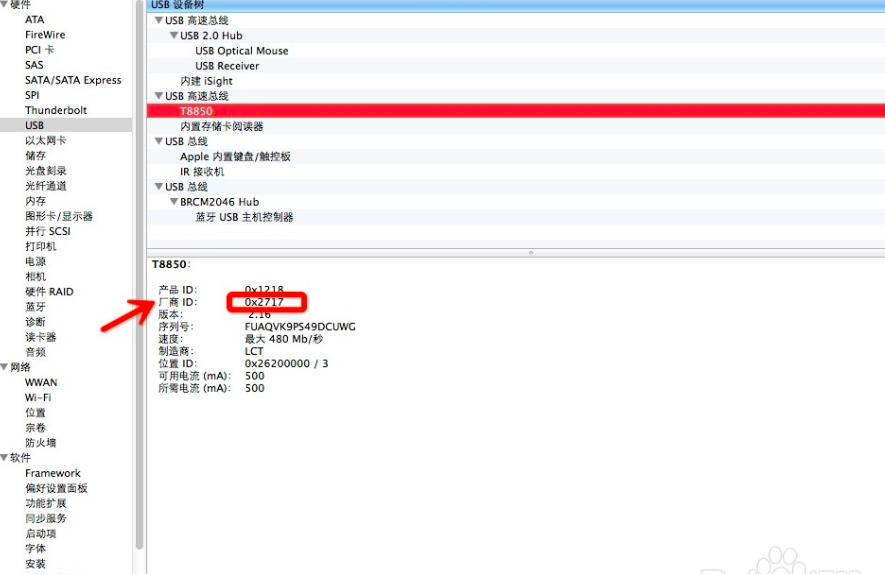 Mac 搭建 Android 開發環境整理
Mac 上搭建 Android 開發環境 在 Mac 上開發 Android,常見選擇有 Android Studio 與 Eclipse 加 ADT。Android S
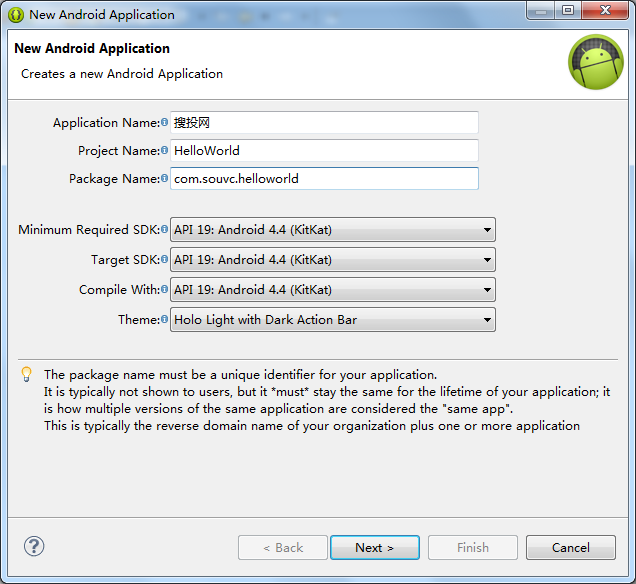 Android 應用程序目錄結構詳解:以 HelloWorld 為例
新建的 HelloWorld 項目,其代碼由 ADT 插件自動生成,形成了 Android 項目特有的結構框架。本文將以一個 HelloWorld 為例,帶大家逐一解析
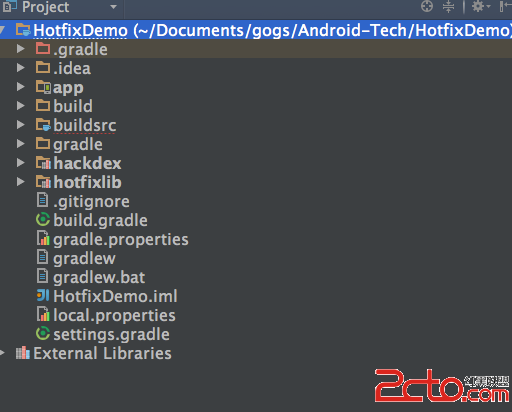 Android 熱修補動態修復實踐
 熱修補技術的目標,是在不重新發佈完整 APK 的情況下,快速修復線上問題。其常見思路是將修復後的類別打包成補丁檔案,下載後動態插入應用