

編輯:關於 Android 開發
在 Android 開發中,我們經常需要在界面上彈出對話框,比如詢問用戶或讓用戶做出選擇,這類功能我們稱之為 Dialog 對話框,其實現採用了建造者模式。然而 AlertDialog 內置的一些對話框往往無法滿足我們的實際需求,這時就需要通過自定義對話框 VIEW 來實現。下面我自定義一個登錄提示對話框,效果圖如下:
Layout(alertdialog 自定義登錄按鈕)界面代碼:
1 <?xml version="1.0" encoding="utf-8"?> 2 <LinearLayout xmlns:android="https://schemas.android.com/apk/res/android" 3 android:orientation="vertical" android:layout_width="match_parent" 4 android:layout_height="match_parent"> 5 <Button 6 android:text="自定義登陸" 7 android:layout_width="match_parent" 8 android:layout_height="wrap_content" 9 android:id="@+id/button5" 10 android:onClick="login"/> 11 </LinearLayout>
Layout(login_layout 登錄窗口)界面:
1 <?xml version="1.0" encoding="utf-8"?> 2 <LinearLayout xmlns:android="https://schemas.android.com/apk/res/android" 3 android:orientation="vertical" android:layout_width="match_parent" 4 android:layout_height="match_parent"> 5 <EditText 6 android:layout_width="match_parent" 7 android:layout_height="wrap_content" 8 android:inputType="text" 9 android:hint="請輸入用戶名" 10 android:id="@+id/et_username"/> 11 <EditText 12 android:layout_width="match_parent" 13 android:layout_height="wrap_content" 14 android:inputType="textPassword" 15 android:hint="請輸入密碼" 16 android:id="@+id/et_password"/> 17 </LinearLayout>
Java 功能實現代碼:
1 public class AlertDialogDemo extends AppCompatActivity { 2 private EditText et_username,et_password; 3 @Override 4 protected void onCreate(@Nullable Bundle savedInstanceState) { 5 super.onCreate(savedInstanceState); 6 setContentView(R.layout.alertdialog); 7 } 8 public void login(View v){ 9 AlertDialog.Builder builder = new AlertDialog.Builder(this); 10 builder.setTitle("登錄"); 11 //通過布局填充器獲login_layout 12 View view = getLayoutInflater().inflate(R.layout.login_layout,null); 13 //獲取兩個文本編輯框(密碼這裡不做登陸實現,僅演示) 14 final EditText et_username = (EditText) view.findViewById(R.id.et_username); 15 final EditText et_password = (EditText) view.findViewById(R.id.et_password); 16 builder.setView(view);//設置login_layout為對話提示框 17 builder.setCancelable(false);//設置為不可取消 18 //設置正面按鈕,並做事件處理 19 builder.setPositiveButton("確定", new DialogInterface.OnClickListener() { 20 @Override 21 public void onClick(DialogInterface dialogInterface, int i) { 22 String name = et_username.getText().toString().trim(); 23 String pass = et_password.getText().toString().trim(); 24 Toast.makeText(AlertDialogDemo.this,name + "正在登錄....",Toast.LENGTH_SHORT).show(); 25 } 26 }); 27 //設置反面按鈕,並做事件處理 28 builder.setNegativeButton("取消", new DialogInterface.OnClickListener() { 29 @Override 30 public void onClick(DialogInterface dialogInterface, int i) { 31 Toast.makeText(AlertDialogDemo.this,"取消登錄",Toast.LENGTH_SHORT).show(); 32 } 33 }); 34 builder.show();//顯示Dialog對話框 35 } 36 }
 Android 自定義 View 繪製流程重點整理
自定義 View 的測量、配置與繪製是理解 Android UI 的關鍵。若直接繼承 View 或 ViewGroup,
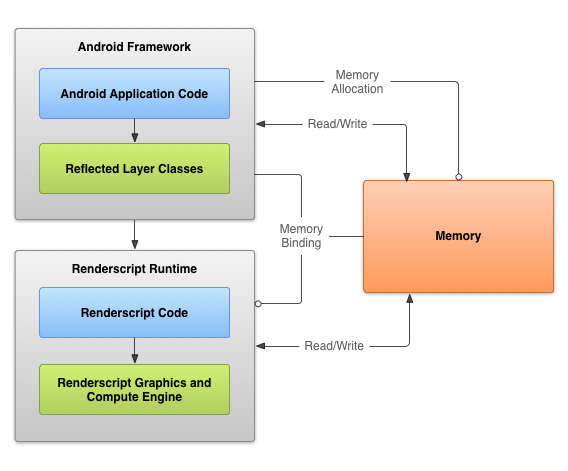 Android 高效計算:RenderScript 入門(一)基本概念與工作流程
 高效計算 —— RenderScript RenderScript 是 Google 在
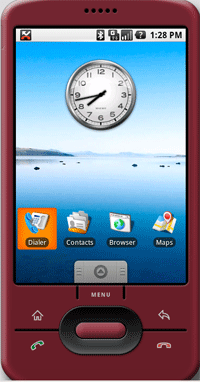 Android 與 3G 行動通訊時代的前言
 本章節作為 Android 學習的開場,先從 3G 行動通訊、智能手機軟體平台與 Android 系統的基本背景開始,幫助讀
 WebView 入門:載入網頁、返回鍵與 JavaScript 設定
為什麼使用 WebView 在 Android 應用中,若需要顯示大量圖文內容,例如新聞、公告、說明頁或活動頁,使用 WebView 往往比完全用原生配置拼出畫面更有效率