

編輯:關於 Android 開發
以下整理 Mac 環境下 Android Studio 常見快捷鍵,涵蓋程式碼編輯、搜尋、執行除錯、重構、視窗操作與版本控制。
option 或 alt、shift、control、command、esc、方向鍵等符號,可對應鍵盤上的實際按鍵。
alt + F7:尋找使用位置;alt + command + L:格式化程式碼;alt + control + O:最佳化 import;command + O:覆寫方法;command + I:實作方法;command + B:查看定義;command + U:跳到父類別方法。
command + F:搜尋;command + R:取代;control + shift + F:在路徑中搜尋;command + E:最近檔案;command + N:搜尋類別;shift + command + N:搜尋檔案。
shift + F10:執行;shift + F9:除錯;command + F8:切換斷點;F7:Step Into;F8:Step Over;F9:恢復執行。
shift + F6:重新命名;F6:搬移方法或類別;F5:複製類別;alt + command + M:擷取方法;alt + command + V:擷取變數。
control + 左右方向鍵:切換分頁;alt + F4:關閉分頁;command + K:提交變更;shift + command + K:推送變更;command + T:更新專案。
 Android 自動完成輸入提示:AutoCompleteTextView 與 MultiAutoCompleteTextView 實用整理
Android 自動完成輸入提示的兩個常用元件 自動完成輸入能依使用者已輸入的內容即時提示候選值,常見於搜尋框、郵件收件人與表單填寫。Android 主要提供 AutoC
 Android 啟動頁(Splash)實作:用 AlphaAnimation 做淡入並自動跳轉
剛接觸 Android 開發的朋友常會疑惑:別人的 App 打開後總會先閃過一個頁面,停留片刻後自動消失。這個頁面既可以投放廣告,也可以用來傳達品牌調性,所以啟動頁的體驗
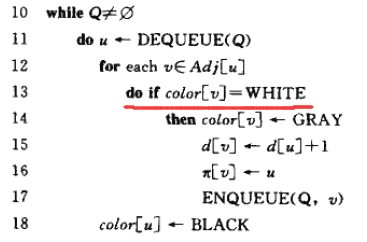 演算法導論筆記:廣度優先搜尋與深度優先搜尋的原理與複雜度分析
廣度優先搜尋(BFS) 給定圖 G = (V, E) 與特定源頂點 s,廣度優先搜尋會系統化地探索 G 中的邊,目的是「發現」所有能從 s 到達的頂點,並計算 s 到這些
 自定義 ViewGroup 打造各種風格的 SlidingMenu 側滑菜單
自定義 ViewGroup,打造各種風格的 SlidingMenu 看了鴻洋大大的 QQ 5.0 側滑菜單影片課程後,我對側滑動畫效果的實現有了新的認識,彷彿打通了任督二