很早以前就看到朋友在討論 QQ 頭像的裁剪上傳是怎麼做的,一直好奇,趁這次機會自己也動手試了試。翻了一下舊專案,發現裡頭有類似的功能,再對照官方文件裡的說明,玩起來就更上手了。
今天一邊聽著《變3》的主題曲,一邊把編程過程重新記錄下來,希望能和更多朋友交流學習。文中截圖本想做成動態的,無奈 WordPress 和 Jekyll 似乎都不太支援 Gif,想看動態效果的朋友可以到 51CTO 那邊瀏覽:https://mzh3344258.blog.51cto.com/blog/1823534/808837。如果覺得有用,也歡迎分享出去,讓更多開發的朋友受益。
同樣的,先看效果圖,再看程式碼怎麼實現。以下都是在模擬器裡完成的,真機上也能正常運行,因為功能其實很簡單。
一、主介面
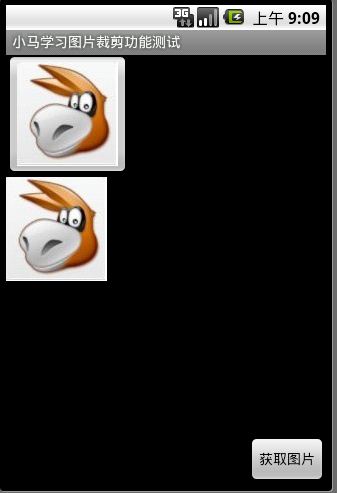
二、點擊控制項觸發事件後
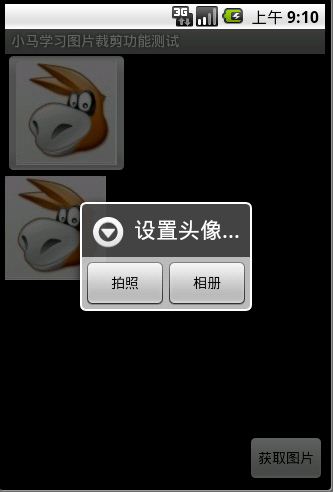
三、拍照完成後
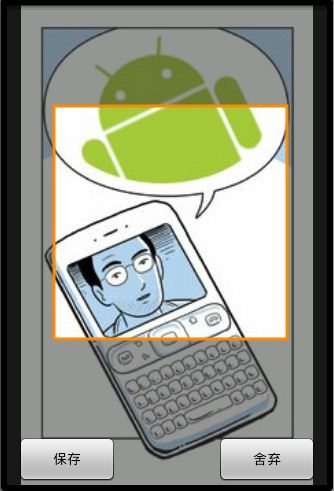
四、裁剪介面
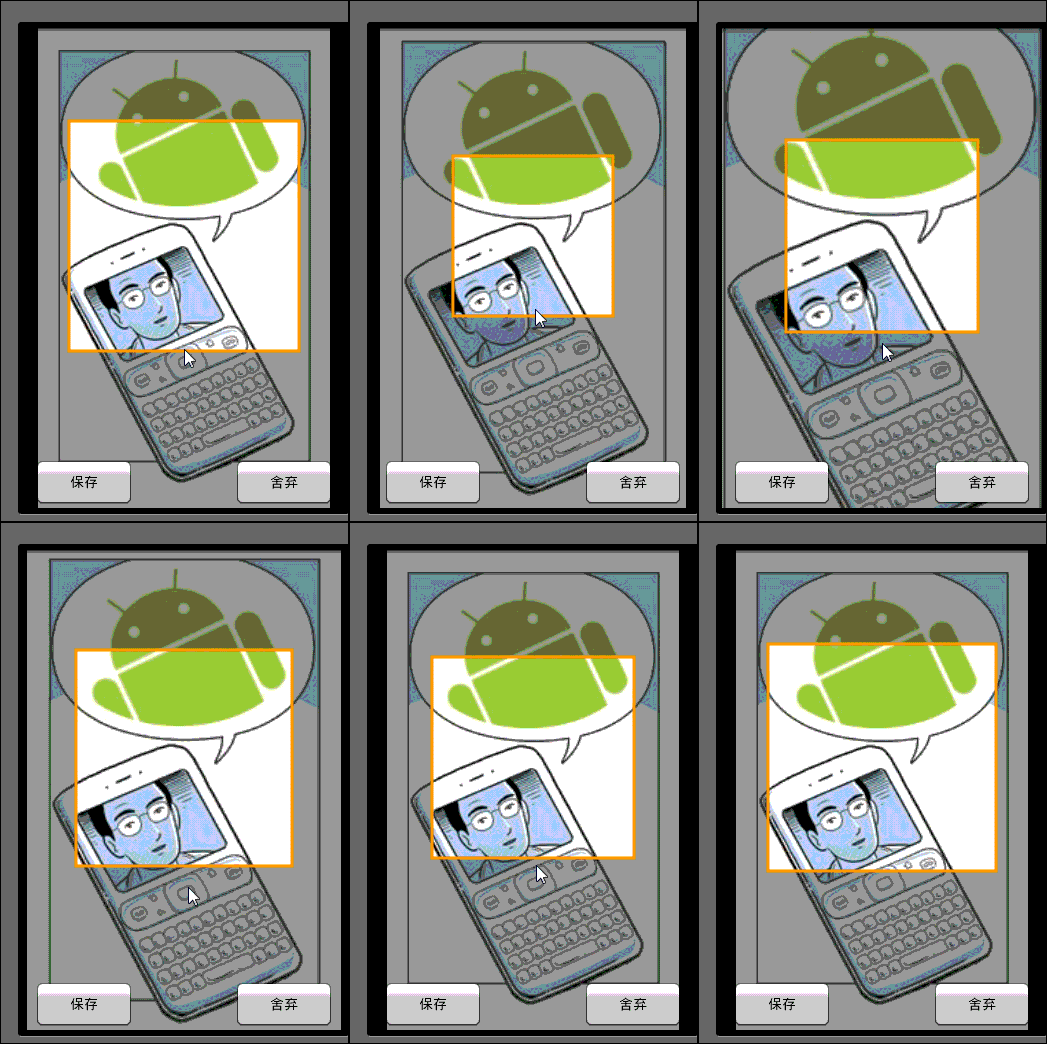
五、從相簿返回的圖片
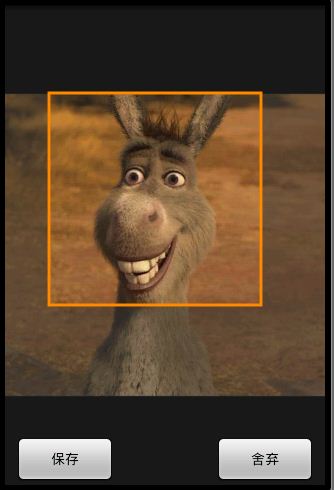
六、相簿 PICK 裁剪保存後的效果
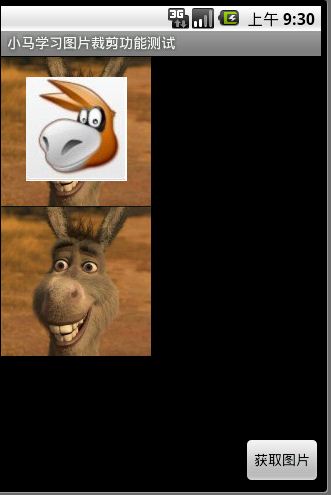
下面直接來看主控制類的程式碼:
Java 程式碼:
- package com.xiaoma.piccut.demo;
-
- import java.io.File;
- import android.app.Activity;
- import android.app.AlertDialog;
- import android.content.DialogInterface;
- import android.content.Intent;
- import android.graphics.Bitmap;
- import android.graphics.drawable.BitmapDrawable;
- import android.graphics.drawable.Drawable;
- import android.net.Uri;
- import android.os.Bundle;
- import android.os.Environment;
- import android.provider.MediaStore;
- import android.view.View;
- import android.view.View.OnClickListener;
- import android.widget.Button;
- import android.widget.ImageButton;
- import android.widget.ImageView;
- /**
- * @Title: PicCutDemoActivity.java
- * @Package com.xiaoma.piccut.demo
- * @Description: 圖片裁剪功能測試
- * @author XiaoMa
- */
- public class PicCutDemoActivity extends Activity implements OnClickListener {
-
- private ImageButton ib = null;
- private ImageView iv = null;
- private Button btn = null;
- private String tp = null;
-
- /** Called when the activity is first created. */
- @Override
- public void onCreate(Bundle savedInstanceState) {
- super.onCreate(savedInstanceState);
- setContentView(R.layout.main);
- //初始化
- init();
- }
-
-
- /**
- * 初始化方法實現
- */
- private void init() {
- ib = (ImageButton) findViewById(R.id.imageButton1);
- iv = (ImageView) findViewById(R.id.imageView1);
- btn = (Button) findViewById(R.id.button1);
- ib.setOnClickListener(this);
- iv.setOnClickListener(this);
- btn.setOnClickListener(this);
- }
-
- /**
- * 控件點擊事件實現
- *
- * 因為有朋友問不同控件的背景圖裁剪怎麼實現,
- * 我就在這個地方用了三個控件,只為了自己記錄學習
- * 大家覺得沒用的可以跳過啦
- */
- @Override
- public void onClick(View v) {
- switch (v.getId()) {
- case R.id.imageButton1:
- ShowPickDialog();
- break;
- case R.id.imageView1:
- ShowPickDialog();
- break;
- case R.id.button1:
- ShowPickDialog();
- break;
-
- default:
- break;
- }
- }
-
- /**
- * 選擇提示對話框
- */
- private void ShowPickDialog() {
- new AlertDialog.Builder(this)
- .setTitle("設置頭像...")
- .setNegativeButton("相冊", new DialogInterface.OnClickListener() {
- public void onClick(DialogInterface dialog, int which) {
- dialog.dismiss();
- /**
- * 剛開始,我自己也不知道ACTION_PICK是干嘛的,後來直接看Intent源碼,
- * 可以發現裡面很多東西,Intent是個很強大的東西,大家一定仔細閱讀下
- */
- Intent intent = new Intent(Intent.ACTION_PICK, null);
-
- /**
- * 下面這句話,與其它方式寫是一樣的效果,如果:
- * intent.setData(MediaStore.Images.Media.EXTERNAL_CONTENT_URI);
- * intent.setType(""image/*");設置數據類型
- * 如果朋友們要限制上傳到服務器的圖片類型時可以直接寫如:"image/jpeg 、 image/png等的類型"
- * 這個地方小馬有個疑問,希望高手解答下:就是這個數據URI與類型為什麼要分兩種形式來寫呀?有什麼區別?
- */
- intent.setDataAndType(
- MediaStore.Images.Media.EXTERNAL_CONTENT_URI,
- "image/*");
- startActivityForResult(intent, 1);
-
- }
- })
- .setPositiveButton("拍照", new DialogInterface.OnClickListener() {
- public void onClick(DialogInterface dialog, int whichButton) {
- dialog.dismiss();
- /**
- * 下面這句還是老樣子,調用快速拍照功能,至於為什麼叫快速拍照,大家可以參考如下官方
- * 文檔,you_sdk_path/docs/guide/topics/media/camera.html
- * 我剛看的時候因為太長就認真看,其實是錯的,這個裡面有用的太多了,所以大家不要認為
- * 官方文檔太長了就不看了,其實是錯的,這個地方小馬也錯了,必須改正
- */
- Intent intent = new Intent(
- MediaStore.ACTION_IMAGE_CAPTURE);
- //下面這句指定調用相機拍照後的照片存儲的路徑
- intent.putExtra(MediaStore.EXTRA_OUTPUT, Uri
- .fromFile(new File(Environment
- .getExternalStorageDirectory(),
- "xiaoma.jpg")));
- startActivityForResult(intent, 2);
- }
- }).show();
- }
-
- @Override
- protected void onActivityResult(int requestCode, int resultCode, Intent data) {
- switch (requestCode) {
- // 如果是直接從相冊獲取
- case 1:
- startPhotoZoom(data.getData());
- break;
- // 如果是調用相機拍照時
- case 2:
- File temp = new File(Environment.getExternalStorageDirectory()
- + "/xiaoma.jpg");
- startPhotoZoom(Uri.fromFile(temp));
- break;
- // 取得裁剪後的圖片
- case 3:
- /**
- * 非空判斷大家一定要驗證,如果不驗證的話,
- * 在剪裁之後如果發現不滿意,要重新裁剪,丟棄
- * 當前功能時,會報NullException,小馬只
- * 在這個地方加下,大家可以根據不同情況在合適的
- * 地方做判斷處理類似情況
- *
- */
- if(data != null){
- setPicToView(data);
- }
- break;
- default:
- break;
-
- }
- super.onActivityResult(requestCode, resultCode, data);
- }
-
- /**
- * 裁剪圖片方法實現
- * @param uri
- */
- public void startPhotoZoom(Uri uri) {
- /*
- * 至於下面這個Intent的ACTION是怎麼知道的,大家可以看下自己路徑下的如下網頁
- * yourself_sdk_path/docs/reference/android/content/Intent.html
- * 直接在裡面Ctrl+F搜:CROP ,之前小馬沒仔細看過,其實安卓系統早已經有自帶圖片裁剪功能,
- * 是直接調本地庫的,小馬不懂C C++ 這個不做詳細了解去了,有輪子就用輪子,不再研究輪子是怎麼
- * 制做的了...吼吼
- */
- Intent intent = new Intent("com.android.camera.action.CROP");
- intent.setDataAndType(uri, "image/*");
- //下面這個crop=true是設置在開啟的Intent中設置顯示的VIEW可裁剪
- intent.putExtra("crop", "true");
- // aspectX aspectY 是寬高的比例
- intent.putExtra("aspectX", 1);
- intent.putExtra("aspectY", 1);
- // outputX outputY 是裁剪圖片寬高
- intent.putExtra("outputX", 150);
- intent.putExtra("outputY", 150);
- intent.putExtra("return-data", true);
- startActivityForResult(intent, 3);
- }
-
- /**
- * 保存裁剪之後的圖片數據
- * @param picdata
- */
- private void setPicToView(Intent picdata) {
- Bundle extras = picdata.getExtras();
- if (extras != null) {
- Bitmap photo = extras.getParcelable("data");
- Drawable drawable = new BitmapDrawable(photo);
-
- /**
- * 下面注釋的方法是將裁剪之後的圖片以Base64Coder的字符方式上
- * 傳到服務器,QQ頭像上傳采用的方法跟這個類似
- */
-
- /*ByteArrayOutputStream stream = new ByteArrayOutputStream();
- photo.compress(Bitmap.CompressFormat.JPEG, 60, stream);
- byte[] b = stream.toByteArray();
- // 將圖片流以字符串形式存儲下來
-
- tp = new String(Base64Coder.encodeLines(b));
- /**這個地方大家可以寫下給服務器上傳圖片的實現,直接把tp直接上傳就可以了,
- *服務器處理的方法是服務器那邊的事了,吼吼
-
- *如果下載到的服務器的數據還是以Base64Coder的形式的話,可以用以下方式轉換
- *為我們可以用的圖片類型就OK啦...吼吼 */
- Bitmap dBitmap = BitmapFactory.decodeFile(tp);
- Drawable drawable = new BitmapDrawable(dBitmap);
- */
- ib.setBackgroundDrawable(drawable);
- iv.setBackgroundDrawable(drawable);
- }
- }
-
- }
接著看看裁剪中用到的 Base64Coder 類,請留意頭部的註解,裡頭其實是一份 license 聲明,需要的朋友可以前往對應網址選用合適的授權條款:
Java 程式碼:
- package com.xiaoma.piccut.demo;
-
- /**
- * 下面這些注釋是下載這個類的時候本來就有的,本來要刪除的,但看了下竟然是license,吼吼,
- * 好東西,留在注釋裡,以備不時之用,大家有需要加license的可以到下面的網址找哦
- */
-
- //EPL, Eclipse Public License, V1.0 or later, https://www.eclipse.org/legal
- //LGPL, GNU Lesser General Public License, V2.1 or later, https://www.gnu.org/licenses/lgpl.html
- //GPL, GNU General Public License, V2 or later, https://www.gnu.org/licenses/gpl.html
- //AL, Apache License, V2.0 or later, https://www.apache.org/licenses
- //BSD, BSD License, https://www.opensource.org/licenses/bsd-license.php
- /**
- * A Base64 encoder/decoder.
- *
- * <p>
- * This class is used to encode and decode data in Base64 format as described in RFC 1521.
- *
- * <p>
- * Project home page: <a href="https://www.source-code.biz/base64coder/java/">www.source-code.biz/base64coder/java</a><br>
- * Author: Christian d'Heureuse, Inventec Informatik AG, Zurich, Switzerland<br>
- * Multi-licensed: EPL / LGPL / GPL / AL / BSD.
- */
-
- /**
- * 這個類在上面注釋的網址中有,大家可以自行下載下,也可以直接用這個,
- * 公開的Base64Coder類(不用深究它是怎麼實現的,
- * 還是那句話,有輪子直接用輪子),好用的要死人了...
- * 小馬也很無恥的引用了這個網址下的東東,吼吼...
- * @Title: Base64Coder.java
- * @Package com.xiaoma.piccut.demo
- * @Description: TODO
- * @author XiaoMa
- */
-
- public class Base64Coder {
-
- //The line separator string of the operating system.
- private static final String systemLineSeparator = System.getProperty("line.separator");
-
- //Mapping table from 6-bit nibbles to Base64 characters.
- private static char[] map1 = new char[64];
- static {
- int i=0;
- for (char c='A'; c<='Z'; c++) map1[i++] = c;
- for (char c='a'; c<='z'; c++) map1[i++] = c;
- for (char c='0'; c<='9'; c++) map1[i++] = c;
- map1[i++] = '+'; map1[i++] = '/'; }
-
- //Mapping table from Base64 characters to 6-bit nibbles.
- private static byte[] map2 = new byte[128];
- static {
- for (int i=0; i<map2.length; i++) map2[i] = -1;
- for (int i=0; i<64; i++) map2[map1[i]] = (byte)i; }
-
- /**
- * Encodes a string into Base64 format.
- * No blanks or line breaks are inserted.
- * @param s A String to be encoded.
- * @return A String containing the Base64 encoded data.
- */
- public static String encodeString (String s) {
- return new String(encode(s.getBytes())); }
-
- /**
- * Encodes a byte array into Base 64 format and breaks the output into lines of 76 characters.
- * This method is compatible with <code>sun.misc.BASE64Encoder.encodeBuffer(byte[])</code>.
- * @param in An array containing the data bytes to be encoded.
- * @return A String containing the Base64 encoded data, broken into lines.
- */
- public static String encodeLines (byte[] in) {
- return encodeLines(in, 0, in.length, 76, systemLineSeparator); }
-
- /**
- * Encodes a byte array into Base 64 format and breaks the output into lines.
- * @param in An array containing the data bytes to be encoded.
- * @param iOff Offset of the first byte in <code>in</code> to be processed.
- * @param iLen Number of bytes to be processed in <code>in</code>, starting at <code>iOff</code>.
- * @param lineLen Line length for the output data. Should be a multiple of 4.
- * @param lineSeparator The line separator to be used to separate the output lines.
- * @return A String containing the Base64 encoded data, broken into lines.
- */
- public static String encodeLines (byte[] in, int iOff, int iLen, int lineLen, String lineSeparator) {
- int blockLen = (lineLen*3) / 4;
- if (blockLen <= 0) throw new IllegalArgumentException();
- int lines = (iLen+blockLen-1) / blockLen;
- int bufLen = ((iLen+2)/3)*4 + lines*lineSeparator.length();
- StringBuilder buf = new StringBuilder(bufLen);
- int ip = 0;
- while (ip < iLen) {
- int l = Math.min(iLen-ip, blockLen);
- buf.append (encode(in, iOff+ip, l));
- buf.append (lineSeparator);
- ip += l; }
- return buf.toString(); }
-
- /**
- * Encodes a byte array into Base64 format.
- * No blanks or line breaks are inserted in the output.
- * @param in An array containing the data bytes to be encoded.
- * @return A character array containing the Base64 encoded data.
- */
- public static char[] encode (byte[] in) {
- return encode(in, 0, in.length); }
-
- /**
- * Encodes a byte array into Base64 format.
- * No blanks or line breaks are inserted in the output.
- * @param in An array containing the data bytes to be encoded.
- * @param iLen Number of bytes to process in <code>in</code>.
- * @return A character array containing the Base64 encoded data.
- */
- public static char[] encode (byte[] in, int iLen) {
- return encode(in, 0, iLen); }
-
- /**
- * Encodes a byte array into Base64 format.
- * No blanks or line breaks are inserted in the output.
- * @param in An array containing the data bytes to be encoded.
- * @param iOff Offset of the first byte in <code>in</code> to be processed.
- * @param iLen Number of bytes to process in <code>in</code>, starting at <code>iOff</code>.
- * @return A character array containing the Base64 encoded data.
- */
- public static char[] encode (byte[] in, int iOff, int iLen) {
- int oDataLen = (iLen*4+2)/3; // output length without padding
- int oLen = ((iLen+2)/3)*4; // output length including padding
- char[] out = new char[oLen];
- int ip = iOff;
- int iEnd = iOff + iLen;
- int op = 0;
- while (ip < iEnd) {
- int i0 = in[ip++] & 0xff;
- int i1 = ip < iEnd ? in[ip++] & 0xff : 0;
- int i2 = ip < iEnd ? in[ip++] & 0xff : 0;
- int o0 = i0 >>> 2;
- int o1 = ((i0 & 3) << 4) | (i1 >>> 4);
- int o2 = ((i1 & 0xf) << 2) | (i2 >>> 6);
- int o3 = i2 & 0x3F;
- out[op++] = map1[o0];
- out[op++] = map1[o1];
- out[op] = op < oDataLen ? map1[o2] : '='; op++;
- out[op] = op < oDataLen ? map1[o3] : '='; op++; }
- return out; }
-
- /**
- * Decodes a string from Base64 format.
- * No blanks or line breaks are allowed within the Base64 encoded input data.
- * @param s A Base64 String to be decoded.
- * @return A String containing the decoded data.
- * @throws IllegalArgumentException If the input is not valid Base64 encoded data.
- */
- public static String decodeString (String s) {
- return new String(decode(s)); }
-
- /**
- * Decodes a byte array from Base64 format and ignores line separators, tabs and blanks.
- * CR, LF, Tab and Space characters are ignored in the input data.
- * This method is compatible with <code>sun.misc.BASE64Decoder.decodeBuffer(String)</code>.
- * @param s A Base64 String to be decoded.
- * @return An array containing the decoded data bytes.
- * @throws IllegalArgumentException If the input is not valid Base64 encoded data.
- */
- public static byte[] decodeLines (String s) {
- char[] buf = new char[s.length()+3];
- int p = 0;
- for (int ip = 0; ip < s.length(); ip++) {
- char c = s.charAt(ip);
- if (c != ' ' && c != '\r' && c != '\n' && c != '\t')
- buf[p++] = c; }
- while ((p % 4) != 0)
- buf[p++] = '0';
-
- return decode(buf, 0, p); }
-
- /**
- * Decodes a byte array from Base64 format.
- * No blanks or line breaks are allowed within the Base64 encoded input data.
- * @param s A Base64 String to be decoded.
- * @return An array containing the decoded data bytes.
- * @throws IllegalArgumentException If the input is not valid Base64 encoded data.
- */
- public static byte[] decode (String s) {
- return decode(s.toCharArray()); }
-
- /**
- * Decodes a byte array from Base64 format.
- * No blanks or line breaks are allowed within the Base64 encoded input data.
- * @param in A character array containing the Base64 encoded data.
- * @return An array containing the decoded data bytes.
- * @throws IllegalArgumentException If the input is not valid Base64 encoded data.
- */
- public static byte[] decode (char[] in) {
- return decode(in, 0, in.length); }
-
- /**
- * Decodes a byte array from Base64 format.
- * No blanks or line breaks are allowed within the Base64 encoded input data.
- * @param in A character array containing the Base64 encoded data.
- * @param iOff Offset of the first character in <code>in</code> to be processed.
- * @param iLen Number of characters to process in <code>in</code>, starting at <code>iOff</code>.
- * @return An array containing the decoded data bytes.
- * @throws IllegalArgumentException If the input is not valid Base64 encoded data.
- */
- public static byte[] decode (char[] in, int iOff, int iLen) {
- if (iLen%4 != 0) throw new IllegalArgumentException ("Length of Base64 encoded input string is not a multiple of 4.");
- while (iLen > 0 && in[iOff+iLen-1] == '=') iLen--;
- int oLen = (iLen*3) / 4;
- byte[] out = new byte[oLen];
- int ip = iOff;
- int iEnd = iOff + iLen;
- int op = 0;
- while (ip < iEnd) {
- int i0 = in[ip++];
- int i1 = in[ip++];
- int i2 = ip < iEnd ? in[ip++] : 'A';
- int i3 = ip < iEnd ? in[ip++] : 'A';
- if (i0 > 127 || i1 > 127 || i2 > 127 || i3 > 127)
- throw new IllegalArgumentException ("Illegal character in Base64 encoded data.");
- int b0 = map2[i0];
- int b1 = map2[i1];
- int b2 = map2[i2];
- int b3 = map2[i3];
- if (b0 < 0 || b1 < 0 || b2 < 0 || b3 < 0)
- throw new IllegalArgumentException ("Illegal character in Base64 encoded data.");
- int o0 = ( b0 <<2) | (b1>>>4);
- int o1 = ((b1 & 0xf)<<4) | (b2>>>2);
- int o2 = ((b2 & 3)<<6) | b3;
- out[op++] = (byte)o0;
- if (op<oLen) out[op++] = (byte)o1;
- if (op<oLen) out[op++] = (byte)o2; }
- return out; }
-
- //Dummy constructor.
- private Base64Coder() {}
-
- } // end class Base64Coder
最後,小 DEMO 源碼可在此下載:https://mzh3344258.blog.51cto.com/blog/1823534/808837(頁面最下方的 Demo 源碼即是),有需要的朋友歡迎下載,一起交流學習。


 Dagger2 實戰記錄:Component 與 Module 的依賴注入搭建
 手機衛士實戰:用 GridView 實現九宮格菜單
 Android APK 在 32 位元與 64 位元環境的差異解析
 Android 菜單開發:OptionMenu、ContextMenu 與 SubMenu